.png)
.png)

.png)
Key Takeaways
Learn how Shopify subscriptions and recurring payments work behind the scenes to create predictable, automated revenue.
Get a clear setup flow for recurring products, payment methods, and solving common subscription failures on Shopify.
See how Flowcart uses WhatsApp to prevent failed renewals, recover payments, and reduce involuntary subscription churn.
Think of a scenario where your customers keep coming back every month without you having to chase them. Without sending your customers any awkward “Hey, remember us?” emails, you get smooth, predictable revenue in your Shopify store like clockwork.
It’s possible with a simple method called subscription (or recurring payments).
From coffee and skincare to SaaS and snacks, Shopify stores are quietly turning one-time shoppers into long-term subscribers.
In this guide, we’ll break down how Shopify recurring payments actually work, what’s happening behind the scenes, and how you can use subscriptions to build a business that grows on autopilot.
What Are Recurring Payments on Shopify?
Recurring payments on Shopify mean turning one-time purchases into ongoing relationships. Instead of a customer buying once and disappearing, they agree to be billed automatically at regular intervals (weekly, monthly, quarterly, etc.)
At its core, recurring billing means the customer authorizes their payment method to be saved and charged automatically, without re-entering details each time.
Behind the scenes, Shopify (with the help of subscription apps and payment gateways) securely stores a token of the customer’s card or payment method. On each billing cycle, the system triggers a charge, processes the payment, and updates the order without any manual follow-up.
For example, consider coffee, something your customer uses regularly.
With recurring payments on Shopify, instead of buying a bag of coffee once and returning to reorder later, the customer subscribes to receive it monthly. They choose how often they want it (say, every 30 days), enter their payment details once, and that’s it.
From then on, Shopify automatically charges the customer on the same schedule and creates a new order each time, and you ship the coffee without the customer lifting a finger
So the customer never runs out of their favorite blend, and you never have to wonder when your next sale is coming. That’s the core idea of recurring payments: turning a product people already need again into a smooth, automatic repeat purchase.
Shopify Subscriptions vs Recurring Payments
At first glance, “subscriptions” and “recurring payments” sound like the same thing. Both involve charging customers automatically on a schedule. But in Shopify terms, they serve slightly different business models and customer experiences.
- Subscriptions are about selling ongoing products or services.
- Recurring payments automate repeat charges, even when the product isn’t a classic subscription.
Let's understand the difference between the two with the following table:
How Shopify Subscriptions Work? (Behind the Scenes)
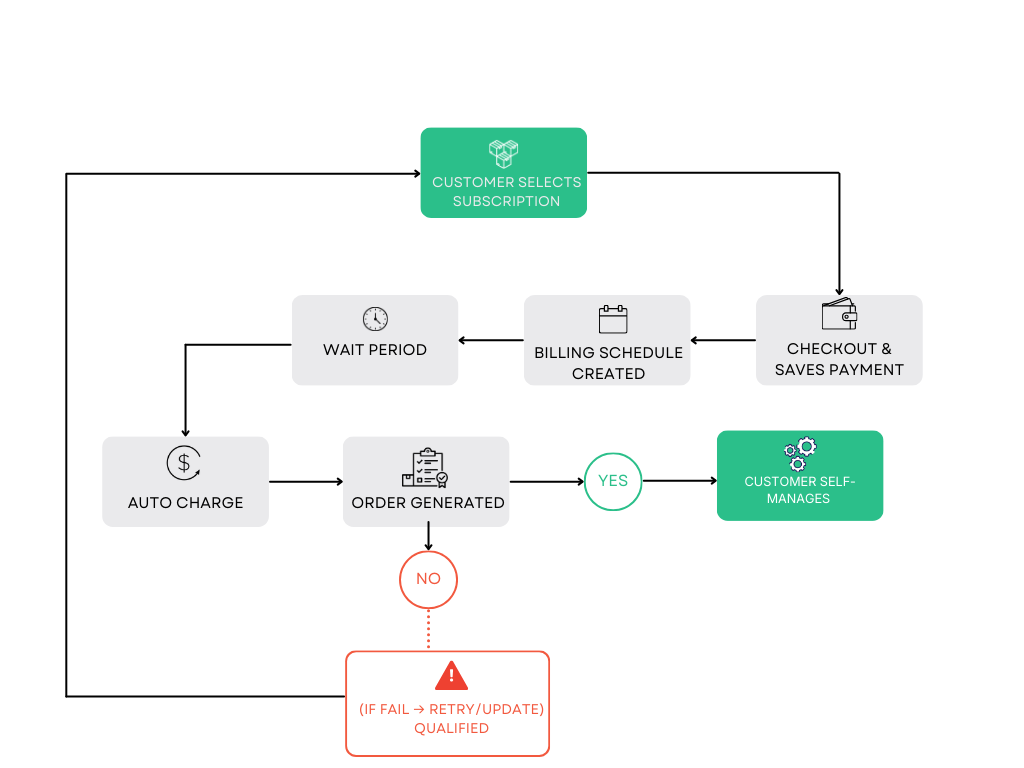
Here’s the entire process of recurring payments on Shopify broken down into simple steps to help you understand how the subscription system actually works:
Step 1: The customer picks a subscription product
They choose a product with a recurring option (e.g., delivery every 30 days) and specify how often they want to receive it.
Step 2: They check out and save their payment method
At checkout, the customer enters their card or payment details once. Shopify’s payment system securely stores a token of the payment (not the actual card number), so it can be reused safely.
Step 3: Shopify creates a billing schedule
After the first payment goes through, Shopify sets up a schedule that knows:
- Who the customer is
- What product are they getting
- How often should they be charged
- How much to bill each time
Step 4: The system waits for the next billing date
Nothing else needs to happen manually. Shopify simply tracks the calendar until the next charge is due.
Step 5: Shopify automatically charges the customer
On the billing date, Shopify uses the saved payment token to process the charge; no action is needed from the customer.
Step 6: A new order is created for you
Once the payment succeeds:
- A fresh order appears in your Shopify admin
- The customer gets a notification
- You fulfill it like any regular order
Step 7: Shopify handles failed payments
If the payment doesn’t go through:
- Shopify retries the charge
- Asks the customer to update their card
- Pauses the subscription until it’s fixed
Step 8: The customer can manage everything themselves
Customers get access to a self-service portal where they can:
- Change delivery dates
- Skip a shipment
- Update payment details
- Cancel anytime
Recurring payments on Shopify are a smart automation loop that runs quietly in the background, so your store keeps selling even when your customers are offline.
How to Set Up Recurring Payments on Shopify
Setting up recurring payments on Shopify is simple if you follow this step-by-step procedure:
Step 1: Decide What You’re Charging Recurring For
Start by clarifying the purpose of the recurring payment. Ask yourself:
- Is it a product refill? (e.g., monthly coffee, skincare, supplements)]
- Is it a service or an access plan? (e.g., membership, SaaS, support retainer)
This decision affects which app and setup flow you’ll use.
Step 2: Choose a Shopify App That Supports Recurring Payments
Shopify doesn’t handle all recurring billing logic on its own. You’ll need a subscription / recurring payments app from the Shopify App Store. Look for apps that support:
- Automated recurring charges
- Customer self-management (pause, skip, cancel)
- Flexible billing cycles (weekly, monthly, custom)
Install the app from your Shopify admin.
Step 3: Connect the App to Shopify Payments or Your Gateway
Once installed, the app will ask you to connect a payment provider. For this, you must either enable Shopify Payments or connect to a supported gateway. This allows the app to securely store customer payment details and charge them automatically according to the schedule you define.
Step 4: Create Your Recurring Product or Plan
Now you’ll define what the customer is subscribing to or paying for on a recurring basis. Inside the app:
- Choose the product or service
- Set the billing frequency (e.g., every 30 days)
- Set the price
- Add options like “skip,” “pause,” or “cancel anytime.”
This turns a normal product into a recurring payment item.
Step 5: Add the Recurring Option to Your Product Page
Next, you’ll display the option on your storefront. Typical options include one-time purchase and Subscribe and Save (recurring). While displaying these options, make sure:
- The recurring option is visible
- The benefits are clearly explained
- The billing interval is easy to understand
This is where customers choose a recurring plan instead of a one-time plan.
Step 6: Test the Entire Checkout Flow
Before going live, test for the following:
- Make sure the first payment goes through
- Confirm the subscription/plan is created in the app
- Check if future billing dates are scheduled properly
Step 7: Set Up Customer Management and Notifications
Now configure what happens after signup, and set up email notifications for upcoming charges, customer portal access to manage their plan, failed payment retries, and dunning emails. This reduces churn and support tickets.
Step 8: Go Live and Monitor Performance
Once everything looks good, publish the product and start driving traffic. Monitor recurring revenue inside Shopify and on your app dashboard. Track active subscriptions, churn rate, and Monthly recurring revenue (MRR).
Supported Payment Methods for Recurring Payments
When you’re setting up recurring payments (such as subscriptions or memberships), the payment method must support automatic, recurring charges without requiring the customer to approve each transaction manually. Not all payment options are built for that.
Here’s how the main ones stack up:
Cards
Credit and debit cards are the most reliable option for recurring payments. Once a customer authorizes the first charge, the card can be securely stored (as a token) and billed automatically on a fixed schedule.
This is why most subscription businesses default to cards. They’re globally accepted, support auto-renewals, and allow retries if a payment fails due to insufficient funds or expiry.
Wallets
Some digital wallets also support recurring payments, but with limitations. Wallets that support tokenization and require mandate-style approvals (such as certain international wallets) can work for subscriptions.
However, many popular wallets are designed for one-time, push-based payments, where the customer has to approve each transaction manually.
Local payment limitations
Local or region-specific payment methods often don’t support automatic recurring billing. These systems are typically built around real-time user authorization for every payment.
That’s great for control and security, but not ideal for subscriptions, which need background, scheduled charging without user action every time.
UPI and COD
UPI is a pull-based, real-time system. In most cases, the user must approve each transaction manually in their app. That breaks the core idea of subscriptions, where charges should happen automatically.
COD can’t work for subscriptions because there’s no way to “auto-collect” cash every month. Each delivery would require manual handling, confirmation, and logistics, making it impossible to scale recurring billing.
Common Issues with Shopify Recurring Payments
Recurring payments are powerful, but they’re not completely set and forget. Even well-set-up Shopify subscriptions can encounter issues that affect revenue and customer experience. Here are the most common issues and why they happen:
Failed payments
Payment failures are among the largest leaks in subscription revenue. They usually occur due to insufficient funds, temporary banking issues, or network errors at the time of billing. If retries aren’t handled properly, a single failed charge can result in paused or canceled subscriptions, even when the customer intends to continue.
Expired cards
When a customer’s card expires or gets replaced, the next renewal attempt fails. If there’s no smart update flow or reminder system in place, the customer may not even realize their subscription stopped until they miss a delivery.
Customer cancellations
Some cancellations are natural, but many happen because customers feel trapped, confused, or unsupported. If it’s hard to skip, pause, or change a subscription, people cancel instead. Lack of flexibility often leads to cancellations.
Most Shopify recurring payment issues aren’t about the product but about friction. Fixing failed payment processing, keeping cards up to date, making cancellations fair and flexible, and improving the subscription UX can reduce churn and protect your recurring revenue.
How Flowcart Helps Shopify Brands Promote and Protect Subscriptions
Flowcart isn’t a subscription app. And it’s not a payment gateway either.
It serves as a retention support layer for Shopify subscriptions, ensuring your recurring revenue doesn’t leak due to missed messages or failed payments.
While your subscription app manages plans and your gateway processes charges, Flowcart focuses on the part most brands ignore: keeping subscribers active and paying.
Here’s how Flowcart’s features actively support Shopify recurring payments:
1. Automated renewal reminders on WhatsApp
Flowcart lets you send timely WhatsApp reminders before a subscription is about to renew. These messages clearly tell customers what’s being charged, when it will occur, and how much it will cost. This reduces surprise charges, builds trust, and lowers the risk of disputes or cancellations at renewal.
2. Real-time failed payment alerts
When a recurring charge fails due to an expired card, insufficient funds, or bank issues, Flowcart instantly notifies the customer on WhatsApp. Instead of losing the subscriber silently, bring the issue to the surface and give them a chance to resolve it immediately.
3. One-tap payment update links
Flowcart generates and shares secure, personalized payment update links via WhatsApp. Customers don’t need to log into their Shopify account or navigate a complex portal.
They tap the link, update their card details, and their subscription is back on track in seconds.
4. Smart retry and payment recovery nudges
Flowcart supports structured retry flows with WhatsApp nudges. If a payment fails, Flowcart can follow up automatically with polite, well-timed messages that prompt the customer to retry. This dramatically improves recovery rates for failed renewals.
5. Involuntary churn prevention by design
Most subscription churn is involuntary, driven by payment issues rather than lack of interest. Flowcart is designed to capture these moments and convert them into successful renewals, rather than lost revenue.
6. High open rates = higher recovery
WhatsApp messages have significantly higher open and response rates than email. Flowcart leverages this advantage to ensure critical messages (such as renewal alerts and payment failures) are seen and acted on in real time.
Subscriptions don’t grow on acquisition alone.
They grow on retention and reliability.
Flowcart ensures your recurring revenue doesn’t slip through the cracks due to expired cards, missed emails, or silent payment failures by keeping your subscribers engaged, informed, and one tap away from resolving issues on WhatsApp.
Frequently Asked Questions (FAQs)
What are recurring payments on Shopify?
Recurring payments are automatic charges taken from a customer at regular intervals—like monthly or yearly—for subscriptions, memberships, or repeat deliveries.
Does Shopify support subscriptions natively?
Shopify provides the framework for subscriptions, but you need a subscription app to create and manage recurring billing plans.
Which payment methods work for recurring payments?
Credit and debit cards work best because they support automatic, scheduled charging. Most wallets and local methods like UPI or COD are built for one-time payments, not subscriptions.
Why do recurring payments fail?
They usually fail due to expired cards, insufficient funds, bank declines, or customers forgetting to update their payment details.
Can I offer COD or UPI for subscriptions?
No. COD can’t be automated, and UPI typically requires manual approval for every transaction—so neither works well for true recurring billing.
What is the best Shopify subscription app?
The best app depends on your business model, but a good one should handle plans, billing logic, proration, and customer self-service smoothly.
How do I reduce subscription churn on Shopify?
Focus on preventing failed payments, sending renewal reminders, making it easy to update payment methods, and giving customers transparent control over their subscriptions.

.png)





%201.webp)




.png)