
Key Takeaways
Understand why native WhatsApp Business analytics block serious marketing and how dashboards unlock full-funnel performance visibility.
Learn a step-by-step framework to set up API access, webhooks, conversion tracking, and CRM/e-commerce integrations for WhatsApp campaigns.
See how Flowcart gives commerce brands real-time WhatsApp funnel tracking, ROI measurement, and team performance insights out of the box.
Your email campaigns have native analytics capabilities, your ads use the Meta Pixel to track ROI, and your website has heatmaps and session recordings with tools like HotJar and Microsoft Clarity.
But your WhatsApp campaigns? The ones generating the highest conversion rates for your store, run in complete darkness. WhatsApp offers a basic "sent/delivered/read" dashboard but will it give you the path from message to purchase?
If you’re a business investing deeply into marketing using WhatsApp as a channel,read along to see how to build a dashboard to track ROI from WhatsApp.
What is a WhatsApp Dashboard?
A WhatsApp dashboard helps you track, analyze, and optimize every WhatsApp conversation and campaign your business runs on the platform.
You use it to monitor message delivery rates, customer responses, conversion funnels, and revenue attribution, all in one place.
What is the role of a dashboard in WhatsApp marketing
The dashboard helps you justify investments into WhatsApp as a marketing channel. Here's what it does:
- Tracks campaign performance across broadcasts, templates, and automated flows
- Manage customer conversations across multiple team members from one unified workspace
- Monitors team response times and individual agent performance
- Identifies drop-off points in your customer journey
- Attributes revenue to specific WhatsApp campaigns
- You can use the WhatsApp performance data to compare against email and SMS
- Generates automated reports for stakeholders
For businesses running conversational commerce on WhatsApp, the dashboard becomes even more critical. You need to track not just messages, but the entire buying journey from first conversation through repeat purchases.
Why native WhatsApp Business App lacks analytics
The WhatsApp Business App was designed for solo business owners, not marketing teams. The app shows you sent, delivered, and read counts. That's it. For serious marketers running campaigns worth tens of thousands of dollars, this isn't analytics that helps you justify the spend.
Its analytics limitations are brutal:
- Message limits: Only 256 contacts per broadcast. That's not marketing at scale.
- No conversion tracking: You can see if someone read your message. You can't see if they bought anything.
- Single device only: One phone, one person. No team collaboration, no shared inbox.
- Zero data export: All metrics are trapped in the app. You can't pull data into your BI tools or CRM.
- No API access: Forget about integrating with your existing tech stack.
- No webhook support: Real-time tracking? Not happening.
- No attribution: That customer who just bought? Was it from your WhatsApp campaign, email, or Instagram ad? You'll never know.
Why WhatsApp Dashboard Matters for High-Converting Campaigns
The numbers don't lie. WhatsApp crushes every other marketing channel, but only if you can track and optimize it.
Here's the performance gap:
WhatsApp delivers 98% open rates compared to email's 21%. That's nearly 5x better. But the real magic happens in conversion rates: 45-60% versus email's 2-5%.
Companies with proper analytics infrastructure are seeing 300-600% ROI on WhatsApp campaigns. Some top performers hit 10-30x returns.
The key is tracking your entire WhatsApp sales funnel. Without analytics, you can't identify which messages work, which timing generates the best response, or which customer segments convert most reliably.
How to Build a WhatsApp Dashboard (Step-by-Step)
Building a WhatsApp analytics dashboard isn't a weekend project, but it's not rocket science either. Here's the practical path.
Step 1: Get WhatsApp Business API access
First, forget the WhatsApp Business App. You need the WhatsApp Business API.
You have two routes:
Option A: Direct with Meta (Cloud API)
- Sign up at business.facebook.com
- Navigate to WhatsApp Manager
- Follow verification process
- Free to start, pay per conversation
Option B: Through a Business Solution Provider (BSP)
- Faster setup with hand-holding
- Pre-built dashboards included
- Usually better support
- Slightly higher cost
For most businesses, Option B makes more sense.
BSPs like Flowcart handle the technical complexity and give you analytics dashboards out of the box.
Step 2: Set up webhook tracking
This is where real analytics begins. Webhooks are your data pipeline. They send real-time events from WhatsApp to your dashboard.
Technical requirements:
- HTTPS endpoint with valid SSL certificate (self-signed won't work)
- Must respond within 5 seconds
- Handle duplicate deliveries gracefully
Three webhook events you'll track:
- Messages: Every incoming message, button click, and media file
- Statuses: Sent, delivered, read, failed timestamps for every message
- Errors: Technical failures and issues
Your webhook endpoint receives these events and logs them to your database. This creates the foundation for all your analytics.
If you're not technical, don't panic. Most BSPs handle this automatically.
Step 3: Implement conversion tracking
Here's where it gets interesting. WhatsApp has no built-in conversion tracking, so you build your own.
The UTM tracking method:
- Generate unique tracking ID for each campaign
- Embed it in your WhatsApp message links
- When customer clicks and converts, match the ID back to the campaign
- Log the conversion with campaign attribution
For Click-to-WhatsApp ads: Use Meta's Conversions API to track the full funnel from ad click through WhatsApp conversation to purchase.
Step 4: Connect your CRM and e-commerce platform
Your dashboard needs context. That means integrating with:
- CRM (HubSpot, Salesforce, Zoho): Match WhatsApp conversations to customer profiles
- E-commerce (Shopify, WooCommerce): Track cart abandonment and purchase attribution
- Support tools (Zendesk, Freshdesk): Monitor ticket resolution via WhatsApp
These integrations let you answer questions like "Which WhatsApp campaigns drove the most high-value customers?" or "What's our average response time to VIP customers?"
Step 5: Build your dashboard views
Different stakeholders need different metrics.
For executives:
- Total revenue from WhatsApp
- ROI and ROAS
- Month-over-month growth
- Cost per acquisition
For marketing managers:
- Campaign performance (open rate, CTR, conversion)
- Template effectiveness comparison
- Segment analysis
- A/B test results
For operations teams:
- Response time metrics
- Agent workload and performance
- Queue status
- Customer satisfaction scores
Most modern BSPs let you customize dashboard views or export data to tools like Google Data Studio, Tableau, or Power BI.
Step 6: Set up automated reporting
Manual reporting is a time sink. Automate it.
Daily reports: Response times, delivery rates, agent performance Weekly reports: Campaign performance, conversion trends Monthly reports: ROI, budget utilization, strategic insights
Tools like Slack integrations can push key metrics to your team automatically. Redash and Metabase are great for custom SQL-based reports.
Step 7: Establish benchmarks and alerts
Your dashboard is useless if nobody watches it.
Set alerts for:
- Delivery rate drops below 90%
- Response time exceeds 15 minutes
- Opt-out rate above 2%
- Conversion rate drops 20% week-over-week
These thresholds help you catch problems before they tank your campaigns.
Key Metrics to Track in WhatsApp Campaigns
Not all metrics matter equally. Here's what actually drives decisions.
Core campaign metrics
Delivery rate
Target: 95-99%
This measures what percentage of messages actually reach customer phones. Anything below 90% signals problems.
Read/open rate
Baseline: 58% Optimized: 75-79% Top performers: 90-98%
Read rates tell you if people are even seeing your messages. In India, 95% of WhatsApp messages are read within 3 minutes. That's your engagement window.
Response rate
Target: 45% or higher
This is the percentage of recipients who reply to your message. It's a proxy for engagement quality.
Click-through rate (CTR)
Target: 15-60%
For messages with links or call-to-action buttons, CTR shows how many people actually click through.
Conversion rate
Target: 45-60% for optimized campaigns
The ultimate metric. What percentage of message recipients complete your desired action: purchase, sign-up, booking, etc.
Opt-out rate
Target: Under 1% per campaign
Track how many people block you or unsubscribe after each campaign. Above 2% means you're messaging too frequently or sending irrelevant content.
Chatbot journey analytics
If you're using automated flows or chatbots, track the funnel:
Greeting → Engagement → Conversion → Retention
Key metrics:
- Containment rate
- Target: 70-85%
- What percentage of customer queries does your bot resolve without human intervention? Low containment means your bot needs improvement or customers have complex issues.
- Fallback rate
- How often does the bot fail to understand user input? High fallback rates frustrate customers.
- Goal completion rate
- Track specific goals: "Book appointment," "Check order status," "Complete purchase." What percentage of users who start the flow finish it?
- Human handover rate
- When do conversations escalate to human agents? Understanding these trigger points helps you improve automation.
Team performance metrics
If you have multiple agents handling WhatsApp, track individual and team performance:
- First response time
- Target: Under 6-15 seconds
- Average resolution time
- How long does it take to fully resolve a customer issue?
- Chats handled per hour
- Agent efficiency metric. But don't optimize purely for volume. Quality matters too.
- Conversion rate per agent
- Some agents are better at closing sales than others. Identify your top performers and learn from them.
Segment performance
Don't just look at aggregate numbers. Break down performance by:
- Customer segment (new vs. returning, high-value vs. low-value)
- Geographic region
- Product category
- Time of day
- Day of week
You'll often find that a small segment drives most of your ROI. Double down there.
Best Tools to Create a WhatsApp Business Dashboard
You don't need to build everything from scratch. Here are the platforms that already solve this problem.
For small businesses on a budget:
- AiSensy: Free plan available, good for startups
- Interakt: Affordable with strong Shopify integration
For e-commerce and D2C brands:
- Flowcart: Built specifically for WhatsApp commerce with deep analytics for campaign tracking and conversions
For teams needing multi-channel support:
- Trengo: Manages WhatsApp, email, SMS, and social media in one inbox
- Respond.io: Strong API and integration options
For enterprises with custom needs:
- Twilio: Developer-friendly with full API control
- MessageBird: Robust infrastructure for high-volume messaging
For best-in-class analytics:
- TimelinesAI: Deep CRM integration with advanced reporting
What to look for when evaluating tools:
- Real-time dashboards (not just daily summaries)
- CRM and e-commerce integrations
- Customizable reporting
- Team collaboration features
- Reasonable pricing (watch for hidden Meta conversation charges)
- Good customer support
A note on pricing: Most BSPs charge platform fees plus Meta's per-conversation charges. Make sure you understand both components.
Common Mistakes to Avoid in WhatsApp Analytics
I've seen businesses waste months and thousands of dollars on WhatsApp campaigns because of these mistakes.
1. Tracking vanity metrics instead of business outcomes
Open rates feel good. But they don't pay the bills.
Too many teams celebrate 95% open rates while ignoring the fact that conversion rates are stuck at 2%. Or they obsess over message volume instead of revenue per message.
What matters: Revenue, conversion rate, customer acquisition cost, return on ad spend.
2. Not integrating with your CRM
Your WhatsApp dashboard shows campaign performance. Your CRM holds customer history, lifetime value, and segment data.
Without integration, you're flying blind. You can't answer basic questions like "Do WhatsApp customers have higher LTV than email customers?" or "Which customer segment has the best WhatsApp conversion rate?"
3. Ignoring UTM parameters and tracking links
If you're not adding UTM parameters to every link in your WhatsApp messages, you're losing attribution data.
Google Analytics can't track WhatsApp traffic without proper UTM tagging. You'll see conversions happening but won't be able to attribute them to specific campaigns.
Use a consistent UTM structure:
- utm_source=whatsapp (always)
- utm_medium=message or broadcast or chatbot
- utm_campaign=your_campaign_name
4. Not tracking drop-off points in chatbot flows
Your chatbot starts with 1,000 users. By step 3, you're down to 200. By checkout, only 50 complete the purchase.
If you're not tracking exactly where users drop off, you can't fix the flow.
5. Looking at raw numbers without context
"We sent 10,000 messages and got 500 conversions!"
Is that good? Impossible to say without context.
Always compare:
- This campaign vs. previous campaigns
- This segment vs. other segments
- WhatsApp vs. email vs. SMS
- Your performance vs. industry benchmarks
Raw numbers without comparison are meaningless.
6. Focusing only on last-touch attribution
Your customer journey probably looks like this:
- Sees Instagram ad
- Visits website
- Abandons cart
- Receives WhatsApp message
- Clicks link
- Purchases
Last-touch attribution credits WhatsApp with the entire sale. But Instagram and your website played a role too.
Use multi-touch attribution models to understand the full journey. WhatsApp often plays a "closer" role. It's not always the first touchpoint, but it's often the one that drives conversion.
7. Not analyzing opt-out reasons
When someone blocks you or opts out, that's valuable feedback.
Are people opting out after specific campaigns? That campaign is the problem. Are opt-outs concentrated in certain segments? Your targeting is off.
Track opt-out patterns and adjust accordingly.
How Flowcart Helps You Build a WhatsApp Analytics Dashboard
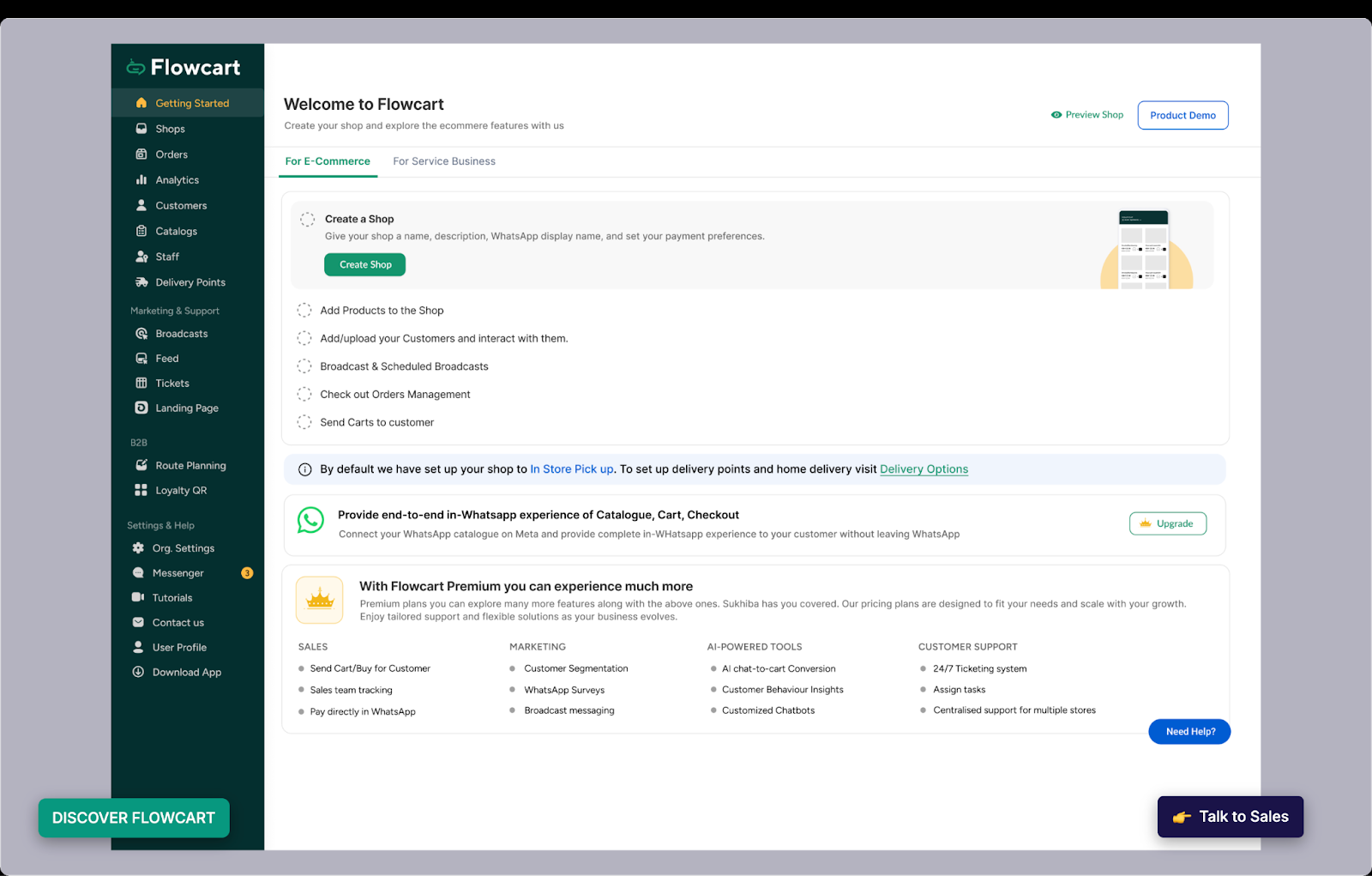
Flowcart is built specifically for businesses running WhatsApp commerce campaigns.
Instead of generic messaging tools adapted for WhatsApp, Flowcart was designed from the ground up for e-commerce brands, D2C companies, and businesses that need to track the complete customer journey from first message through repeat purchase.
What makes Flowcart's analytics different
Complete conversion funnel tracking
Flowcart connects WhatsApp conversations directly to your e-commerce platform. That means you can track:
- Which broadcast drove that purchase
- Which abandoned cart message recovered that sale
- Which chatbot flow generated the most revenue
- Which customer segment has the highest repeat purchase rate
Real-time campaign performance dashboards
See delivery rates, read rates, response rates, and conversions update in real time. Not the next day. Right now.
When a campaign isn't performing, you know within minutes.
Team performance visibility
Track individual agent response times, conversation quality, and conversion rates. Identify your top performers and understand what they're doing differently.
Template optimization insights
See which message templates drive the most engagement and conversions. Test variations and let data decide which messaging works best.
Built-in ROI calculator
Flowcart automatically calculates campaign ROI by connecting WhatsApp costs (both platform fees and Meta conversation charges) to revenue generated.
Who Flowcart is built for
Flowcart works best for:
- E-commerce brands running promotional campaigns and cart recovery
- D2C companies building direct customer relationships
- Marketing teams managing multiple campaigns simultaneously
- Growth marketers who need data-driven optimization insights
- Agencies managing WhatsApp campaigns for multiple clients
If you're currently using WhatsApp for marketing but struggling to measure ROI or justify your spending, Flowcart gives you the analytics infrastructure you need.
FAQs
What's the difference between WhatsApp Business App and WhatsApp Business API?
WhatsApp Business App is free and designed for small businesses with basic needs. It has limited analytics and a 256-contact broadcast cap.
WhatsApp Business API is for larger businesses that need automation, team collaboration, unlimited broadcasts, and proper analytics. It requires partnering with a Business Solution Provider and has per-message pricing.
How much does a WhatsApp analytics dashboard cost?
It depends on your approach. BSP platforms typically charge $50-$500/month depending on features and message volume. Enterprise solutions can cost more. Plus, you'll pay Meta's per-conversation charges (varies by country, typically $0.01-$0.14 per marketing conversation).
Can I track WhatsApp campaigns in Google Analytics?
Yes, but only if you use proper UTM parameters in all your links. Google Analytics can't natively track WhatsApp conversations, but it can track when someone clicks a link from WhatsApp and what they do on your website.
How do I calculate ROI for WhatsApp marketing?
ROI = ((Revenue from WhatsApp - Total WhatsApp Costs) / Total WhatsApp Costs) × 100
Total costs include platform subscription fees, Meta conversation charges, and any labor costs for managing campaigns.
Can I track individual customer journeys across multiple channels?
Yes, but it requires proper integration. Your CRM should be the central hub that connects WhatsApp conversations, email opens, website visits, and purchases to individual customer profiles.
What metrics should I monitor daily vs. weekly vs. monthly?
- Daily: Delivery rates, response times, agent performance, technical issues
- Weekly: Campaign performance, conversion trends, template effectiveness
- Monthly: ROI, customer acquisition cost, lifetime value, strategic insights
How long does it take to set up a WhatsApp dashboard?
With a BSP platform: 1-2 weeks for basic setup, 4-6 weeks for full integration with CRM and e-commerce platforms.
Building custom: 2-3 months for MVP, 4-6 months for production-ready solution.
Do I need technical skills to build a WhatsApp dashboard?
Not if you use a BSP platform. They handle the technical complexity. You'll need basic marketing and analytics knowledge to configure campaigns and interpret data.
For custom solutions, you'll need developers familiar with APIs, webhooks, and databases.
What happens if my delivery rate suddenly drops?
Check these in order:
- Meta quality rating (is your template flagged?)
- Phone number quality (old/invalid numbers?)
- Technical issues (webhook down, API errors?)
- Compliance violations (too many marketing messages?)






%201.webp)




.png)