.png)
.png)

.png)
Key Takeaways
Understand why Shopify stores get traffic but few sales, from weak trust to leaky checkout and poor mobile experience.
Apply 8 practical strategies to boost Shopify sales, including navigation, SEO, urgency, support, and social proof improvements.
Use WhatsApp and Flowcart to recover abandoned carts, personalize campaigns, and turn conversations into measurable Shopify revenue.
Launching a Shopify store feels like crossing the finish line.
But in reality, it’s just the warm-up lap.
Once your store is live, the real challenge is turning casual scrollers into paying customers. And that’s where most brands hit a wall. Traffic doesn’t stick. Conversions stall. Sales feel unpredictable.
Every Shopify owner asks sooner or later: How do you grow sales without burning money on ads that barely move the needle?
This is exactly the question we will address in this guide. We will provide practical strategies to increase Shopify sales and show you how to leverage WhatsApp to drive more sales.
Reasons Why You May Be Getting Traffic But No Shopify Sales
The typical Shopify store converts just 1.4% of its visitors, meaning only about 1.4 out of every 100 people who land on the site make a purchase. It's like traffic gets people in the door, but for one reason or another, they don't end up pulling out their wallet. Let's explore the reasons:
Mismatch between intent and experience
Visitors arrive expecting something specific based on your ads, SEO, or social posts. If the landing page, pricing, or product offering doesn’t match that expectation, they leave almost instantly.
Too much friction to decide
Cluttered layouts, too many options, or unclear product benefits make shoppers think harder than they want to. Confused visitors rarely convert.
Weak trust signals
Missing reviews, testimonials, shipping details, return policies, or secure payment badges create doubt. Even interested buyers hesitate when trust feels uncertain.
A leaky checkout experience
Long forms, forced sign-ups, surprise costs, or slow load times push users out at the final step, right when they’re closest to buying.
No follow-up for interested visitors
Many shoppers aren’t ready to buy on the first visit. Without reminders, retargeting, or personalized nudges, that traffic is lost for good.
Poor mobile experience
A site that looks fine on desktop but feels clunky on mobile loses sales fast, especially when most traffic comes from phones.
Read More: WhatsApp Lead Qualification: Turn WhatsApp Leads Into Revenue
Tips for How to Increase Sales in Your Shopify Store
Here are 8 practical tips along with examples that are sure to boost your sales on Shopify:
Improve Website Navigation
If visitors can’t quickly find what they’re looking for, they won’t stick around long enough to buy. A clear, intuitive navigation structure helps shoppers move from discovery to checkout without friction. Categories should be logical, menus should be uncluttered, and key pages like bestsellers, offers, and support should be easy to access.
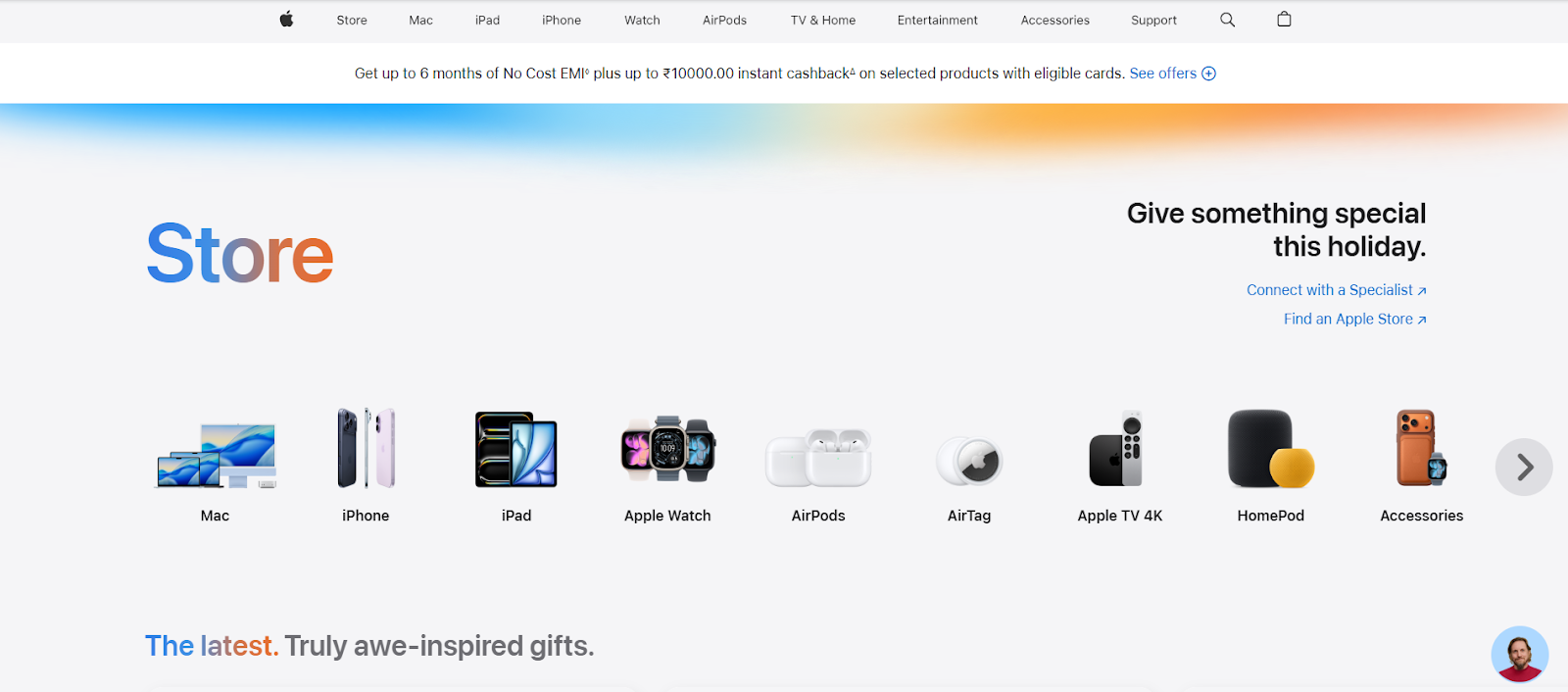
Apple’s website is a great example of navigation done right. The top menu is clean, minimal, and focused, with broad categories like Mac, iPhone, iPad, and Support.
When you hover over a category, such as iPhone, you see clear sub-options, including Shop iPhone, iPhone accessories, and Trade iPhone. This simplicity reduces friction, keeps users oriented, and helps them find exactly what they need without feeling lost.
Run Abandoned Cart Email Campaigns and WhatsApp
Not every shopper who adds a product to their cart is ready to buy immediately. Distractions, price comparisons, or simple hesitation often lead them away. Abandoned cart email campaigns help bring these high-intent shoppers back by reminding them of what they left behind and nudging them toward checkout.
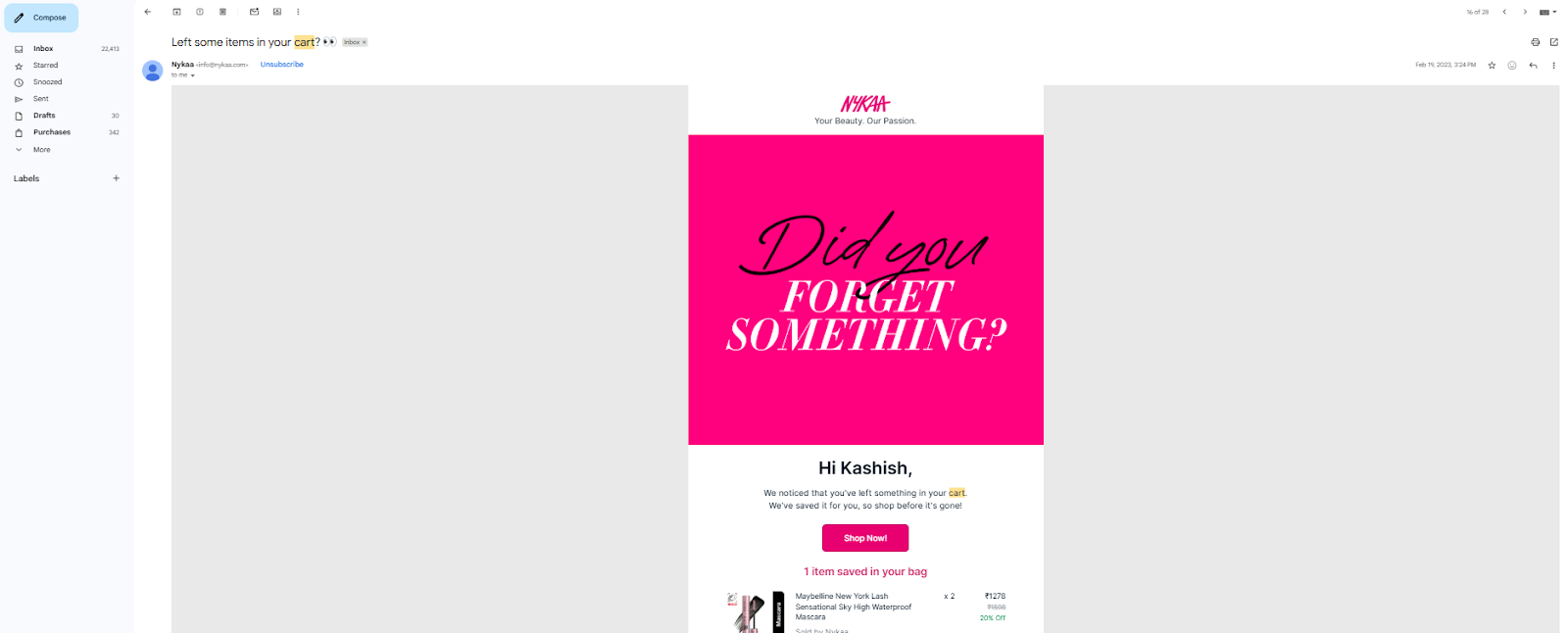
Nykaa, a fashion and beauty brand, uses abandoned-cart emails effectively to re-engage shoppers in the buying process. If you leave without checking out, you’ll often receive an email with a subject line like “You forgot something in your cart.”
The email clearly lists the exact items you added, along with images, prices, and product details, so there’s no friction in remembering what caught your attention. More importantly, Nykaa includes a prominent Checkout button that takes you straight back to your cart.
Launch Time-Bound Sales Campaigns That Create Urgency
Well-timed sales don’t just attract attention; they trigger action. When buyers know a deal won’t last forever, they make quick decisions. Limited-period sales tap into the fear of missing out, nudging shoppers to buy now instead of “thinking about it later.”
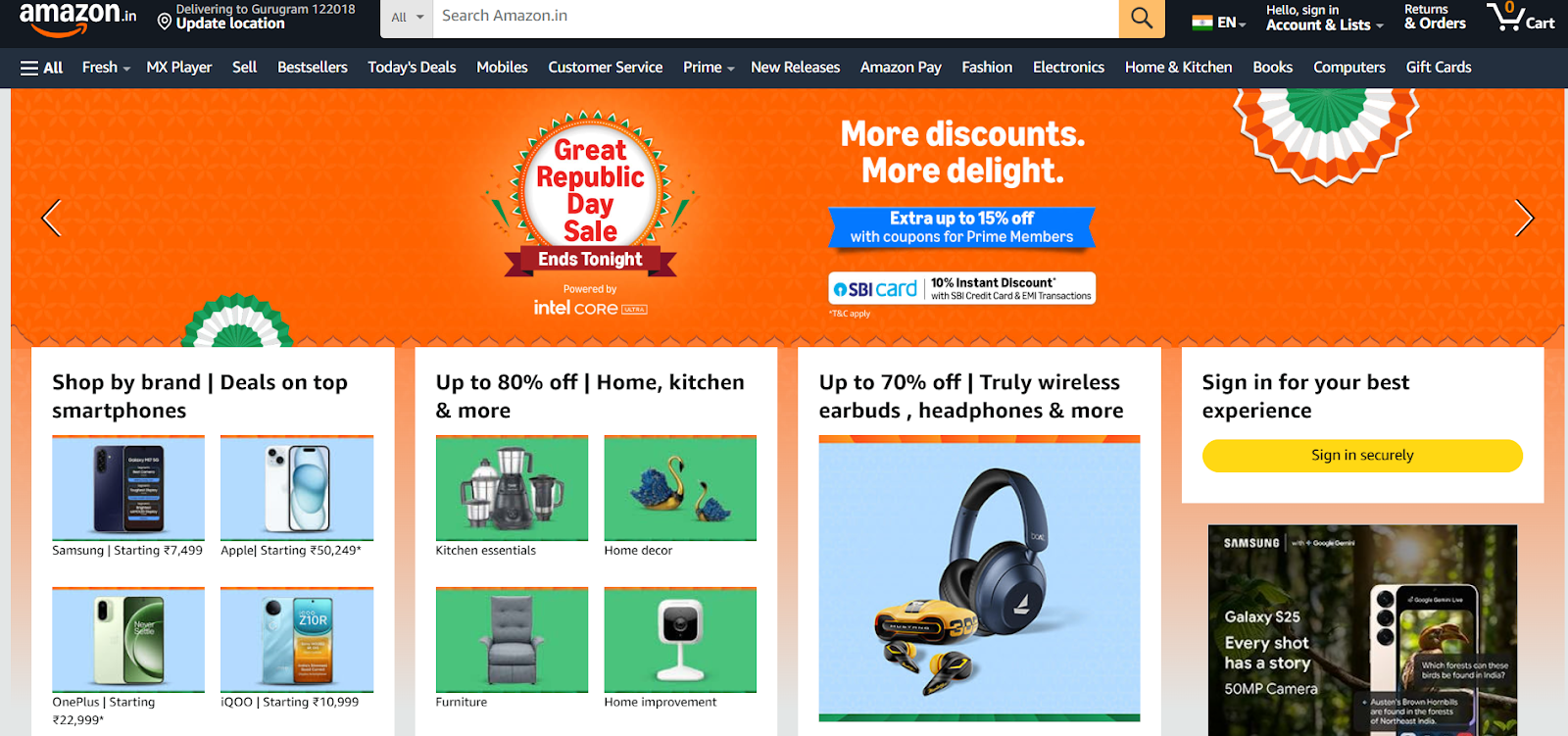
During the Republic Day Sale, Amazon fills its homepage with banners like “Republic Day Sale – Ends Tonight” or “Last Day to Save.” The messaging is clear: this is your final chance.
When shoppers see “Ends Tonight,” it immediately creates a deadline in their mind. Even if they were just browsing earlier, the time limit pushes them to act now instead of postponing the purchase.
Improve Website SEO to Attract High-Intent Traffic
Getting traffic is one thing. Getting the right traffic is what drives sales. Strong SEO ensures your Shopify store appears when shoppers actively search for the products you sell, not just when they are casually browsing.
Optimizing product pages with clear titles, keyword-rich descriptions, and structured headings helps search engines better understand your store. Fast page load times, mobile optimization, and clean URLs further improve rankings and user experience.
When your store appears for relevant search queries, visitors arrive with intent, making them far more likely to convert compared to traffic from random promotions.
Refer to this video on how to improve your SEO ranking by Shopify.
Offer Free Shipping to Remove Purchase Hesitation
Shipping costs are one of the biggest reasons shoppers abandon their carts. Even when customers like the product, unexpected delivery fees at checkout can instantly break the deal. Offering free shipping removes this mental roadblock and makes the final price feel simpler and more transparent.
Many brands use free shipping strategically by setting a minimum order value, which not only boosts conversions but also increases average order value.
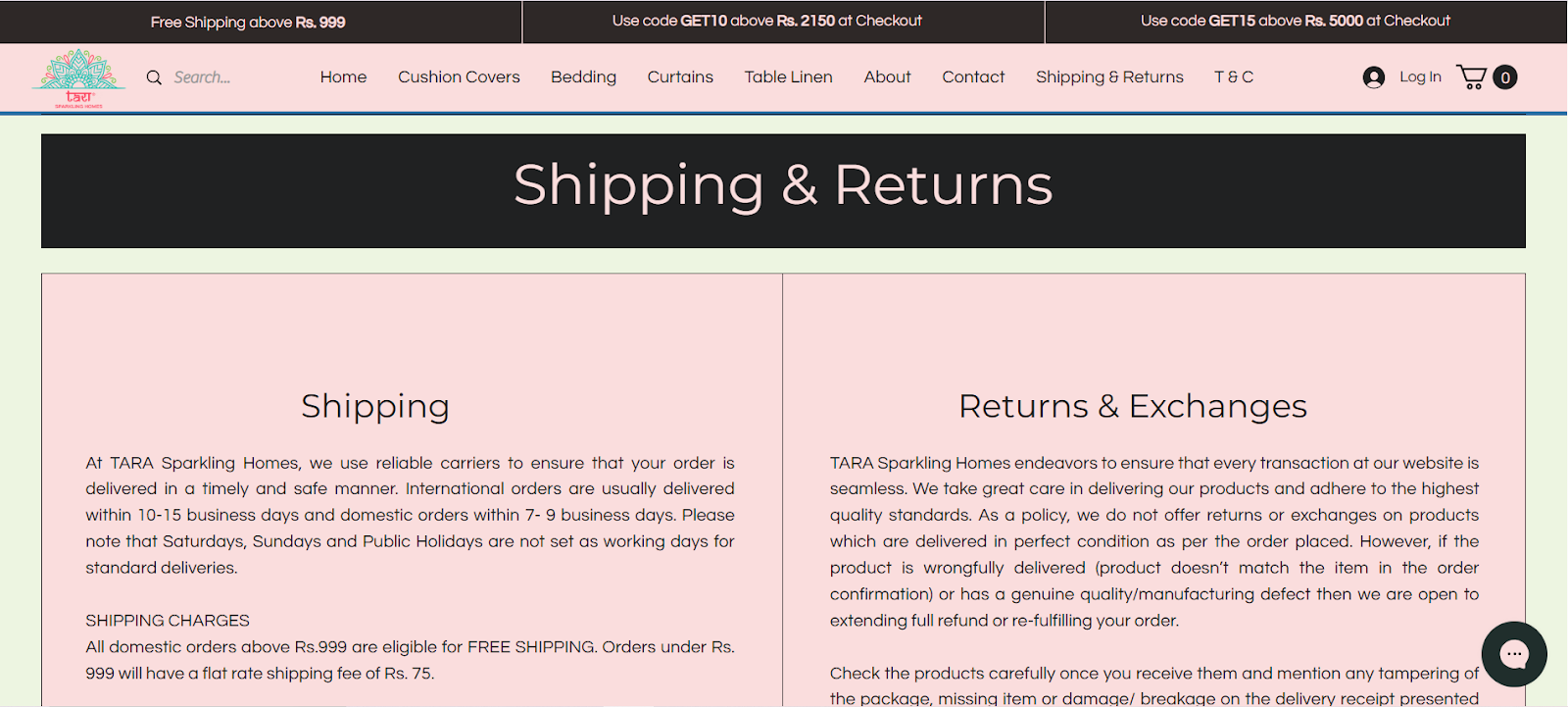
TARA Sparkling Homes clearly promotes its free shipping offer right on the home screen, highlighting free shipping on orders above ₹999. By making this information visible upfront, the brand sets the right expectations from the start and avoids unpleasant surprises at checkout.
This transparency works in two ways. It encourages shoppers to add more items to reach the free shipping threshold, increasing order value and reducing cart abandonment caused by last-minute shipping charges. Customers know the rule before they shop, which builds trust and keeps the buying journey smooth.
Keep Return and Exchange Policies Clear and Easy to Find
Shoppers hesitate when they’re unsure what happens if the product doesn’t work out. A clear return and exchange policy removes this anxiety and reassures buyers that they’re not taking a risk when they purchase.
Make this information visible on the home screen itself with a short, confidence-building line like “Easy 7-Day Returns” or “Hassle-Free Exchanges”, linked to a dedicated page with full details. Being upfront builds trust, sets expectations early, and reduces hesitation that can quietly kill conversions.
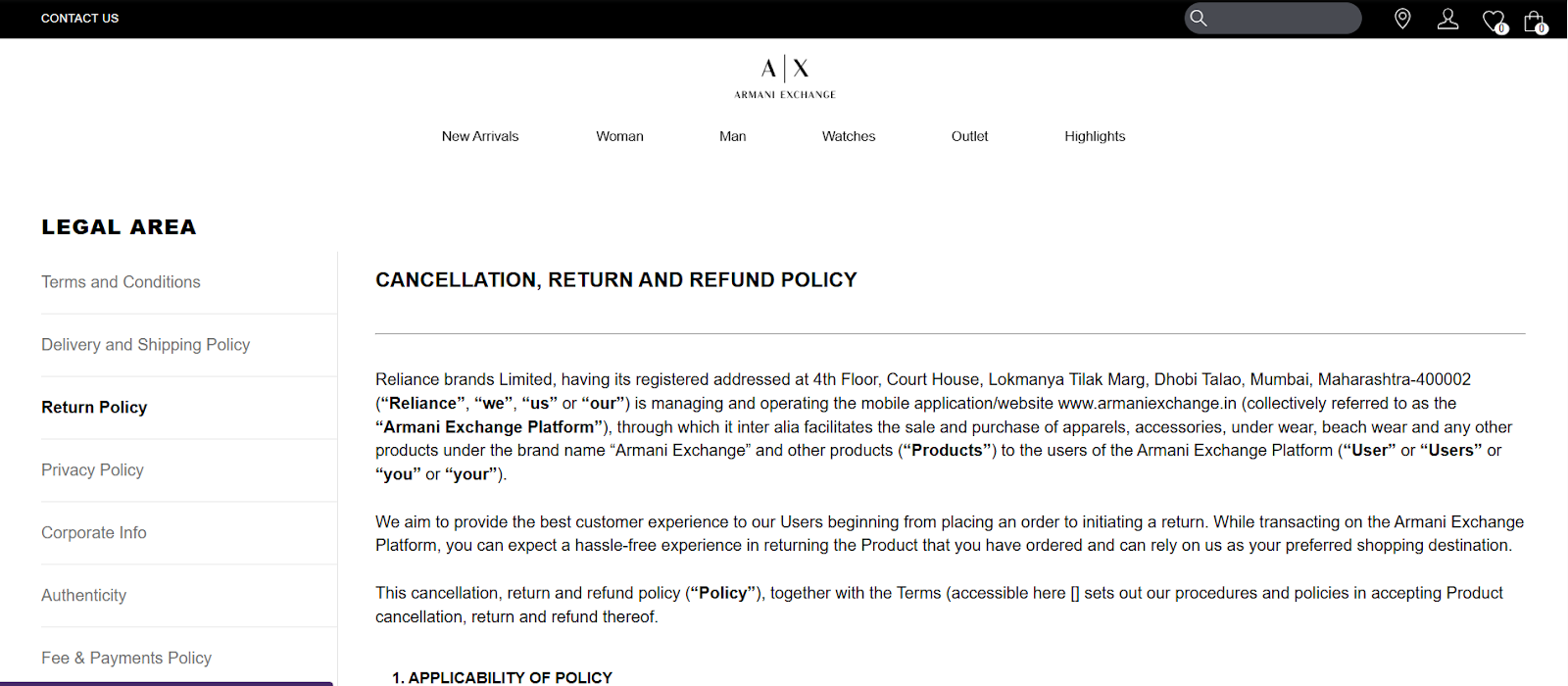
Armani Exchange makes its cancellation, return, and refund policies easy to access and understand. The brand clearly lists these policies and links them to a dedicated page that explains timelines, eligibility, and refund methods in detail.
Provide Easy-to-Reach Customer Support Across Channels
When shoppers have questions and can’t get quick answers, they leave. Making customer support easy to access removes last-minute doubts around sizing, delivery, payments, or returns that often block a purchase.
Offer multiple ways to reach you, such as a WhatsApp number, a chatbot for instant queries, and an email address for detailed concerns. This reassures customers that help is just a message away and that they won’t be left stranded after placing an order.
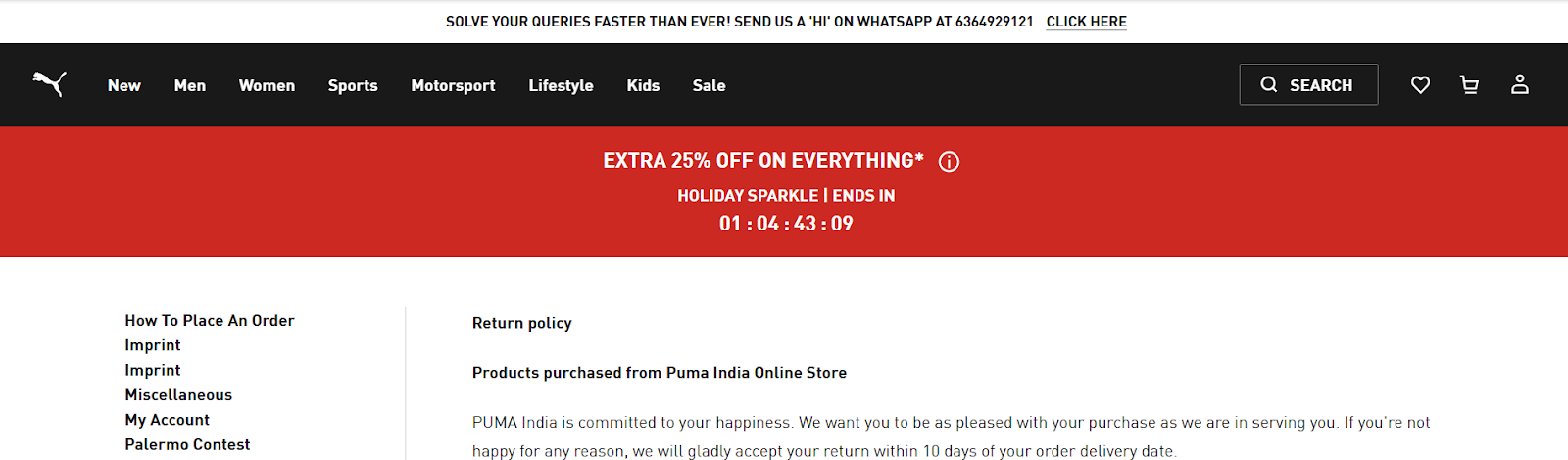
Puma does this well by displaying a website runner at the top of its site with its WhatsApp number, inviting shoppers to “Send us a Hi” for quick support. This small but powerful prompt encourages real-time conversations, resolves queries faster, and helps shoppers move forward with confidence rather than abandon the purchase.
Share Customer Reviews to Build Trust
When shoppers are unsure, they look for reassurance from people who’ve already bought from you. Customer reviews act as social proof, helping new visitors feel more confident about their decision.
Displaying reviews directly on product pages, collection pages, or even the home screen shows transparency and credibility. Honest feedback, star ratings, and real customer experiences answer unspoken questions around quality, fit, and reliability.
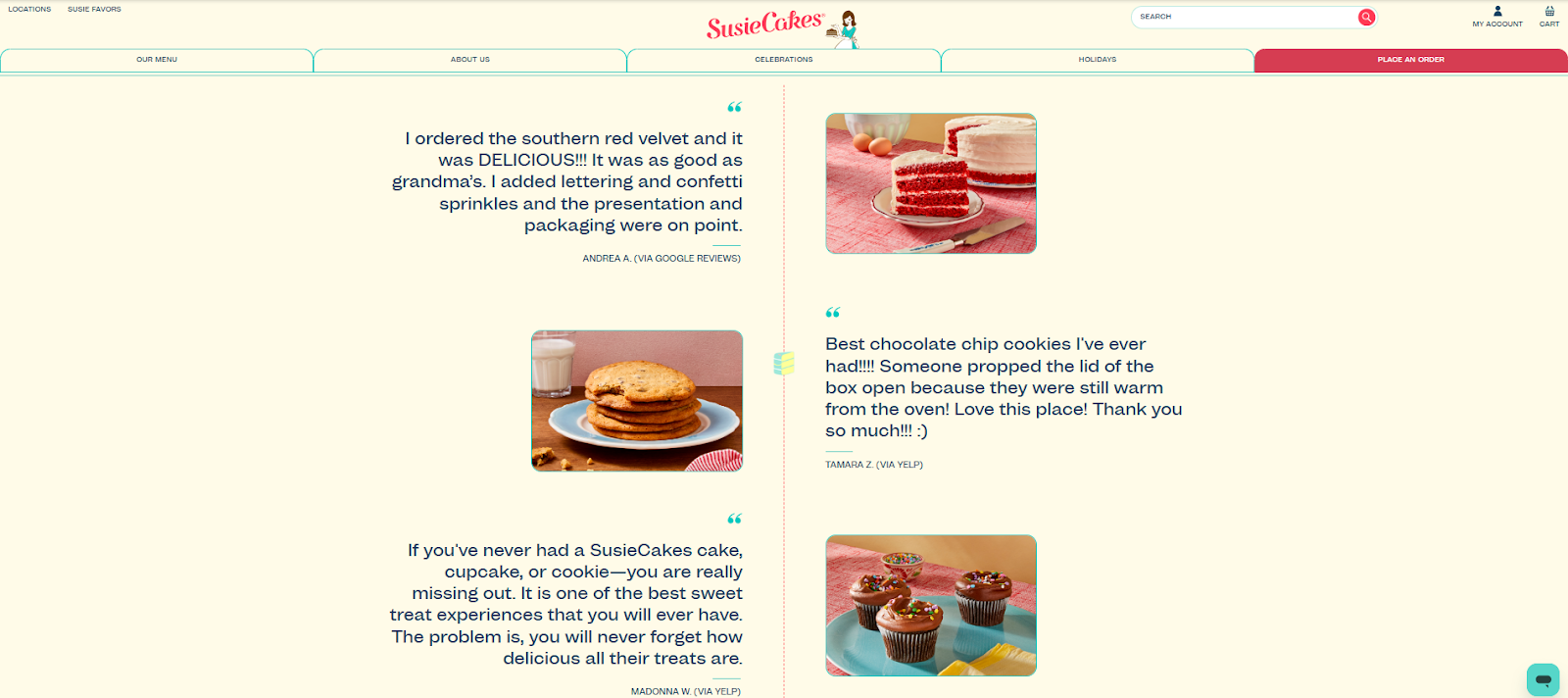
SusieCakes, the American bakery brand, highlights customer trust right on its homepage by displaying three real reviews pulled from Google Reviews and Yelp. By featuring recognizable platforms and real customer voices upfront, SusieCakes reassures first-time visitors about product quality and service.
Key Metrics That Directly Impact Shopify Sales
If you want to grow Shopify sales, you need to look beyond traffic numbers. Revenue is shaped by a small set of measurable metrics that reveal exactly where shoppers drop off, what convinces them to buy, and how much they spend when they do.
Tracking these metrics helps you identify specific bottlenecks and address them:
- Conversion rate shows the percentage of visitors who complete a purchase. A low conversion rate often indicates issues such as poor navigation, weak product pages, a lack of trust signals, or checkout friction. Even a small improvement here can significantly increase sales without increasing traffic.
- Average order value (AOV) measures the average amount customers spend per order. This metric highlights whether your pricing, bundling, and upsell strategies are working. Tactics such as free-shipping thresholds, product bundles, and add-on recommendations directly influence AOV.
- Cart abandonment rate tells you how many shoppers add items to their cart but leave before paying. High abandonment usually signals problems such as unexpected shipping costs, complicated checkout steps, slow page load times, or limited payment options. Reducing friction at this stage recovers revenue that’s already close to conversion.
- Traffic quality measures whether the visitors landing on your store are actually interested in your products. High traffic with low engagement often means your SEO keywords, ads, or campaigns are attracting the wrong audience. Monitoring bounce rate, time on site, and product page views helps you assess intent, not just volume.
Together, these metrics offer a clear, actionable view of what’s holding your Shopify sales back and where focused improvements will have the biggest impact.
Also Read: How to Measure ROI from WhatsApp Marketing Campaigns
How to Use WhatsApp to Increase Sales on Shopify
Once you’ve optimized your website, improved navigation, built trust, and tracked the right metrics, the next challenge is clear: converting interested visitors who still hesitate or drop off. This is where WhatsApp steps in as a powerful extension of your Shopify store.
Instead of relying solely on ads or emails that often go unopened, WhatsApp lets you engage shoppers where they’re already active and responsive. It bridges the gap between browsing and buying by enabling direct, real-time conversations that remove doubts, answer questions instantly, and guide customers toward checkout.
Here’s how WhatsApp helps drive Shopify sales:
- It enables real-time conversations, allowing shoppers to ask questions about pricing, sizing, delivery, or returns and get instant responses.
- It helps recover abandoned carts by sending timely reminders with direct checkout links.
- It supports personalized product recommendations based on browsing behavior or past purchases.
- It builds trust through one-on-one communication, especially for first-time buyers who need reassurance.
- It shortens the path to purchase by letting customers browse, select, and pay without leaving the chat.
How Flowcart Turns WhatsApp Into a High-Converting Sales Channel for Shopify
To unlock WhatsApp’s full potential and use it as a true sales channel, businesses need the right partner like Flowcart. It is built to help Shopify brands turn WhatsApp into a revenue-driving sales channel. Here are some Flowcart features that help businesses boost sales using WhatsApp:
- WhatsApp Catalog Sync: Flowcart syncs your Shopify product catalog directly with WhatsApp, allowing customers to browse products inside the chat itself. Shoppers can view product images, prices, variants, and availability without being redirected to your website, making discovery faster and friction-free.
- In-Chat Checkout Experience with WhatsApp Webview: Instead of pushing customers through multiple website pages, Flowcart lets them complete their purchase right inside WhatsApp using secure Webview screens. Shoppers can review their cart, choose payment options, and place orders without ever leaving the conversation through the In-Chat Checkout feature.
- Automated Abandoned Cart Recovery: Flowcart automatically identifies users who added products but didn’t complete the purchase and sends context-aware Abandoned Cart Recovery reminders. These messages include product details, images, and a direct payment link so customers can pick up exactly where they left off.
- Personalized Campaigns and Broadcasts: Flowcart AI-Powered Segmentation and Smart Broadcasts enable brands to send targeted WhatsApp campaigns based on customer behavior, past purchases, browsing patterns, and intent. This ensures messages feel relevant and timely, increasing engagement and conversion rates compared to generic broadcasts.
- Unified Sales and Performance Analytics: Flowcart provides clear insights into how WhatsApp conversations translate into revenue. Brands can track metrics like clicks, conversions, recovered carts, and sales generated through WhatsApp, helping teams optimize campaigns and prove ROI.
Explore Flowcart Pricing structure here.
Here’s what Willy Kimani, the CEO and Founder of Jaza, has to say about Flowcart:
“We used to lose a lot of carts, especially on weekends. Now, Flowcart brings them back with better timing and smarter messages than we ever could manually.”
Want to know how other brands are integrating Flowcart for driving sales? Read Flowcart customer success stories.
Turning Shopify Traffic Into Consistent Sales
Boosting Shopify sales involves removing friction, building trust, and meeting customers where they’re most comfortable making decisions. From clearer navigation and stronger SEO to smart incentives and responsive support, small improvements across the journey add up to meaningful revenue growth.
WhatsApp takes this a step further by turning conversations into conversions. And with Flowcart, Shopify brands can use WhatsApp not just to chat, but to sell, recover carts, and drive measurable ROI.
If you’re ready to turn everyday customer conversations into sales, book a demo with Flowcart now!
Frequently Asked Questions (FAQs)
How long does it take to increase Shopify sales?
The timeline depends on what you fix first. Improvements like clearer navigation, better checkout flow, or abandoned cart recovery can show results within days or weeks. SEO and content-driven growth usually take longer, often a few months.
What’s the fastest way to boost Shopify conversions?
Reducing friction at key points in the buying journey is the fastest win. Simplifying checkout, displaying trust signals like reviews and return policies, and following up with abandoned cart messages can quickly lift conversion rates.
Does WhatsApp marketing work for Shopify stores?
Yes. WhatsApp works especially well for Shopify because it enables direct, real-time conversations. Shoppers can ask questions, get personalized recommendations, and complete purchases faster, which often leads to higher engagement and better conversion rates compared to email alone.
How do I reduce cart abandonment on Shopify?
Start by being transparent about pricing, shipping costs, and delivery timelines upfront. Then use abandoned cart reminders through email or WhatsApp to bring shoppers back. A smooth checkout experience and multiple payment options also play a major role in reducing drop-offs.
Can I increase sales without discounts?
Yes, sales can grow through better product positioning, clear messaging, social proof, faster support, and improved user experience. Free shipping thresholds, bundles, personalization, and proactive customer communication often drive conversions without relying on constant discounts.
LinkedIn Post:
Many Shopify brands face the same frustrating problem:
Traffic is coming in, but sales aren’t.
Visitors browse. Some add to cart. Most leave.
Not because the product is bad, but because small points of friction quietly break the buying journey.
In our latest guide, we break down 8 practical strategies to increase Shopify sales, including:
• Improving navigation so shoppers find products faster
• Reducing checkout drop-offs and cart abandonment
• Building trust with reviews, clear returns, and transparent shipping
• Attracting high-intent traffic through better SEO
But optimizing your store is only half the equation.
The real unlock is meeting customers where decisions actually happen.
WhatsApp turns browsing into conversations and conversations into conversions. It helps answer last-minute questions, recover abandoned carts, and guide hesitant shoppers to checkout in real time.
That’s where Flowcart comes in:
Flowcart helps Shopify brands turn WhatsApp into a high-converting sales channel with:
• WhatsApp catalog sync for in-chat browsing
• In-chat checkout to reduce drop-offs
• Automated abandoned cart recovery
• Personalized WhatsApp campaigns
• Clear revenue and ROI tracking
If you’re getting traffic but not sales, this might be the missing piece.
Read the full guide here: [link]

.png)





%201.webp)




.png)