
Key Takeaways
WhatsApp is now the highest-intent channel, revealing buyer intent instantly through replies, questions, and behavior.
Unstructured WhatsApp workflows waste qualified demand; structured flows, scoring, and routing turn chats into a predictable revenue engine.
Flowcart combines AI, tagging, catalogs, and in-chat checkout to qualify, segment, and convert leads directly inside WhatsApp.
Over the last few years, buyer behavior has changed faster than most sales teams have. Prospects no longer want forms, long email threads, or slow qualification cycles. They want quick answers, personal conversations, and a frictionless buying experience on the channels they already use daily.
That’s why WhatsApp has become the new starting point of the sales funnel. What began as a simple messaging app is now where customers ask questions, compare options, request demos, and even make purchase decisions.
And the scale is impossible to ignore: WhatsApp now has 2.95 billion users and has grown 3,500% since Meta’s acquisition. In India alone, it serves over 535 million users.
But here’s the catch.
Most businesses still manage WhatsApp lead qualification like it’s 2016. They rely on manual replies, generic bots, or button-based conversations that feel automated from the first tap. The result is predictable: slow qualification, missed signals, inconsistent handoffs, and conversations that never move beyond surface-level engagement.
Automation alone isn’t the problem. The real issue is unstructured automation. Many companies invest in WhatsApp tools, yet without the right qualification strategy or conversational flow design, the results fall short. This gap is costing businesses conversions, and in this blog, we’ll break down exactly how to fix it with modern practices that actually work in 2025
Why is WhatsApp Ideal for Lead Qualification?
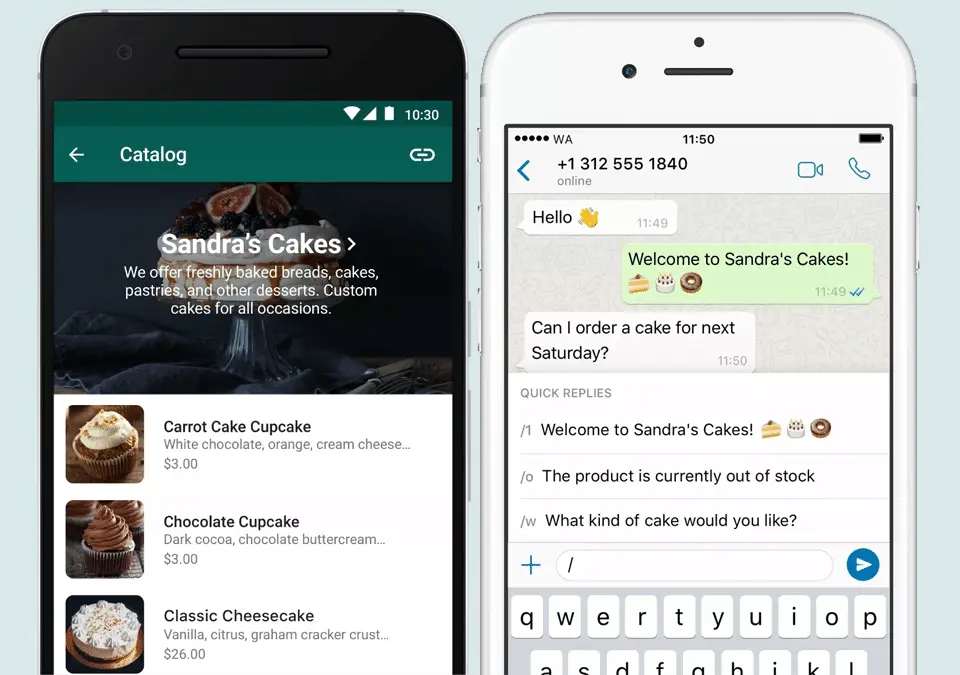
The real reason WhatsApp works so well for lead qualification has everything to do with the behavior it creates. Most channels place a barrier between the buyer and the business. Forms hide intent. Emails delay it. Websites try to guess it. WhatsApp, however, reveals intent in real time.
When someone messages a business on WhatsApp, they are not completing a task. They are starting a conversation. That single shift changes qualification entirely. Instead of pushing prospects through rigid steps like "fill this" or "wait here," WhatsApp allows you to observe intent as it unfolds naturally.
There is also a visibility advantage that is difficult to match. WhatsApp messages are opened far more consistently than email, and buyers respond significantly faster.
High visibility means qualification signals appear quickly, and those signals are often richer.
- You see intent in how fast someone replies.
- You see it in the depth of their questions.
- You see it in whether they type a short answer or a detailed explanation.
- You even see it in whether they return to the chat the next day without being prompted.
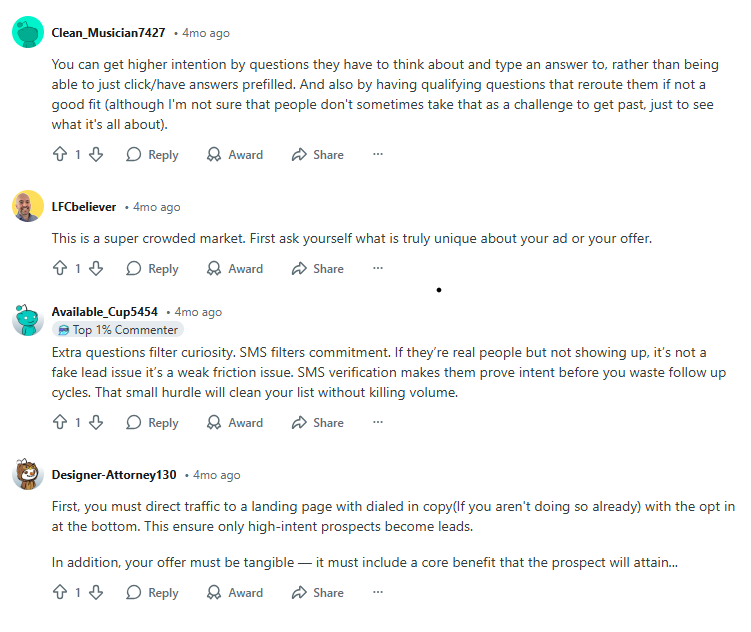
Reddit Thread: Various ways marketers handling whatsapp lead qualification
Real-world marketing conversations show the same pattern. Businesses that qualify effectively on WhatsApp tend to rely on four principles:
- Ask questions people must type to show genuine interest
- Add small, intentional friction (like SMS or typed answers) to filter casual browsers
- Send messages that feel human to boost response rates
- Automatically route and tag leads to keep sales teams focused
A back-and-forth exchange that might require multiple emails can happen in minutes on WhatsApp. Buyers ask follow-up questions, browse a catalog, send a voice note, or tap a quick reply without leaving the conversation. The friction that usually slows qualification simply disappears.
Another advantage is nuance. Typed answers often reveal urgency, hesitation, confidence, and budget sensitivity. These soft signals are exactly what experienced sales teams rely on, yet most automated systems overlook. Typed responses outperform button-only flows for a reason: they require effort, and that effort reveals intent.
WhatsApp also adapts easily to different lead types such as new enquiries, warm engagers, subscribers, and returning customers. It offers immediacy, engagement, and behavioral insight, which is why high-performing teams increasingly treat it as their most reliable qualification layer.
Challenges Businesses Face in Lead Qualification
A recent discussion among marketers highlighted a common frustration: WhatsApp brings in plenty of leads through click-to-chat ads and website widgets, but qualifying those leads without sounding spammy or robotic is still difficult.
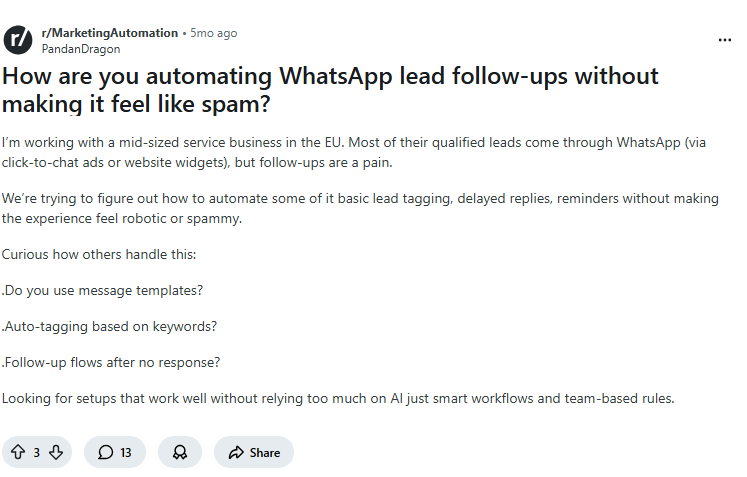
Reddit thread: User seeking to solutions to handle whatsapp lead follow-ups.
Teams try templates, delayed replies, keyword tagging, or simple workflows, yet the process often feels messy and inconsistent. This thread resonated widely because the challenges they described are not unique. They represent the core issues most businesses run into when they try to qualify leads on WhatsApp at scale.
Challenge #1 - Too many unqualified leads clog the funnel
In general most businesses don’t struggle with getting leads, but getting the right ones. The problem is that not all of those leads have buying intent

Reddit Comment: Lead Generation
Click-to-chat ads, website widgets, and social touchpoints often generate large volumes of inbound messages. Without an early qualification layer, reps waste significant time answering casual questions, handling curiosity-driven chats, or engaging with people who simply are not ready. The funnel becomes noisy, and the highest-quality leads get slowed down by the volume.
Tip to solve this: Instead of sending leads directly into a generic inbox, they route Click-to-WhatsApp traffic into structured onboarding flows. Flowcart helps guide each lead through tailored questions (budget, location, timeline, product interest), which instantly sorts high-intent buyers from casual browsers.
Challenge #2 - No segmentation or scoring to prioritize the right prospects
A redditor pointed out that response rates are dropping because inboxes are oversaturated and buyers can spot generic messaging instantly. This is exactly what happens inside most WhatsApp inboxes: everything looks the same.
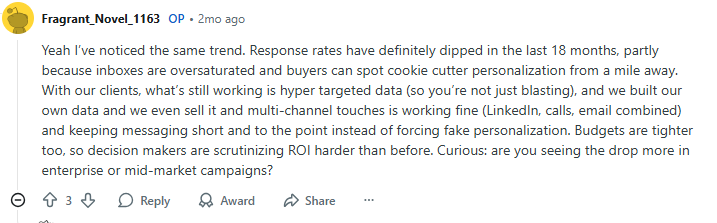
Reddit Thread: Personalization and Segmentation being key
Most WhatsApp inboxes look the same: a long list of conversations with no context, no hierarchy, and no indicators of who deserves attention first. Without auto-tagging, scoring rules, or structured conversational data, every lead appears equally important. This leads to misprioritization, inconsistent follow-ups, and pipeline uncertainty. Sales teams end up guessing instead of qualifying.
Tip to solve this: Smart teams rely on automatic tagging and conversation-based scoring. Flowcart reads the signals by using auto-tagging and AI-assisted scoring to categorize leads. Every chat can sync automatically to HubSpot, Shopify, or your CRM, giving teams clean visibility into the funnel.
Challenge #3 - Slow response times that lead to lost deals
WhatsApp is a high-intent channel, but that also means expectations are higher. Buyers expect instant replies, and if they don’t get them, they move on. One Reddit user captured this challenge: “If I don’t respond within five minutes, the customer has already moved on. I’m on a ladder installing a ceiling fan, and by lunch they’ve gotten quotes from two other guys.”
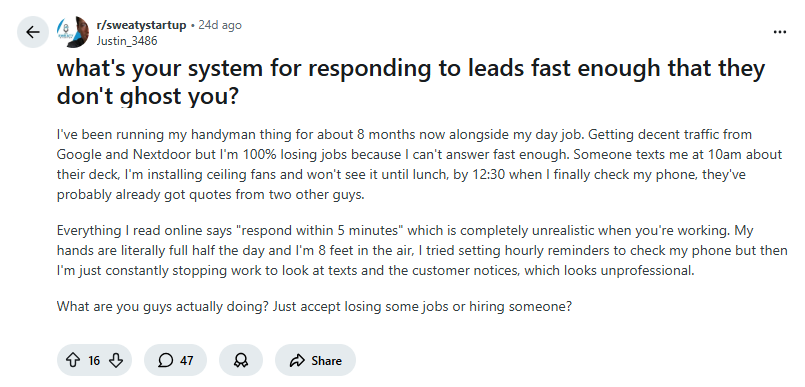
Reddit Thread: Responding to Leads without Delay
Many businesses still rely on manual responses or overwhelmed team inboxes. When teams rely on manual responses or a shared inbox that’s already overloaded, even a short delay feels like silence on the customer’s end. And silence kills deals. A lead who messages at 10:00 a.m. and doesn’t hear back until 10:15 already feels the momentum fading.
WhatsApp gives businesses an incredible opportunity to capture intent at its peak, but without a system for instant acknowledgment, that opportunity disappears just as quickly.
Tip to solve this: Using intelligent routing and AI-assisted replies, Flowcart ensures every lead gets an immediate response, then assigns the conversation to the right rep or region so nothing slips through.
Challenge #4 - Compliance risks when collecting customer data
One Reddit user described how her friend’s WhatsApp account was hijacked after a scam message mimicked the official “Security Center,” complete with language options and a near-identical domain. It felt real enough that she shared a verification code.
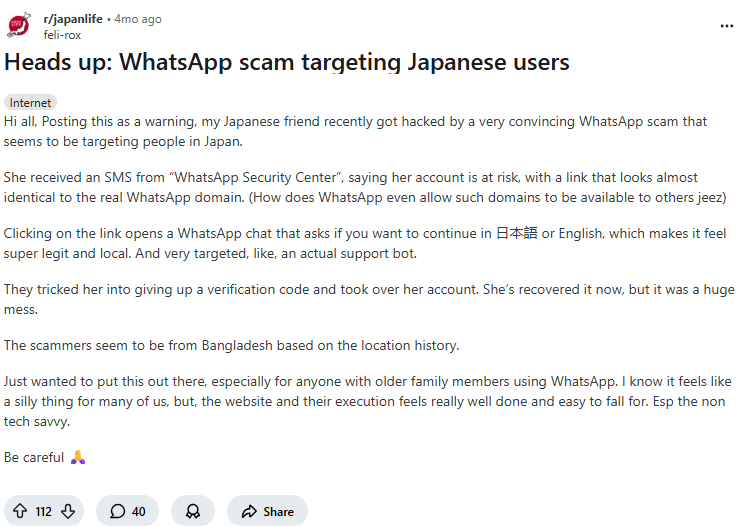
RedditThread: Whatsapp Scamming
Incidents like this show how fragile trust can be on WhatsApp, especially when businesses collect sensitive data. Qualification naturally involves asking for budget, timelines, locations, or industry details.And when businesses collect sensitive details like budget, location, or role during qualification, that same trust is on the line. This is where many teams run into trouble.
Without proper opt-ins, approved templates, or compliant data handling practices, businesses risk more than just a messy inbox. They expose themselves to policy violations, account restrictions, and customer distrust. Some teams even mix personal and business chats or store data in unstructured ways, which only increases the risk.
Tip to solve this: Good teams use compliant onboarding flows and Meta-approved templates. Flowcart ensures customer data is collected securely and conversations remain policy-safe.
Your Next Read: WhatsApp Sales Funnel: How to Convert Chats into Customers
7 Proven Strategies for WhatsApp Lead Qualification
The highest-performing WhatsApp funnels don’t treat conversations as “messages”, they treat them as micro data points in a qualification system.
Each interaction reveals intent, urgency, budget, objections, and buying readiness. When designed well, a WhatsApp qualification system behaves like a live funnel where every reply sharpens the picture of who is ready to buy.
These 7 strategies represent the most effective methods used by teams who rely on WhatsApp as a revenue channel, not just a support channel.
#1. Automated Qualifying Questions at High-Intent Entry Points
A quick, conversational set of questions that helps you understand who’s actually in your WhatsApp inbox, what they want, their budget, and how fast they’re trying to make a decision. It gives you instant clarity without making the customer feel like they’re filling out a form.
Most WhatsApp inquiries are exploratory. Leads often reach out before they have clarity about what they want. Without structured early questions, sales teams spend significant time trying to interpret intent manually. From a user perspective, this reduces the cognitive load, they receive direction rather than navigating uncertainty.
How to implement this?
- Replace traditional lead forms on Meta with Click-to-WhatsApp Ads so the “form” is the conversation instead of a separate page.
- Trigger a WhatsApp Flow that asks 3 core qualifiers, for example:
- “What are you looking to solve today?” (problem / use case)
- “What’s your budget range?” (fit / tier)
- “How urgently do you need this?” (timeline)
- Map each answer to structured fields and immediately push them into your CRM (HubSpot / Shopify / ERP) for lead record creation.
- Use your Analytics Dashboard to see which CTWA campaigns and question flows produce the highest percentage of “Sales-ready” leads, then refine the questions over time.
Example: Uncover uses Flowcart to turn WhatsApp into their primary revenue channel, tripling revenue from WhatsApp compared to email. Their interactive skincare quizzes act as built-in qualification: customers answer questions about skin type, concerns (e.g. hyperpigmentation, sensitivity), and current routine. Behind the scenes, those same answers segment the lead and tell the team exactly what regimen to recommend and who is likely to buy now versus later.
💡Pro Tip: Design your first flow like a consult, not an interrogation. Start with one value-driven line (“Let’s find the best fit for you in under 60 seconds”) and keep every question answerable in a single line or tap. Let the last question define routing: e.g., if someone selects “I want results in the next 30 days,” auto-flag them as High Intent in your CRM and send them straight to a rep.
#2 Chatbots for Initial Screening + Human Handoff
A WhatsApp chatbot that manages initial interactions, greeting, basic information capture, FAQs and transfers the conversation to a human agent when advanced questions or purchase signals appear.
Speed is a critical factor in WhatsApp engagement. Users expect immediate responses, and delays negatively affect conversion. However, most early-stage questions are repetitive. Automating this stage maintains response quality without increasing operational load. Human attention is reserved for deeper product evaluations, pricing discussions, or scenarios requiring contextual judgment.
How to implement this?
- Funnel all entry points (CTWA ads, site widgets, store QR codes) into a single WhatsApp number connected to your Team Inbox.
- Let the chatbot run the first layer of the conversation: greeting, simple FAQs, and a short qualifying flow.
- Configure Routing rules:
- High-ticket products → senior sales reps
- Support questions → service team
- Store-related queries → nearest location / territory team
- When a handoff happens, show the rep the full Q&A history, tags, and any product views (from In-Chat Catalogs) so they never have to ask the same question twice.
Example: Electromart partnered with Flowcart to launch a guided WhatsApp shopping assistant. Customers can search by brand or category, filter by price, and see curated product options — all via a conversational bot. Once they’ve narrowed down to a shortlist inside WhatsApp (using flows and structured prompts), placing the order is one tap away with in-chat checkout.
💡Pro Tip: Build “handoff triggers” into your flows. For example: if a customer asks about installation, financing, or bulk pricing, mark that as a signal to bring in a human. Use routing rules like [Product: High-value] + [Intent: Buying in 30 days] to push that chat to your best closer.
#3. Tagging & Segmenting Every Conversation
A structured tagging system that categorises each lead by region, buyer type, product interest, engagement level, and purchase potential. These tags feed into segmentation for prioritisation and tailored follow-up.
A raw WhatsApp inbox contains no inherent structure. Without segmentation, all leads look equal even though they differ significantly in value, intent, and readiness. Tagging introduces clarity. It transforms conversations into organised datasets that inform routing, prioritisation, and personalised communication.
How to implement this?
- Define a tag schema before scaling (e.g. Region, Buyer Type, Product Focus, Value Tier, Engagement Level).
- Use automated rules in your WhatsApp CRM to apply tags when:
- A customer joins via a specific campaign / CTWA ad
- They answer a budget or location question in a certain way
- They purchase from a specific category repeatedly
- Use the Analytics Dashboard to compare conversion and revenue across segments (e.g. “Salons who buy X line monthly” vs “One-off buyers”).
- Run Broadcast Follow-ups to high-value segments only, with tailored offers or educational content that match their tags.
Example: Darling Hair turned chaotic WhatsApp conversations with salons into a structured, segmented revenue engine. Flowcart captures stylist purchase behavior (frequency, top products) and feeds it into a CRM + loyalty setup. Stylists are grouped by spend level and preference, and Darling can broadcast offers or loyalty updates to the right clusters, a shift that helped them grow unique customer accounts from 2,000 to 13,500 and increase sales by 300%.
💡Pro Tip: Ask: “What decisions will this tag change?” If a tag won’t change who follows up, what they send, or how you report performance, you probably don’t need it. Start lean (5–7 tags) and let real funnel decisions dictate new tags later.
#4. Catalog-Based Product Discovery Inside the Chat
A WhatsApp-native product catalog that allows users to browse, compare, and add items without leaving the chat, transforming WhatsApp into a guided shopping environment. Customers often struggle to articulate exactly what they want. Visual options reduce ambiguity and accelerate decision-making.
Every tap viewing a product, exploring variants, adding to cart provides qualification signals and behavioural data that can be used for scoring, routing, or personalised assistance.
How to implement this?
- Build an In-Chat Catalog or storefront that mirrors your main categories and hero products.
- In early qualification, route people to curated views: “Since you said you’re buying for a family, here are our bulk packs.”
- Let customers add items, change quantities, and confirm right inside WhatsApp via In-Chat Checkout.
- Use the Team Inbox so your sales or support team can jump into any cart in progress to upsell, answer a last-minute question, or fix friction (delivery, sizing, etc.).
Example: Samaking, a farm-to-retail fish platform, uses Flowcart’s WhatsApp Storefront to let customers browse products, build a cart, edit their choices, and complete payments entirely within WhatsApp. That reduced friction, improved retention, and helped them drive 50% month-on-month topline revenue growth with 100% of transactions running on Flowcart.
💡Pro Tip: Build micro-catalogs aligned to your personas or entry points (“Starter kits,” “Wholesale packs,” “Refills”). Use qualifiers to route people to the right micro-catalog, then treat every click as a signal for later segmentation and scoring.
#5. Automated Nurturing That Feels Like a Single Conversation
A set of behaviour-driven WhatsApp follow-ups that re-engage leads with context-aware messages reminders, updates, support within the same conversational thread. Leads often pause due to distractions, not disinterest. WhatsApp’s conversational continuity makes nurturing feel natural rather than intrusive. By automating timely, relevant nudges, you prevent pipeline leakage without adding manual workload to your team.
How to implement this?
- Sync every qualified lead into your CRM with their WhatsApp thread as the source of truth.
- Create event-triggered flows:
- After a quote: send a recap + FAQ
- After an order: send fulfilment updates and simple feedback prompts
- After inactivity: send a value-driven nudge or educational tip
- Use Broadcast Follow-ups only where there’s clear context (e.g. “customers who bought this collection,” “leads who asked about delivery times”) rather than blasting everyone.
- Let AI-driven flows answer routine questions and surface anything complex to humans, keeping the thread warm without overwhelming your team.
Example: Kings Collection, a fast-growing fashion brand in Kenya, used Flowcart to pull a messy process: calls, DMs, forms, manual delivery tracking into WhatsApp. Behind the scenes, Flowcart’s AI agent and CRM handle assignment, updates, and follow-ups so no message gets missed. The result: nurturing isn’t a separate campaign; it’s a natural continuation of the same conversation buyers started on day one.
💡Pro Tip: Map the full lifecycle for one persona, then ask: “Where does the conversation usually die?” Build your first nurture automations exactly around those drop-off moments (after quote, after first order, after shipping) instead of around arbitrary dates.
#6. Buttons & Quick Replies for Fast Filtering
Quick-reply options and buttons that simplify early choices goals, product categories, budgets allowing customers to self-filter instantly and providing clean data for qualification. Typing introduces friction and leads to inconsistent data (“50k”, “50,000”, “around 50k”). Quick replies reduce user effort and provide standardised information that can immediately drive routing or segmentation. This keeps the experience fast for users and structured for your team.
How to implement this?
- Start conversations with quick-reply options for your biggest branches:
- “What do you need help with today?” → Supplements / Healthy Snacks / Store Info
- “Are you shopping for yourself or someone else?” → Myself / Family / Business
- Use these taps to trigger different flows and auto-assign tags.
- Surface the quick-reply data in your Team Inbox, so agents instantly see context and don’t re-ask basic questions.
- Use the Analytics Dashboard to track which paths people choose most, then adjust your homepage CTA, ad messaging, or catalog ordering based on real behavior.
Example: Healthy U moved from dozens of disconnected store WhatsApp numbers to one unified WhatsApp storefront and CRM. Under the hood, Flowcart centralises all chats and orders, gives HQ complete oversight, and lets staff respond faster and more consistently.
💡Pro Tip: Combine structured quick replies with one open text prompt. This provides both speed and nuance.
#7. Lead Scoring Inside Your WhatsApp CRM
A scoring model that assigns value to each lead based on behavioural signals (responses, catalog actions) and historical data (purchase frequency, account size). High-scoring leads receive priority attention. WhatsApp creates message volume quickly, and many conversations appear equally urgent. Lead scoring introduces objectivity, allowing teams to prioritise high-value or high-readiness leads without relying on intuition. It ensures that sales resources are directed where they have the most impact.
How to implement this?
- Connect WhatsApp to your CRM / ERP so every message is linked to a customer record.
- Define scoring rules that combine conversation signals + account value, like:
- +30 for “existing high-value wholesale account”
- +20 for “selected high-margin product in catalog”
- +10 for “ready to buy in <30 days”
- Use your Team Inbox + Routing to automatically send 80+ score leads to senior reps and 30–79 to regular sales, while <30 goes into automated nurture.
- In the Analytics Dashboard, compare close rates and deal sizes by score band so you can refine your scoring model over time.
Example: Spinners & Spinners, a textile manufacturer with 295 different price lists, integrated Flowcart with their ERP and customer IDs. When a customer messages on WhatsApp, Flowcart matches their phone number to the correct account, applies the right price list automatically, generates a quote via a zero-price RFQ system, and sends it back for confirmation all in chat. That effectively “scores” and prioritises B2B customers with complex pricing and high order value.
💡Pro Tip: Start with 3–4 rules tied to outcomes you already know: repeat orders, high AOV, fast reply speed. Re-visit the model monthly using dashboard data. The goal isn’t mathematical purity; it’s making sure your best opportunities never sit at the bottom of the inbox.
Best Practices for Qualifying Leads on WhatsApp
Qualifying leads on WhatsApp works best when the experience feels structured without feeling scripted. The strongest teams follow a few simple principles that keep conversations efficient, compliant, and genuinely helpful for the buyer.
1. Set a strong foundation for every conversation
A complete business profile, clear expectations about response times, and transparent opt-in points all create confidence before a single message is exchanged. Leads engage more openly when they know who they’re speaking to and why the business is contacting them. Treat this as the baseline of a trustworthy qualification flow.
2. Respond quickly and maintain momentum
Speed remains one of the biggest predictors of conversion on WhatsApp. Whether through automation or a well-routed team inbox, acknowledging a lead quickly keeps intent alive. Slow responses introduce doubt and push buyers to competing options. Momentum is part of qualification, it helps reveal who’s serious and who isn’t.
3. Guide the conversation with clarity, not pressure
Strong qualification is directional, not forceful. Use short messages, interactive elements, and clear next steps to help leads progress naturally. Calls to action should feel like helpful shortcuts rather than commands. When the conversation stays focused and easy to navigate, buyers share information more freely.
4. Personalize interactions, even in automation
People respond better when they feel seen. Referencing past interactions, product views, or previous questions makes qualification feel like a continuation, not a restart. Even small touches — a name, a recalled preference increase engagement and reduce drop-off.
5. Add value before expecting a decision
Qualification isn’t just about extracting information. It’s also about giving leads what they need to make a decision. Useful resources, product visuals, short demos, or simple explanations of key differences help buyers clarify what they want. A value-first approach creates smoother and more honest qualification.
6. Respect boundaries and communication preferences
Respecting opt-outs, limiting frequency, and staying within WhatsApp’s policy guidelines isn’t just compliance, it's customer experience. Over-messaging or reaching out without context quickly erodes trust. When people feel in control of the conversation, they are far more willing to engage in it.
7. Continuously refine based on real behavior
Qualification improves as you study patterns: which questions generate meaningful answers, where leads stop responding, which segments convert best, and how routing affects outcomes. Regularly reviewing analytics helps turn your WhatsApp process from a series of chats into a predictable qualification system.
Tools & Platforms for WhatsApp Lead Qualification
High-Level Overview of the tools:
Flowcart is the best fit if you want qualification to happen automatically inside the buying journey. Leads move from ad click to product view, to AI-guided questions, to personalized carts and in-chat payment without switching channels. Qualification, discovery, and purchase all happen in one continuous flow, making it the most complete option for commerce-driven teams.
WATI works well when qualification is mainly handled by human agents. Its shared inbox, simple routing, and basic pre-qualification flows make it ideal for support-heavy teams that need structure but do not require advanced commerce automation.
Zoko is effective when your qualification relies on shopping actions such as COD confirmation, cart behavior, and product views. It excels at transactional workflows and cart recovery, but is less suited for conversational or AI-led qualification.
Feature Comparison for Lead Qualification:
How Flowcart Helps Businesses Qualify Leads Faster
Many teams begin on WhatsApp with basic tools or shared inboxes. They work at low volume, but the moment conversations pick up, the cracks appear quickly: double replies, clunky interfaces, manual follow-ups, and automations that fail under pressure.
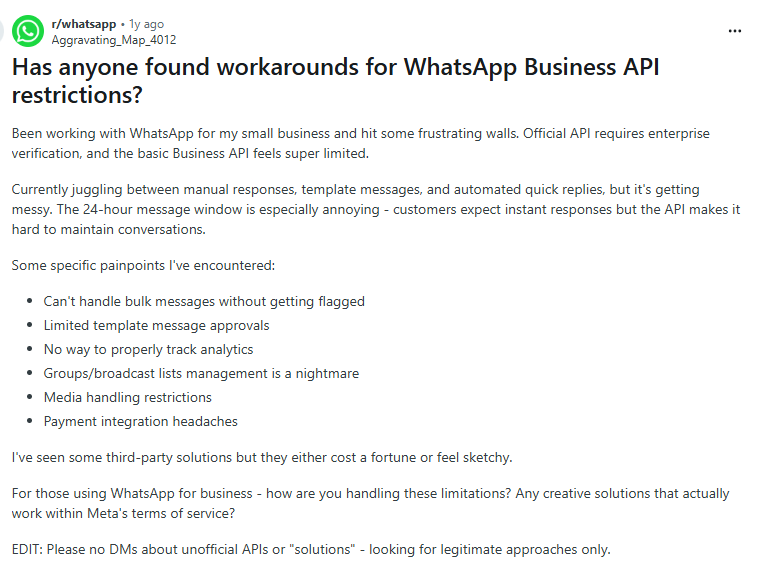
Operators often describe the same pattern online — juggling templates, fighting the 24-hour window, struggling with broadcasts, and having no reliable way to track performance. As soon as they try to scale qualification or run more advanced workflows, the setup becomes messy and limiting.
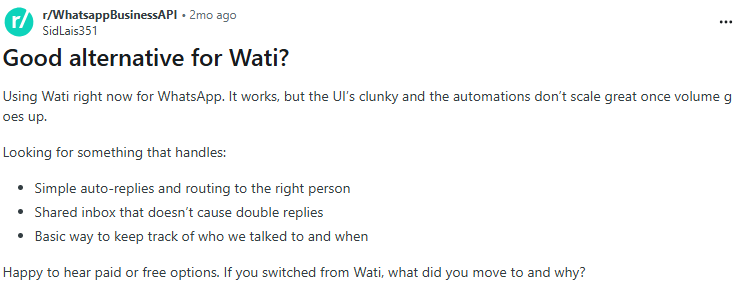
Redditor looking for Wati alternative
This is exactly the gap Flowcart fills. Flowcart transforms WhatsApp into a structured qualification engine by using its full commerce and automation stack. Each feature plays a specific role in helping teams identify high-intent leads earlier and more accurately.
Click-to-WhatsApp Ads for instant context
Every lead enters WhatsApp with the exact product, offer, or campaign they clicked. This removes guesswork and starts qualification with a clear intent signal.
WhatsApp Flows for guided early-stage qualification
Leads move through short, no-code flows that capture budget, preferences, timeline, and product interest. This eliminates open-ended chats and gives you clean qualification data from the first message.
AI-driven conversations for deeper discovery
Flowcart’s AI asks follow-up questions, clarifies needs, and builds understanding based on natural input from the customer. By the time a rep joins, the buyer has already expressed clear intent.
Auto-tagging to structure every conversation
Each interaction is tagged by product category, buying stage, engagement level, and campaign source. This keeps the inbox organized and ensures high-intent leads rise to the top.
AI-generated carts that reveal true intent
When customers browse or tap catalog items, Flowcart builds personalized carts automatically. Every cart action becomes a qualification signal that helps you identify serious buyers.
In-chat checkout for instant conversion
Qualification seamlessly transitions into purchase since customers can pay inside WhatsApp. No drop-off from redirects and no need for manual order-taking.
Abandoned cart recovery to re-qualify silent leads
Automated nudges bring promising leads back into the conversation and help reps prioritize who is still worth following up with.
Analytics that surface sales-ready segments
Flowcart shows which flows convert best, which behaviors correlate with purchase, and which leads are ready for handoff. Teams focus on the conversations that matter.
WhatsApp lead qualification is no longer optional. It has become the foundation of how modern teams capture intent, guide buyers, and convert interest into revenue. Businesses that design structured conversations, automate early discovery, and act on real-time behavior consistently convert faster and grow with more predictability.
Where basic tools struggle to keep up, Flowcart treats qualification as part of a larger commerce workflow not a workaround. This means your team can finally stop firefighting conversations and start focusing on the leads who are actually ready to buy. Ready to experience Flowcart?
FAQs
Can WhatsApp really qualify leads the way a CRM does?
Yes. With structured flows, auto-tagging, and behavioral tracking, WhatsApp can capture the same qualification data a CRM collects, often with higher accuracy because responses happen in real time.
How do I automate lead scoring inside WhatsApp?
Use automated tags, AI-driven responses, and catalog actions to assign points based on intent signals such as budget, product interest, reply speed, and cart behavior. These scores can sync directly to your CRM.
What is the difference between lead generation and lead qualification on WhatsApp?
Lead generation brings people into your WhatsApp funnel. Lead qualification identifies which of those people are actually ready to buy by analyzing their answers, actions, and engagement.
Is WhatsApp lead qualification effective for B2B companies?
Yes. B2B buyers often prefer WhatsApp for quick questions, pricing checks, and follow-up. WhatsApp qualification can filter by company size, use case, budget, and timeline before routing to sales.
How do I stay compliant when collecting customer data on WhatsApp
Start with clear opt-ins, use approved message templates, avoid unnecessary personal data, and keep all information inside secure, compliant systems connected to the WhatsApp Business API.






%201.webp)




.png)