.png)
.png)


Key Takeaways
Upselling is a precision sport: show the right offer at the wrong moment, and it either gets ignored or disrupts the sale you were about to close. This happens because you ask your customer to make a second decision while they’re still working through the first one.
It’s also the reason why your average order value (AOV) is flat despite consistent traffic. In simpler terms, your pre-existing upsell widget is repelling sales, or you lack one entirely.
Let's understand which Shopify upsell apps and methods you can adopt to reap the most out of this strategy.
The Upsell Moment Most Merchants Never Reach (and Why It Converts Better)
Every on-site upsell app operates within a closed window: from the first page visit to the thank-you page. Once that tab closes, the conversation ends. What happens after, regarding the satisfaction, the repeat intent, the genuine openness to buying again,none of it gets captured.
Think about the last time you bought something online that genuinely impressed you. By the time it arrived, you’d already forgotten the checkout experience. What you remembered was the product and the brand that sent it.
Your customer lives the same moment after delivery. The transaction anxiety is behind them, and the product has either met or failed their expectations. You’d only know about their experience if they return to your website for another order or to leave a review: both scenarios depend on the customer’s mood.
This gap produces flat repurchase rates even when your product is good. Ultimately, creating a timing problem.
Flowcart, a Shopify-native WhatsApp commerce app, integrates with your storefront and sends automated upsell flows via the messaging app. Unlike on-site apps that go silent when the tab closes, Flowcart operates in two windows that most merchants never reach:
The first is while the order is still in transit. The purchase decision is behind them, the anxiety of committing to a new brand has passed, and they're in an open, anticipatory state.
A well-timed message at this point, such as, ‘Your order is on its way, here's what most customers grab with it’, lands when the customer is already thinking about you, without the friction of an unsolicited interruption.
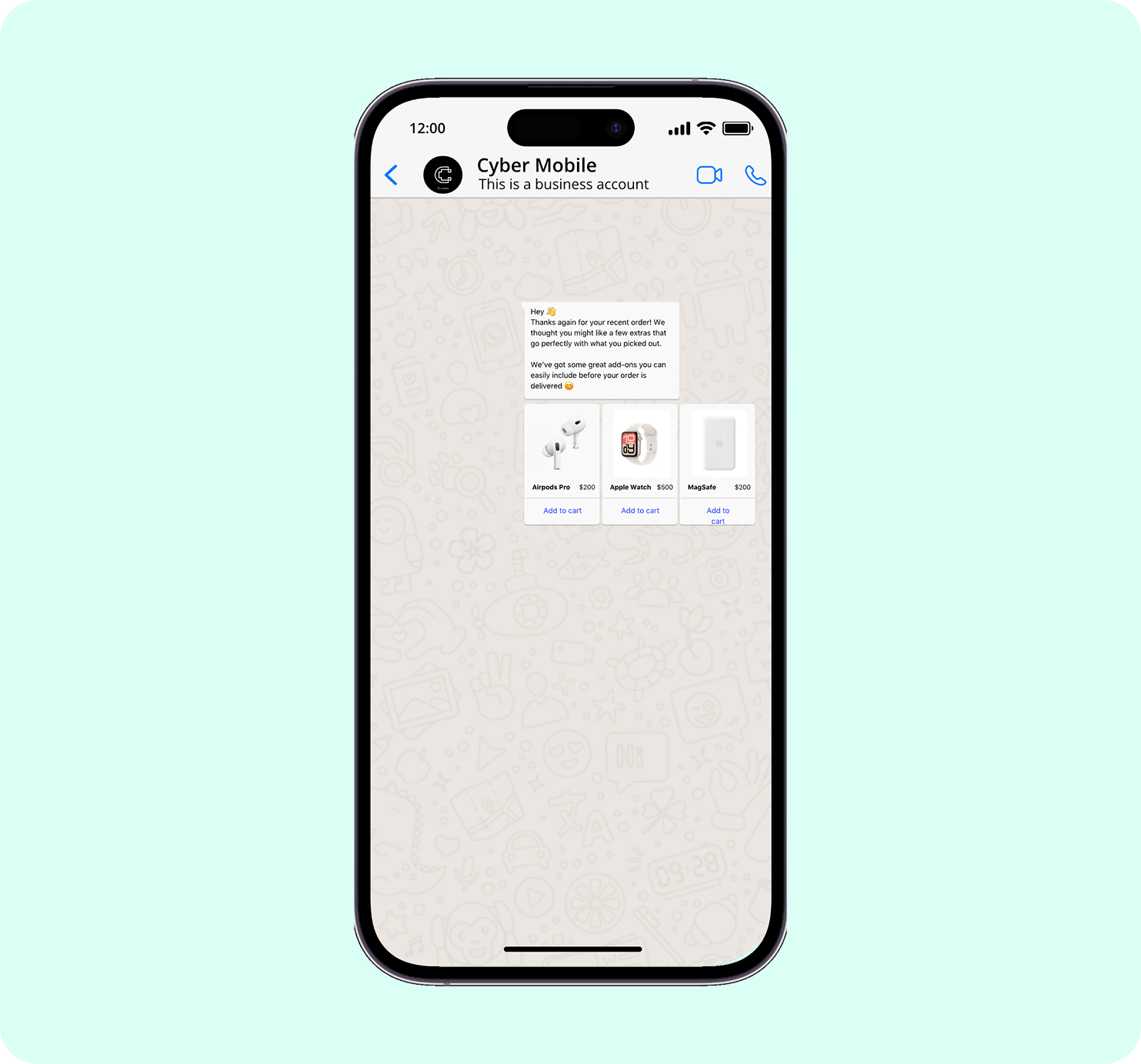
The second is after delivery. The product is in their hands, the experience has either met or exceeded their expectations, and trust in your brand is at its highest point.
This is when a reorder reminder, a winback message carries the most weight. It happens because the customer isn't deciding whether to trust you anymore. They already have.

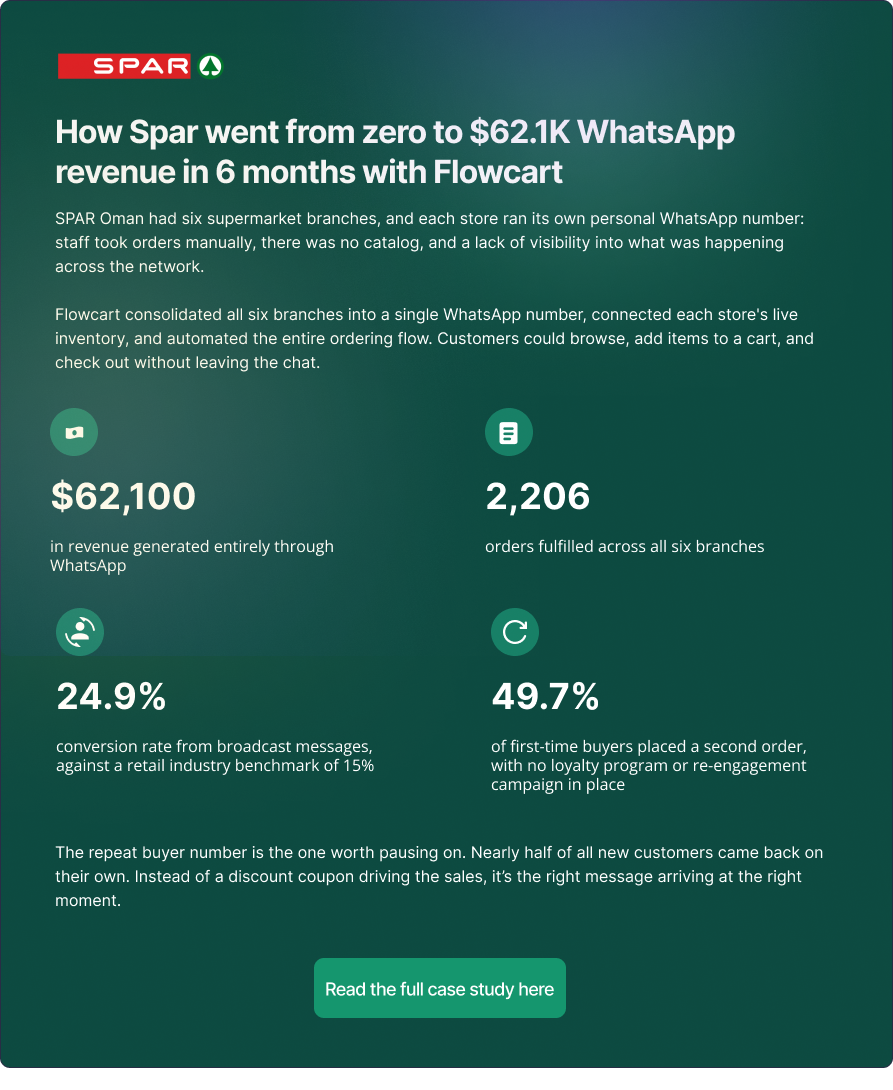
🤝 How Spar went from zero to $62.1K WhatsApp revenue in 6 months with Flowcart
SPAR Oman had six supermarket branches, and each store ran its own personal WhatsApp number: staff took orders manually, there was no catalog, and a lack of visibility into what was happening across the network.
Flowcart consolidated all six branches into a single WhatsApp number, connected each store's live inventory, and automated the entire ordering flow. Customers could browse, add items to a cart, and check out without leaving the chat.
Within six months:
- $62,100 in revenue generated entirely through WhatsApp
- 2,206 orders fulfilled across all six branches
- 49.7% of first-time buyers placed a second order, with no loyalty program or re-engagement campaign in place
- 24.9% conversion rate from broadcast messages, against a retail industry benchmark of 15%
The repeat buyer number is the one worth pausing on. Nearly half of all new customers came back on their own. Instead of a discount coupon driving the sales, it’s the right message arriving at the right moment.
How to Set Up Post-Purchase Upsell Flows on WhatsApp with Flowcart
The post-purchase window doesn’t end when the customer closes their browser tab. You can use the Flowcart Shopify Plugin to move the conversation to WhatsApp Messenger, a platform where 95% of messages are read within 3 minutes.
📌 What Flowcart does differently with this approach: Using this Shopify plugin, you can send automated, personalized upsells directly to their phone, instead of hoping a customer checks their email for a follow-up offer.
What You'll Need
Before you can put your post-purchase revenue on autopilot, make sure you have these foundations ready:
- Verify your Shopify plan: Ensure your store is currently on a Basic, Shopify, Advanced, or Plus plan, as the Flowcart app is specifically optimized for these tiers
- Active Shopify storefront: Maintain a fully functional store where you are actively managing product listings and customer checkouts
- Compliant opt-in list: Gather a list of customers who have provided a valid phone number and explicitly opted in to receive WhatsApp marketing
- Established product catalog: Keep your Shopify product data up-to-date so Flowcart can accurately pull images and pricing into your WhatsApp automated flows
To install the Flowcart plugin on Shopify:
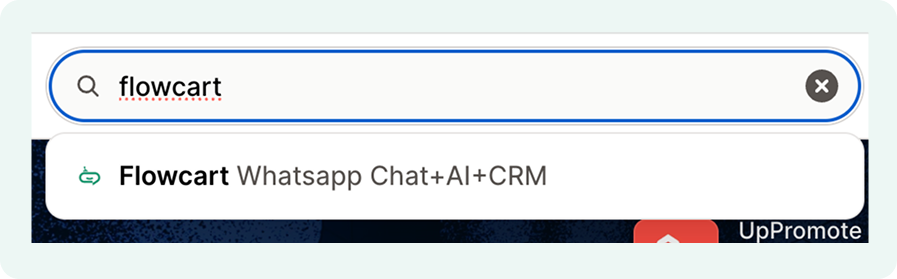
- Search for Flowcart in the Shopify app store
- Click on the Flowcart Whatsapp Chat+AI+CRM plugin from the search results
- Select the Install button to begin the installation process
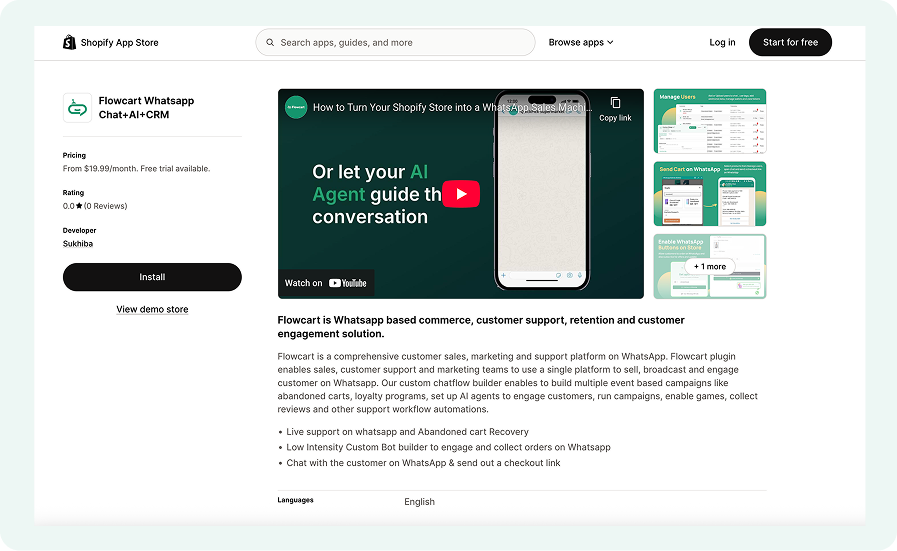
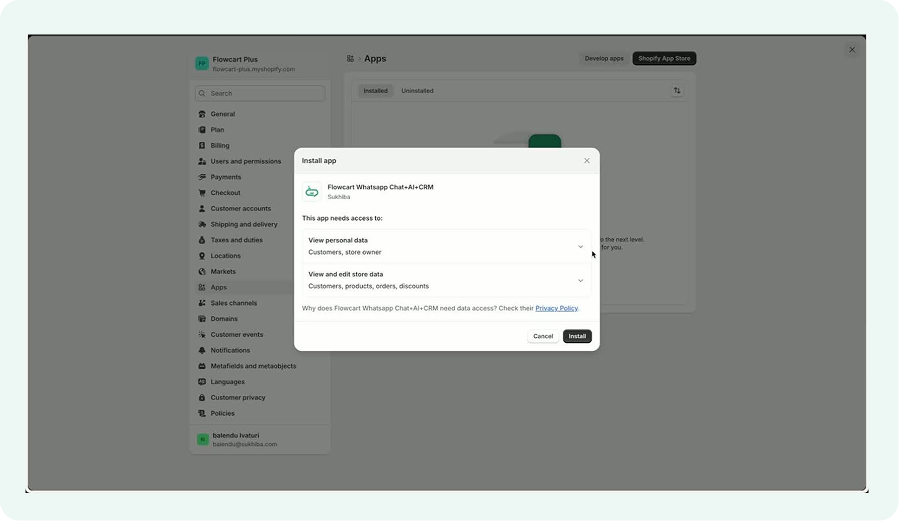
After clicking 'Install', the merchant will be taken to the installation page.
- Review the permissions that the app requires
- Click on the Install button to proceed
Once the installation is complete, a trial account will be created automatically, and the merchant’s number will be added as an admin.
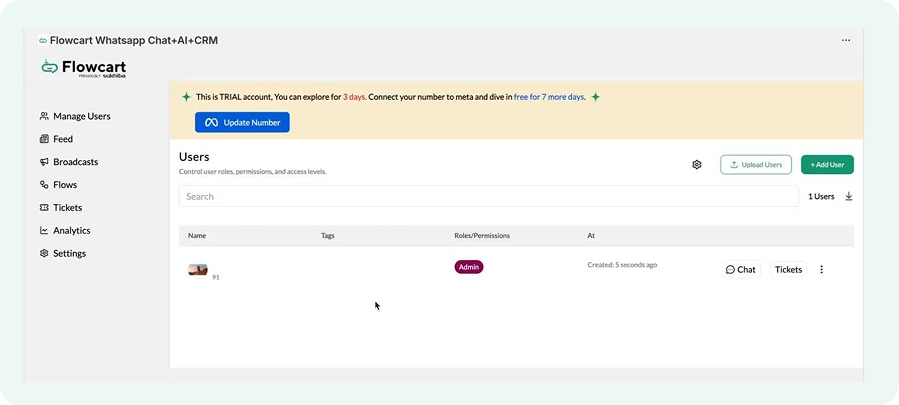
The merchant can explore the features available in the trial account for three days, with an option to extend it to seven days if they connect their number via Meta.
Activating the Shopify Upsell Flow
- Go to Flows in the Flowcart Shopify Plugin and select Flowcart Flows
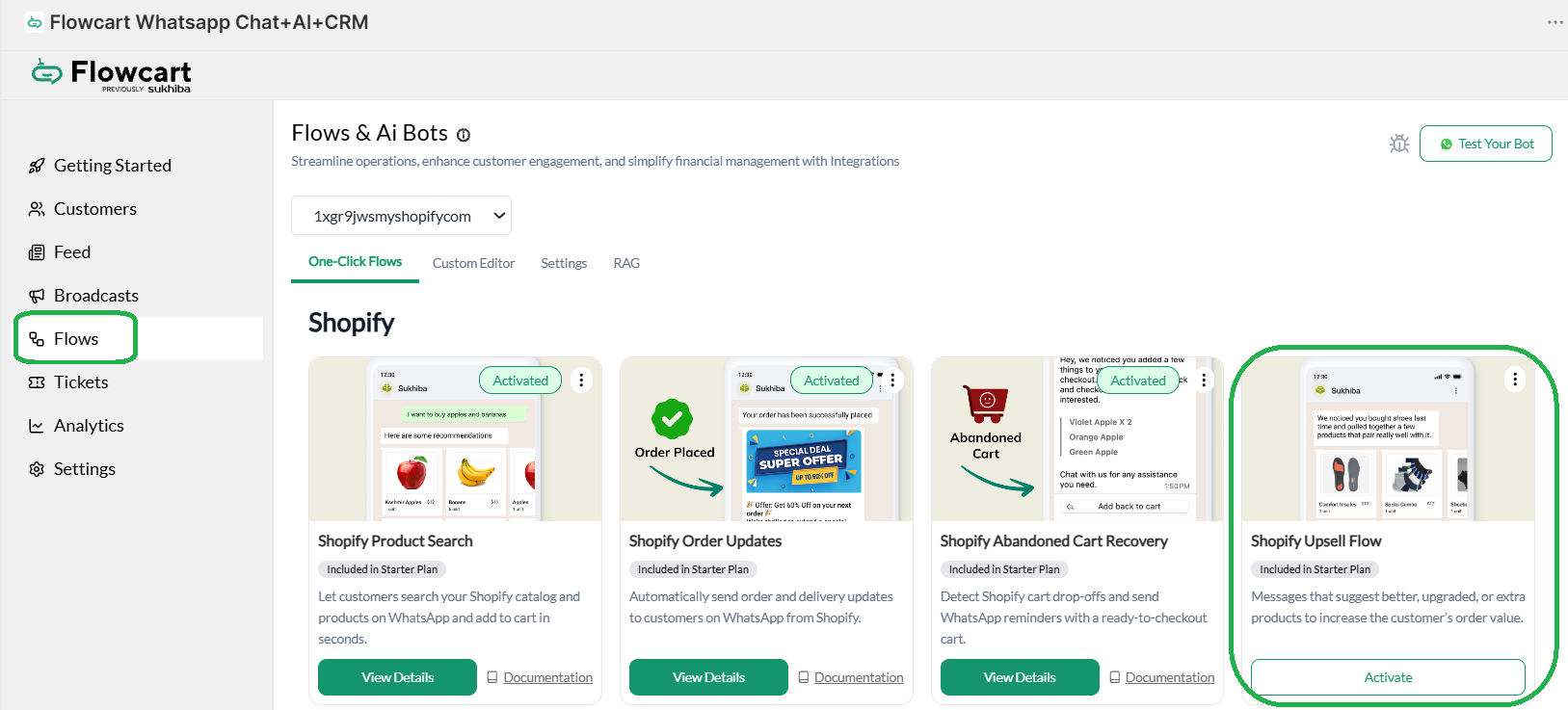
- Click on Activate, and this window will open
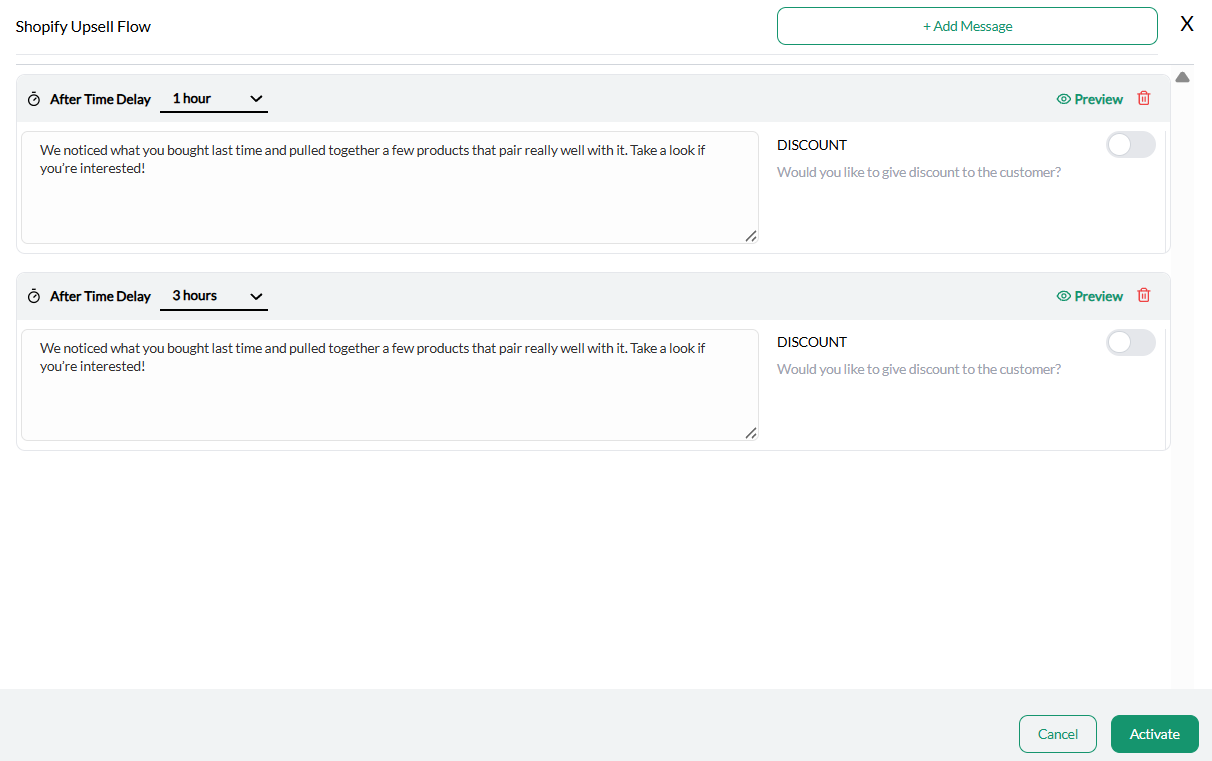
- Trigger one or two upsell messages by configuring the After Time Delay setting
- Edit or rewrite the pre-existing copy to personalize your Upsell message copy
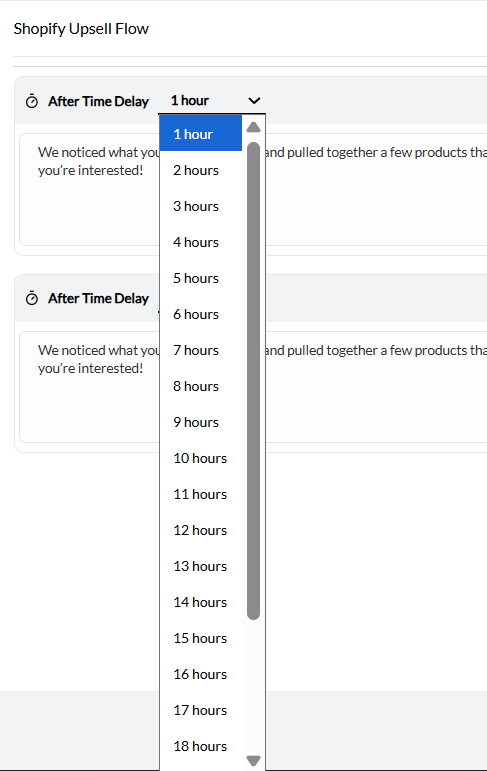
- Toggle the discount setting on to offer a flat or a percentage discount

You can also add more message templates; however, two are recommended.
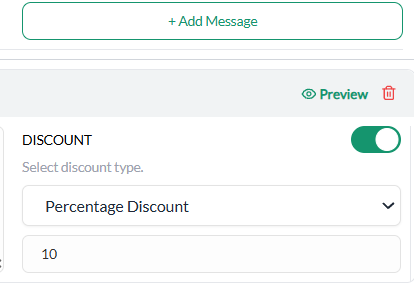
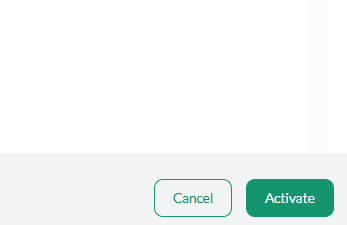
Once done, Activate the flow using the button at the bottom:
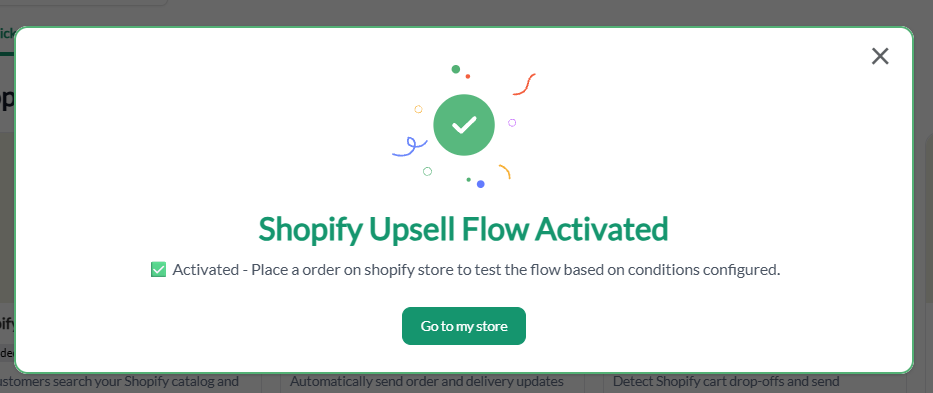
You can Go to your store by clicking on this pop-up after:
Install the Flowcart Shopify Plugin and get started for free
Other Upsell Strategies
Before your customer reaches the post-delivery window, there are four moments inside your store where you can and should be upselling. Here are the best approaches for each, with honest pros and cons.
Strategy 1: Pre-Add-to-Cart
The pre-add-to-cart strategy on the product details page. At this point, your customer is still in research mode. They are comparing specs, reading reviews, and deciding if this specific item solves their problem.
👀 Point to remember: Since they haven’t committed to a purchase yet, you should not try to sell ‘more’ here. What you can do is help them build a better version of their order.
For example, you can present a ‘frequently bought together’ bundle or show them a premium version of the product they’re browsing. It will nudge them toward a higher-value decision while they are still open to influence.
📌 Let’s look at the Shopify upsell apps that can help you with it:
Selleasy
via Selleasy
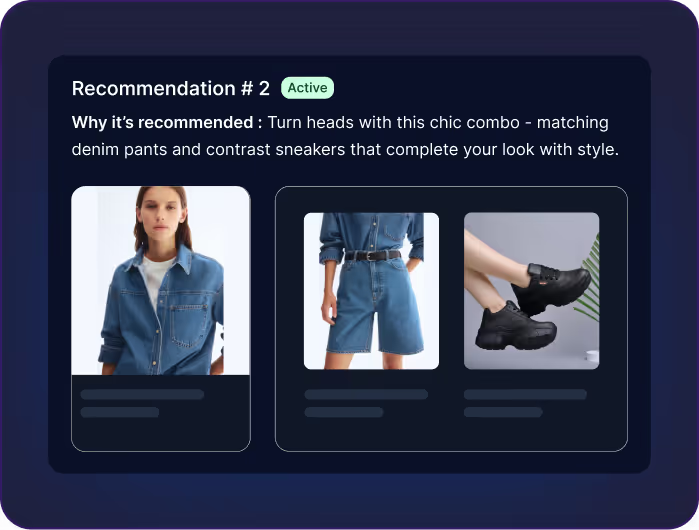
Selleasy recreates the ‘Amazon-style’ bundling experience. It embeds upsell widgets, such as product add-on grids and bundle offers, directly into your page layout. This makes the suggestions feel like a native part of the shopping experience rather than an advertisement.
It’s particularly effective for stores with logical accessory pairings, such as electronics or apparel, where a ‘Complete the Look’ section can provide genuine value to users.
Candy Rack
via Candy Rack
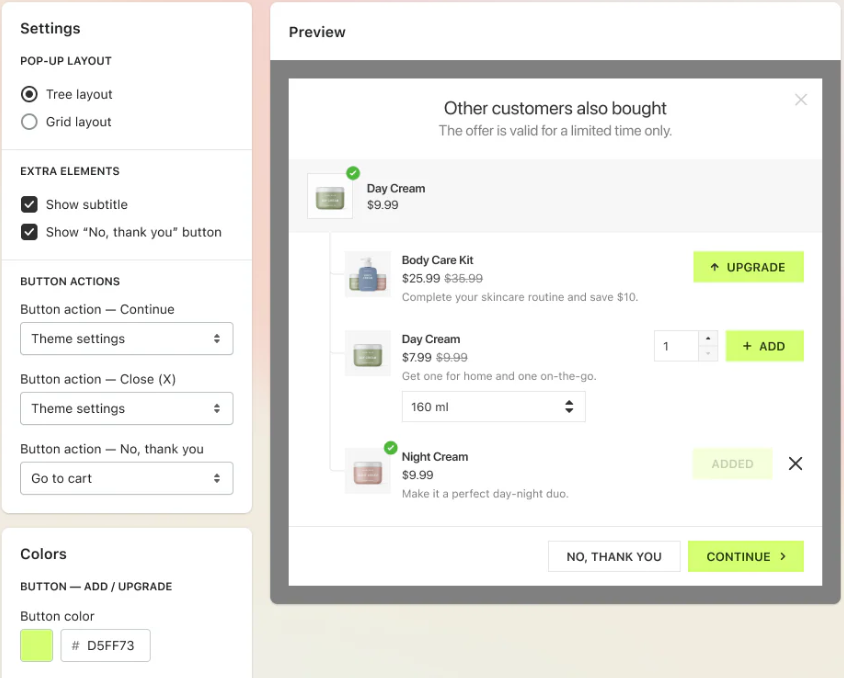
Candy Rack focuses on the exact millisecond a customer decides to buy. It triggers the moment a customer interacts with the ‘Add to Cart’ button. With it, you can catch the user at the peak of their interest. To keep things relevant, the app uses an AI-driven ‘Smart Auto-Upsell’ engine that looks at your store’s sales data to suggest the most likely product the customer will want next.
This app is an ideal choice for merchants who want to offer premium services or small add-ons without cluttering their product page. The offer appears in a modal window; you can use it to pitch invisible upgrades like extended warranties, gift wrapping, or priority processing.
Strategy 2: Added to Cart
Once a customer clicks ‘Add to Cart,’ their intent shifts from browsing to buying. Now, the customer has mentally committed to the purchase but hasn't yet entered the checkout environment.
👀 Pay attention: At this stage, do not try to sell them a different product; instead, increase the value of the decision they’ve already made.

For example, use a slide-out cart drawer or a cart pop-up to present impulse items or progress-based rewards that feel like a bonus.
📌 Let’s look at the Shopify upsell apps that can help you with it:
iCart
via iCart
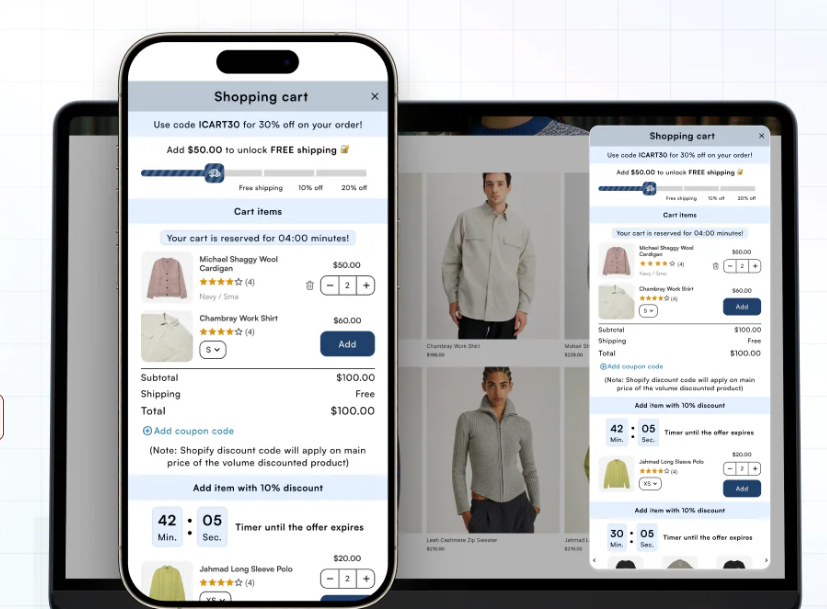
iCart is a comprehensive cart drawer editor that turns the standard Shopify side-cart into a dedicated sales funnel. You can replace the default, often static cart with a Smart Cart. It features progress bars, product recommendations, and time-sensitive offers.
The Shopify app packs a sheer amount of utility into the cart experience: you can add a free shipping tracker to motivate higher spending or include a gift wrap toggle right next to the checkout button.
Merchants who want total control over the pre-checkout experience without needing a developer can try this out.
AOV.ai
via AOV.ai
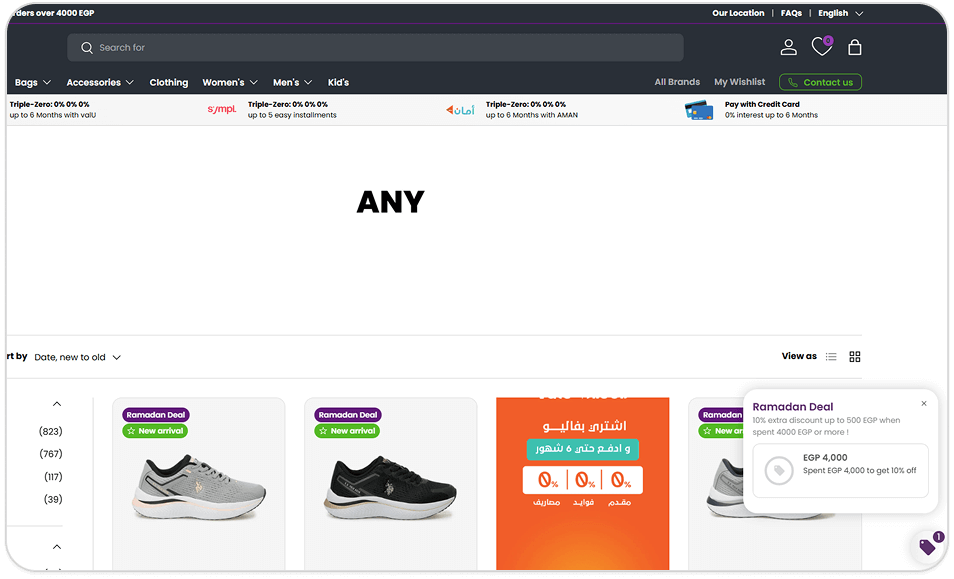
AOV.ai focuses on data-driven results with a heavy emphasis on gamification and Smart Rewards. It uses tiered rewards, like free gifts or ‘Buy X Get Y’ offers, to increase the Average Order Value (AOV).
You can also use the built-in AI-powered insights to recommend the specific campaigns that will work best for your unique store data. It is the ideal choice for high-growth DTC brands that rely on promotions and gift-with-purchase strategies to drive volume.
Strategy 3: Checkout Page
The checkout page is the highest-intent moment on your site. Your customer has navigated through your store, added items to their cart, and is now ready to finalize the transaction.
👀 Remember: This is also the most critical placement for an upsell. Because the customer is focused on completing a task, any friction or distraction can trigger a last-second hesitation, leading to a lost order.

This space is strictly regulated by Shopify; advanced checkout customizations and order bumps are exclusively available to Shopify Plus merchants using Checkout Extensibility.
📌 Let’s look at the Shopify upsell apps that can help you with it:
Aftersell
via Aftersell
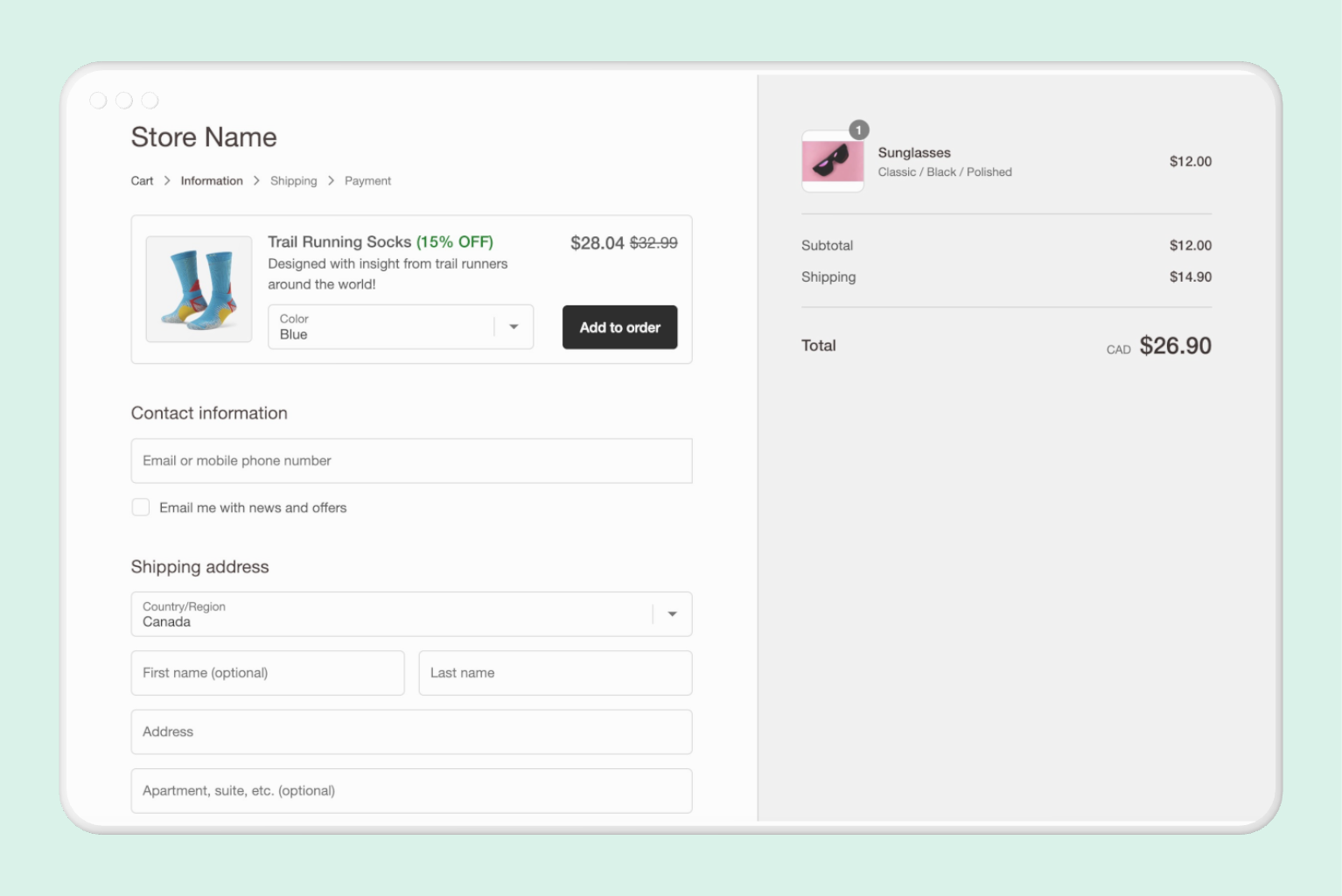
Aftersell uses native Checkout Extensibility blocks to insert seamless order bumps and small, checkbox-style offers directly into the shipping or payment pages. It's Smart Funnels engine uses AI and specific audience rules to ensure the item being offered is highly relevant to what is already in the checkout.
This app is for high-volume, enterprise-level brands that need a no-code solution that feels completely native to the Shopify checkout. It’s perfect for offering simple, decision-free add-ons like shipping insurance, priority processing, or small accessories.
ReConvert
ReConvert uses the Checkout Blocks functionality to allow Shopify Plus merchants to build trust and increase value simultaneously. You can mix promotional offers with functional elements, such as trust badges, custom text, or reviews, right at the point of purchase.
It is suitable for merchants who want a full-funnel approach to upselling. While Aftersell focuses heavily on the product itself, ReConvert lets you wrap that offer in social proof.
For example, you can show a frequently bought together item alongside a 5-star review, all within the checkout flow.
Strategy 4: Thank-You Page / Post-Checkout
Thank-you page or post-checkout is widely considered the sweet spot for upselling because the hard part, which is securing the initial sale, is already done. These offers appear immediately after the customer clicks ‘Pay Now’ but before they reach the final order confirmation page.
👀 The best part? Because the original transaction is secured, you can present a high-value offer that the customer can add to their order with a single click, without re-entering their credit card details or shipping address.
📌 Let’s look at the Shopify upsell apps that can help you with it:
Zipify OCU (One Click Upsell)

via Zipify
Zipify OCU works on the Funnel Builder logic. It maximizes the profit of every single visitor. You can create elaborate sequences: if a customer accepts an upsell, show them a second one; if they decline, show them a lower-priced downsell.
It is best suited for performance-driven marketers who want to squeeze the maximum value from every transaction. The app also includes split-testing tools as a core feature. If you have a high-margin product and want to build a sophisticated funnel to guide the customer through multiple offers, Zipify can help.
Wiser

via Wiser
Wiser is an AI-powered personalization engine focused on contextual product recommendations. Unlike tools that require you to manually build every funnel, Wiser comes with smart automation. It analyzes a shopper’s browsing history, past purchases, and real-time behavior to automatically serve the most relevant post-purchase offers.
This app is the go-to for merchants with larger, more complex catalogs who don't have the time to manually map rules for every SKU.
Which Combination is Right for Your Store?
While the right stack setup depends on where you are and what you're trying to fix, here's how to think about it:
If you're just getting started, Selleasy is the lowest-friction entry point. It covers the product page well and won't require a developer to configure.
If your thank-you page isn't doing anything, ReConvert or Aftersell are solid starting points for capturing the immediate post-checkout window. But the thank-you page has a hard ceiling: once the tab closes, that opportunity is gone.
If you're on Shopify Plus, Aftersell gives you both checkout and thank-you page upsells under one roof.
If customers are buying once and not returning, that's not an on-site problem; no widget is going to fix it. Flowcart's post-purchase WhatsApp Flows reach customers after the browser closes, across both the in-transit and post-delivery windows, when trust is highest, and the next purchase is most likely.
The Upsell Stack that Works After Hours
Every upsell strategy in this guide comes down to one thing: timing. The right offer at the wrong moment either gets ignored or costs you the sale entirely. Get the timing right, and two things follow: increasing AOV and an improving customer relationship that extends well beyond the checkout page.
While the four on-site moments will deliver results, the merchants consistently seeing the highest repeat purchase rates are the ones who don't let the conversation end when the tab closes.
Schedule a demo with Flowcart and see how post-delivery WhatsApp flows can turn one-time buyers into repeat customers on autopilot.

.png)





%201.webp)




.png)