
Key Takeaways
WhatsApp Webviews keep the entire shopping journey in chat, cutting redirects and boosting checkout conversions.
Ecommerce brands can use Webviews for browsing, reorders, COD verification, returns, and abandoned cart recovery inside WhatsApp.
Flowcart lets you design fast, mobile-first Webviews and in-chat checkout that drive higher revenue from WhatsApp.
You’ve perfected your product. You’ve nailed your pricing. You’ve built a brand people trust.
Yet the sales still don’t match the effort. Customers browse, add items to their cart… and disappear.
Why? The moment you redirect your customers for payment, you introduce friction. Over 70% of shopping carts are abandoned, and 22% of shoppers drop off simply because the checkout feels too long or too complicated.
This is where WhatsApp Webview comes in. It lets customers browse products, view details, and complete checkout without ever leaving WhatsApp.
Here’s a guide on how Webviews work, real ecommerce use cases, and best practices to get started.
What Are WhatsApp Webviews for Ecommerce and Why Does it Matter?
WhatsApp Webviews let you load mini web pages inside WhatsApp without opening a browser or redirecting customers to your website. Think of them as tiny app screens that appear right within the chat. Your customers can browse products, compare variants, apply coupons, select quantities, and complete checkout in a single, uninterrupted flow.
For ecommerce brands, this is important because shoppers today expect speed and simplicity. The moment they are pushed out of WhatsApp, even for something as small as adding an address or choosing a payment option, conversion rates take a hit.
Webviews remove that friction completely by keeping the entire shopping journey within WhatsApp. This matters because:
- Customers trust WhatsApp and feel comfortable buying where they already chat.
- Fewer redirects mean fewer drop-offs and higher conversion rates.
- The experience feels app-like, but without building or maintaining an actual app.
- You can personalise, guide, and convert users in real time using automation and Webviews
How to Build High-Converting WhatsApp Webviews for Ecommerce
Creating a WhatsApp Webview requires building a fast, intuitive, and trustworthy user experience. Here’s how to build Webviews that actually convert:
1. Start With a Clean, App-Like Layout
Webviews open in a compact mobile window, so they demand simplicity. Use a clean layout with clear product images, large tap-friendly buttons, and minimal text. Remember that every extra scroll or cluttered detail increases the chance of a drop-off.
2. Showcase Products With High-Intent Information
Customers inside WhatsApp are already warm leads. Provide them with all the information they need to buy, including pricing, variants, reviews, stock status, and delivery timelines. The more clarity you provide upfront, the faster they will convert.
3. Reduce Steps in the Checkout Process
A great Webview compresses checkout into the fewest possible actions. Prefill customer details using WhatsApp data wherever possible, support fast payment options, and allow users to complete the order in under a minute.
Less typing = more conversions.
5. Make the Transition Seamless With Quick Replies
Pair your Webviews with preconfigured quick replies such as “Add to Cart,” “View Offers,” “Proceed to Payment,” or “See Similar Products.” This creates a guided, conversational journey instead of a static browsing experience.
6. Optimize for Speed
Slow Webviews kill ecommerce revenue. Compress images, load only essential elements, and ensure the page opens instantly inside WhatsApp. A Webview that loads faster can significantly boost conversions.
7. Test, Iterate, and Improve
Track exactly where shoppers drop off, whether it’s during variant selection, at the cart, or right before payment. Small tweaks in button placement, product order, or copy can boost conversions without changing the entire experience.
Also Read: WhatsApp Lead Generation in 2026: Proven Strategies to Drive High-Quality Leads
Best Ecommerce Use Cases for WhatsApp Webviews
WhatsApp Webviews turn casual chats into complete shopping journeys. Here are the most powerful ecommerce use cases, each serving a unique stage of the buying cycle.
1. Seamless Product Browsing
Instead of sending product links, open a clean, mobile-first catalog inside WhatsApp. Customers can scroll through collections, view images, read details, and explore items just like they would on an app, but minus the friction.
2. Smooth Size and Variant Selection
When customers ask, “Do you have this in medium?”, a Webview can instantly show all available sizes, colors, and variants in one place. It removes guesswork and speeds up decision-making.
3. Guided Product Discovery
Use a Webview to display curated picks based on customer queries or past interactions through best sellers, similar products, or personalized recommendations. This makes it feel like a real-time shopping assistant inside the chat.
4. COD Verification and Order Confirmation
COD orders often fail due to wrong addresses or unverified intent. With Webviews, customers can quickly confirm their order, validate their address, or complete an OTP step right inside WhatsApp to improve delivery success rates.
5. One-Click Reorders and Subscription Renewal
For repeat buyers and subscribers, convenience is everything. Webviews allow you to load a fully prefilled checkout with their saved products, preferred quantities, subscription frequency, and payment details, turning reorders into a one-tap experience.
6. Flash Sales and Limited-Time Offers
Create urgency by launching a Webview packed with limited-time offers, flashing countdown timers, and “only 3 left” stock badges. Because shoppers can browse the deal, claim the discount, and complete payment right inside WhatsApp, they’re far more likely to buy on the spot.
7. Abandoned Cart Recovery
Open a Webview that recreates the customer’s cart inside WhatsApp, complete with items, updated prices, auto-applied coupons, delivery timelines, and payment options. Eliminating redirects shortens the checkout path, reduces drop-offs, and consistently improves abandoned cart recovery.
8. Product Comparison for Informed Buying
When customers are torn between options, Webviews present a clean comparison of features, specs, and pricing to help customers make faster decisions. This is especially useful for brands in the electronics, fashion, and beauty industries.
9. Easy Returns and Exchange Requests
Make after-sales effortless by letting customers submit return or exchange requests through a Webview. They can select the reason, upload product images, choose a pickup slot, and track the status without contacting support. The result is a smoother process and a far better customer experience.
Read More: How to Run WhatsApp Marketing Campaigns in 2025: Step-by-Step Guide
Common Mistakes Ecommerce Brands Make with WhatsApp Webviews
WhatsApp Webviews can improve conversions when they are used correctly. However, many ecommerce brands implement them without understanding how customers behave inside WhatsApp. These are the most common mistakes to avoid:
1. Adding too much information inside one Webview
A Webview should feel focused and easy to navigate. Many brands place long descriptions, too many product options, or extra sections that make the page feel crowded. When customers see an overloaded Webview, they feel overwhelmed and often exit before taking action.
2. Slow loading times
Customers on WhatsApp expect pages to open immediately. When images are heavy or the design is not optimized, the Webview loads slowly, and users quickly lose patience. A Webview should open almost instantly to maintain interest.
3. Asking customers to enter information manually
Brands often forget to prefill basic details such as name, phone number, or address. When customers must type everything again, the checkout experience becomes tiring. Using available customer data to prefill fields creates a much smoother flow.
4. Using layouts that are not mobile-friendly
A large number of Webviews feel like shrunken websites rather than mobile-first experiences. Buttons are hard to tap, and the layout requires too much scrolling. Since WhatsApp is used entirely on mobile, the Webview must feel as smooth as a native app.
5. Forgetting essential post-purchase actions
Customers often need to confirm COD orders, request returns, or track their deliveries. When brands fail to include these options inside Webviews, customers have to contact support manually. This adds friction and reduces trust in the buying experience.
8. Providing generic pages without personalization
A basic product page inside WhatsApp rarely converts as well as a personalized view. Many brands forget to highlight relevant products, apply available coupons, or use urgency cues such as low stock alerts. Personalization helps customers complete purchases much faster.
When brands avoid these mistakes, WhatsApp Webviews create fast and simple shopping journeys that feel natural to customers and lead to higher conversion rates.
How Flowcart Helps You Build High-Converting WhatsApp Webviews’
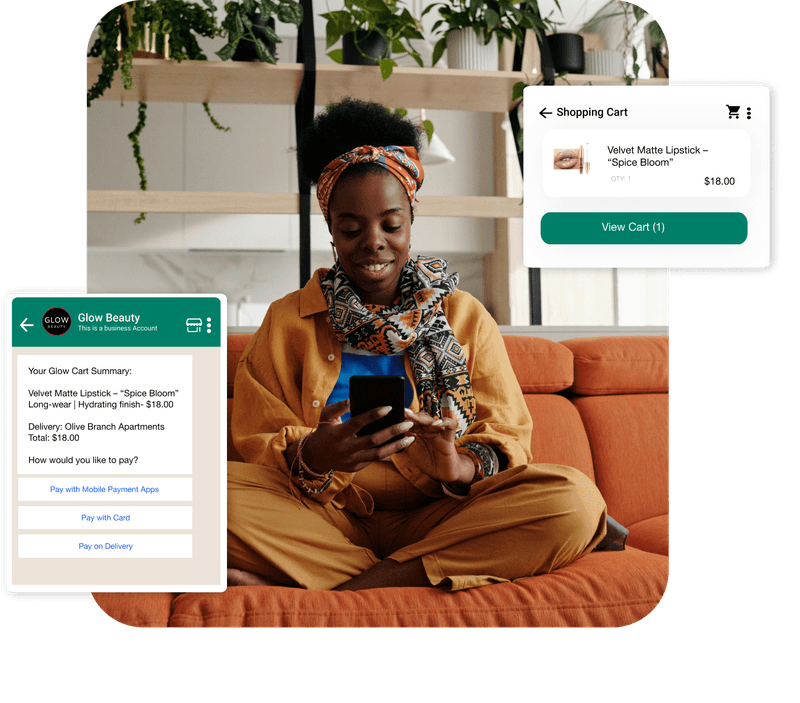
Flowcart is a dedicated in-chat checkout platform that helps ecommerce brands turn WhatsApp into a complete shopping channel and design app-like shopping experiences right inside WhatsApp through fast, mobile-first Webviews.
With Flowcart’s In-Chat Checkout, you can build product displays, variant selectors, carts, and full checkout pages that open instantly within the chat.
Key Features
Here are the features that make Flowcart one of the most powerful WhatsApp Webview builders for ecommerce:
- Fully In-Chat Checkout Flow: Flowcart enables customers to complete the entire purchase process from product selection to payment inside WhatsApp. No browser redirects, no external forms.
- Auto-Filled Customer Details: When a customer shops via WhatsApp, Flowcart can pull their name, phone number, and address automatically (or let them share a live location), reducing friction and speeding up checkout.
- Support for Multiple Payment Methods: Customers can pay via mobile payment apps, cards, or cash, whichever payment option your business supports, right within the Webview.
- Abandoned Cart Recovery via Automated WhatsApp Nudges: If a customer leaves without completing checkout, Flowcart’s automated flows can send reminders or incentives through WhatsApp to bring them back and complete the purchase.
- Retention and Loyalty Tools Inside WhatsApp: Flowcart supports loyalty programs, targeted campaigns via smart segmentation, and tailored broadcasts, enabling businesses to re-engage customers and drive repeat purchases without leaving chat.
- Customizable Checkout Flows and Business Logic: Flowcart gives you the flexibility to adapt checkout flows based on order type, payment method (prepaid vs COD), delivery location, or user profile, ensuring that checkout works smoothly for different customer segments.
Explore Flowcart pricing here.
Customer Testimonial
Samaking, a fast-growing farm-to-retail platform, struggled with a fragmented customer journey where orders came through calls, emails, and scattered WhatsApp messages. As they expanded operations and opened new outlets, this manual process made it difficult to track inquiries, manage order flow, or maintain consistency across sales teams.
They needed a unified way to let customers browse, order, and pay without friction, especially as customer interactions were expected to grow significantly.
Flowcart solved this by shifting Samaking’s entire shopping experience into WhatsApp through Webviews and in-chat checkout. Customers could now browse the full product catalog, update quantities, and complete payments in a structured storefront inside WhatsApp.
The impact was clear: 50 percent month-on-month revenue growth, 100 percent of transactions running through Flowcart, and half of all WhatsApp sales coming from a mix of new and repeat buyers.
Read the success stories of other businesses that solved their business problems through Flowcart WhatsApp marketing and in-chat checkout. If you are ready to go, start a free trial now!
Frequently Asked Questions (FAQs)
1. What is a WhatsApp Webview for ecommerce?
A WhatsApp Webview is an in-app browsing window that lets shoppers explore products, choose variants, and complete purchases without leaving WhatsApp. It delivers an app-like shopping experience inside the chat itself, keeping the entire journey in one place.
2. How do WhatsApp Webviews improve checkout conversions?
Webviews reduce drop-offs by removing redirects and long checkout paths. Customers can browse, fill in details, and pay in the same conversation, which shortens decision time and increases the likelihood of completing the order.
3. Can WhatsApp Webviews integrate with my existing ecommerce website?
Yes. Webviews can pull product information, stock levels, cart data, and payment options directly from your existing ecommerce backend.
4. Are WhatsApp Webviews secure for payments?
Yes. WhatsApp Webviews support secure payment gateways that follow standard encryption and compliance protocols. Customers can complete online payments or COD confirmations safely within the Webview environment.
LinkedIn Post
Today, most customers discover products on WhatsApp… but checkout still pushes them to a website, a browser tab, or a long form. That’s exactly where the drop-offs happen.
The real shift happening now is simple:
Customers want an app-like shopping experience without leaving the chat.
That’s where WhatsApp Webviews change the game.
At Flowcart, we help ecommerce brands turn WhatsApp into a complete shopping channel, not just a messaging platform. With fast, mobile-first Webviews and in-chat checkout, brands can:
✔ Let customers browse, compare, select variants, and pay
✔ Auto-fill customer details to shorten checkout
✔ Support multiple payment methods within the chat
✔ Recover abandoned carts using structured automated nudges
✔ Create repeat purchases and loyalty journeys without external links
The result is a seamless buying experience that feels like an app and converts like one without ever asking the customer to leave WhatsApp.
If your website is the bottleneck, the solution isn’t design upgrades.
It’s bringing the entire shopping journey into chat.
Read this blog on WhatsApp Webview for deeper insights, use cases, and best practices.






%201.webp)




.png)