.png)
.png)

Key Takeaways
Keep the entire shopping journey inside WhatsApp with Webview to reduce redirects, friction, and cart abandonment.
Use Webview for campaigns, cart recovery, flash sales, and reorders to capture impulse buys and repeat purchases in chat.
Launch Webview with Flowcart using store sync, in-chat checkout, optimized UX, and automation for cart recovery and reorders.
You’ve done everything to drive sales, right from great products and big discounts to attention-grabbing offers. Yet shoppers still abandon carts. Sure, they add items, but they don’t complete the purchase.
You will be surprised to know that about 70% of online shoppers abandon carts, and out of those, roughly 18–22% leave because the checkout is long or confusing. That’s the gap that WhatsApp webview shopping fixes.
It keeps the entire shopping flow inside WhatsApp for a smooth, uninterrupted experience that reduces drop-offs and boosts conversions.
Want to see how it works and set it up? Here’s a step-by-step guide.
What is WhatsApp Webview?
WhatsApp Webview is a feature that lets customers browse products, add items to their cart, and complete their purchase without ever leaving WhatsApp. Instead of sending shoppers to your website or another app, Webview opens a mini storefront right inside the chat.
With WhatsApp Webview, you bring your entire shopping experience into the same window where your customer is already talking to you. They tap a button, a clean and mobile-friendly product page appears, they choose what they want, fill in details, make the payment, and confirm their order.
This changes the shopping experience completely. No redirects. No switching apps. No complicated checkout pages. It reduces friction and keeps customers focused on buying, leading to fewer abandoned carts and higher conversions for your business.
Also Read: WhatsApp Chatbot for Business: How to Automate Support & Boost Sales in 2025
Webview Shopping Flow: Step-by-Step Breakdown
Here is how the entire WhatsApp Webview shopping experience works from the moment a customer shows interest to the moment they place an order:
1. Customer receives your message or CTA
It could be a broadcast, a chatbot reply, a campaign message, or even a manual message from your team. The customer taps a button like Shop Now, View Product, or Checkout.
2. Webview opens inside WhatsApp
Instead of redirecting the user to your website, a clean mini-storefront opens right inside WhatsApp. This is your Webview. It loads instantly and feels familiar, so the customer stays engaged.
3. Customer browses products
Customers can view images, read descriptions, choose variants, and explore pricing without leaving the chat. The interface is mobile-first, which makes browsing easy and quick.
4. Add to cart inside Webview
Once they find something they like, they tap Add to Cart. The cart updates instantly and stays visible within the Webview window.
5. Seamless checkout inside WhatsApp
The customer enters details like name, address, and delivery preferences directly within the Webview. No redirects or switching between apps, everything happens in the same flow.
6. Payment inside Webview
Supported payment options appear in the Webview, allowing the customer to complete the transaction smoothly. This eliminates the biggest drop-off point caused by external redirects.
7. Instant order confirmation
Once the payment is done, the customer sees a confirmation screen right inside WhatsApp. A follow-up message can also be sent automatically with order details or tracking information.
8. Continue the chat or shop more
The customer goes right back to the WhatsApp chat. They can ask more questions, browse recommended items, or reorder in the future.
This step-by-step flow keeps everything inside WhatsApp, where your customer already feels comfortable. Just a fast, intuitive shopping experience that leads to higher conversions and fewer abandoned carts.
Read More: Why WhatsApp is the Future of Conversational Commerce
Use Cases of WhatsApp Webview for Shopping (2026)
Here are some scenarios where WhatsApp Webview really shines, helping businesses sell more and shoppers buy more easily, all inside a chat.
1. Impulse buys during chat campaigns
You send a message about a hot deal or new product on WhatsApp. Instead of sending a link to your website (which might get ignored), Webview lets the customer open a mini store right inside WhatsApp to see the product, add to cart, and checkout. That “one-tap buy” helps capture impulse purchases before interest fades.
2. Cart recovery with zero friction
Got a customer who added items but didn’t complete checkout before? With Webview, you can nudge them via WhatsApp. They click, revisit their cart, and complete payment, without leaving the app. Easier follow-up and less drop-off at the last step.
3. Flash sales and limited-time offers
For flash sales or time-limited discounts, speed matters. Sending a Webview-based offer means people don’t waste time waiting for a website to load. They see the deal, grab it, check out, all within a few seconds inside WhatsApp. That convenience drives higher conversion.
4. Personalized shopping with live support
For products that need guidance, like clothes, gadgets, or gifts, you can combine live chat support with Webview. A sales rep chats with the customer, helps pick the right item, then sends a Webview link to complete checkout.
5. Easy reorders and subscriptions for regular purchases
If someone buys a consumable (skincare, groceries, supplements), Webview makes reordering simple. You can send a “reorder now” button via WhatsApp. The customer taps, pays, and the order is placed without the need to search your store again. This is great for building repeat business with minimal friction.
6. Post-sale upsells and cross-sells
Once a customer buys something, Webview lets you show recommended add-ons or complementary products right within WhatsApp. Want to suggest a matching accessory or an extended warranty? Just send a quick Webview link. It feels natural and encourages extra sales.
7. Empowering small businesses and local sellers
For small shops or local artisans that rely on WhatsApp to chat with customers, Webview lets them have a storefront without building a full website. They can send catalogs, accept orders, and process payments inside WhatsApp. It’s a game-changer for sellers who want simplicity and low overhead.
Also Read: How to Run WhatsApp Marketing Campaigns in 2025: Step-by-Step Guide
Common Challenges When Implementing WhatsApp Webview for Shopping
Even though WhatsApp Webview makes shopping smoother, businesses often run into a few roadblocks when setting it up. These challenges include:
1. Connecting your product catalog correctly
Many brands struggle with syncing their website or inventory system to WhatsApp Webview. If product details, prices, or stock levels don’t map properly, the Webview can show outdated information, leading to customer frustration.
2. Getting payments to work inside Webview
The biggest drop-off happens when payments fail to load or redirect. Setting up in-Webview payment gateways requires backend work, API permissions, and proper testing. Without this, you might push users back to external payment apps, defeating the purpose.
3. Designing a smooth flow for mobile
Webview must load fast and feel intuitive. If the layout is cluttered, slow, or not mobile-friendly, customers drop off quickly. Many businesses underestimate how important UX is inside a small Webview window.
4. Handling edge cases during checkout
Shipping rules, taxes, coupon codes, and delivery availability are some factors that can break the Webview experience if not configured properly. Errors during checkout confuse customers and lead to abandoned purchases.
5. Limited testing before going live
Brands often launch Webview without checking every device type, network speed, and payment scenario. A flow that works perfectly on one phone can fail on another. Without thorough testing, the real-world experience may fall short.
6. Customer trust and first-time confusion
Some shoppers are new to in-chat shopping. If the Webview looks unfamiliar or asks for too much information upfront, they may hesitate. Clear labels, secure payment options, and simple steps help build trust.
7. Backend systems that are not ready
WhatsApp Webview needs proper integrations with CRM, order management, shipping partners, and payment gateways. If any backend system is outdated or slow, the Webview experience suffers.
Step-by-Step Setup: How to Launch Webview Shopping with Flowcart
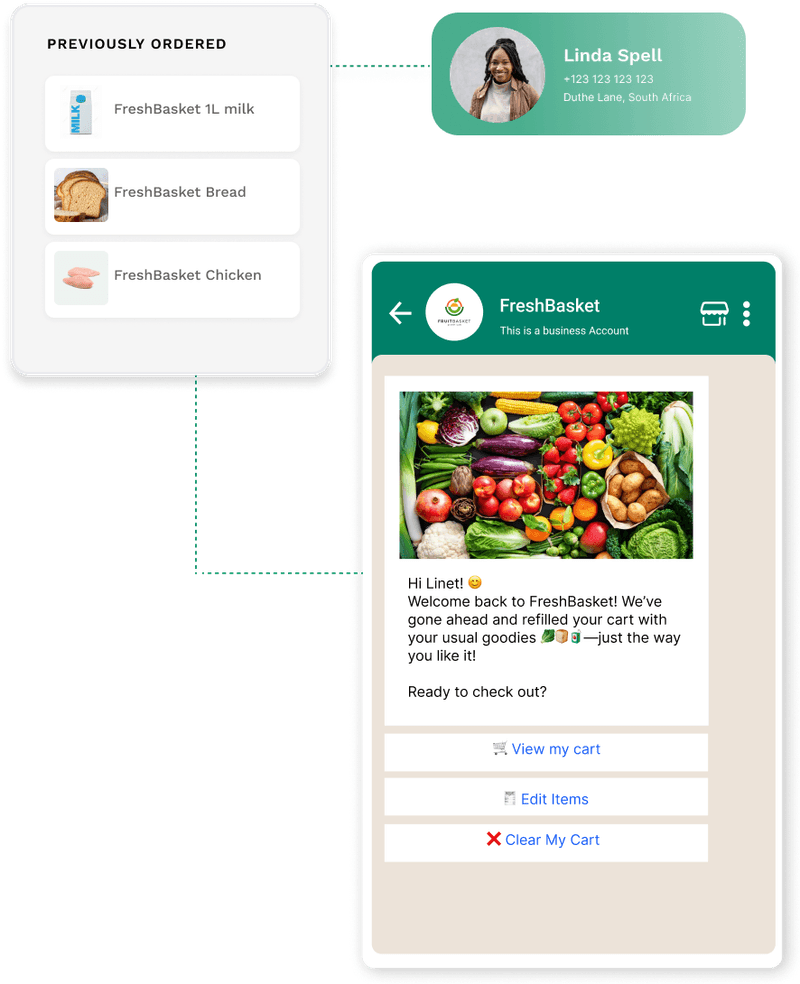
Flowcart is a WhatsApp-first commerce platform that turns chats into full shopping experiences. It lets businesses offer product browsing, checkout, payment, and order confirmation entirely inside WhatsApp.
Here’s what Mkurugenzi has to say about their experience using Flowcart WhatsApp Webview,
“Our WhatsApp funnel used to stop at interest. Now it ends in revenue. In-chat checkout has changed the game for us.”
Explore more customer success stories with us.
Follow this step-by-step procedure to begin using WhatsApp Webview with Flowcart:
1. Connect your existing store or catalog to Flowcart
If you already have an online store (on Shopify, WooCommerce, etc.), connect it with Flowcart so your product catalog, including images, prices, and inventory, gets synced. This ensures the Webview inside WhatsApp shows accurate and up-to-date info.
2. Enable In-Chat Checkout
On Flowcart’s dashboard, activate the “In-Chat Checkout” (or “In-Chat Webview/Checkout”) feature. This makes it possible for customers to complete their purchase from cart to payment directly inside WhatsApp.
3. Configure checkout and payment options
Flowcart supports a variety of payment methods, including mobile wallets, UPI (in markets like India), cards, and more, depending on the region. Configure the gateway you want to use, test payments, and make sure checkout works smoothly in chat.
4. Build or design the shopping flow inside WhatsApp
Using Flowcart’s no-code builder, design how you want customers to interact (e.g., welcome message, product catalogue, cart creation, checkout button). You can also automate parts like cart recovery, customer segmentation, follow-up messages, etc.
5. Personalize user experience: auto-fill, location, cart suggestions
Flowcart auto-fills basic customer info (name, number, address) from WhatsApp, allows one-tap address sharing via live location, and supports AI-powered cart generation or product suggestions, making the process faster and more user-friendly.
6. Test the full flow thoroughly before going live
Simulate the steps: from product selection, cart addition, checkout initiation, payment completion, to order confirmation. Ensure layout works, payments succeed, info flows correctly, and order data syncs with your backend store.
7. Launch and monitor performance
Once satisfied, make the Webview live. Use Flowcart’s analytics and tracking to monitor conversions, cart drop-offs, checkout times, and cart recoveries to optimise based on real data.
8. Optionally enable automated flows: cart recovery, reorders, post-purchase engagement
You can set up automation: abandoned-cart recovery, re-order reminders, loyalty programs, cross-sells or upsells to maximize customer retention and lifetime value. Automated follow-ups can help reach up to 800% more cart recoveries.
WhatsApp Webview is reshaping the way brands sell by turning conversations into instant shopping experiences. It reduces friction, increases conversions, and meets customers exactly where they already spend their time: inside WhatsApp.
If you are ready to launch a smooth, high-converting in-chat shopping experience, Flowcart makes it incredibly easy to get started. Explore Flowcart pricing and Book a demo now!
Frequently Asked Questions (FAQs)
1. What is WhatsApp Webview for shopping?
WhatsApp Webview lets customers browse products, add items to their cart, and complete checkout inside WhatsApp. Instead of opening a website or switching apps, shoppers stay in one place and finish the entire buying journey within the chat.
2. Is Webview secure for making payments?
Yes. Payments inside WhatsApp Webview use the same secure gateways and encryption standards you rely on for online checkout. The shopping flow happens inside WhatsApp, but payment processing follows your trusted payment provider’s security protocols.
3. Do customers need to install anything extra to use Webview?
No. Shoppers only need WhatsApp on their phone. When they tap the call-to-action, the Webview opens automatically. There are no downloads, no extra steps, and no technical setup required on the customer side.
4. Does Webview redirect at the end?
A properly set up Webview can handle the entire checkout flow from product selection, address input, payment, to confirmation right inside WhatsApp. If all elements are integrated correctly, there is no need to redirect customers to external pages.
LinkedIn: Why Websites Are Losing and Chats Are Winning
There was a time when website design decided who won ecommerce.
Today, the checkout experience decides it.
And customers are very clear about what they don’t want:
- redirects
- slow-loading pages
- long forms
- switching apps to complete payments
Every extra step costs revenue.
This is why in-chat checkout is becoming the new standard. When browsing, cart, payment, and confirmation happen inside WhatsApp, conversions rise and drop-offs shrink. Customers never leave the chat.
But WhatsApp doesn’t give you a plug-and-play checkout system. You need deep API work, a custom Webview, product sync, payment gateway integration, and a flow that doesn’t break midway.
Flowcart gives brands a complete in-chat shopping engine:
- automatic sync with your Shopify or WooCommerce store
- a ready-to-use WhatsApp Webview that opens instantly inside chat
- in-chat cart and checkout that work without redirects
- integrated payment options like UPI, wallets, and cards
- order confirmation and tracking delivered inside WhatsApp
- analytics to measure drop-offs inside each step of the flow
You get a fully functional WhatsApp storefront without writing a single line of code.
In 2026, the brands that win will be the ones that turn messaging apps into revenue channels, not just support channels. And that’s exactly the future we’re building with Flowcart.

.png)





%201.webp)




.png)