.png)
.png)

Key Takeaways
Learn how to set up WhatsApp Shopping catalogs, collections, and carts to create a mobile storefront that converts.
Discover promotion tactics like click-to-WhatsApp ads, social links, and broadcasts to drive high-intent WhatsApp product conversations.
See how Flowcart automation, analytics, and Shopify-integrated flows fix WhatsApp scale issues and boost conversion and retention.
A customer messages you late in the evening asking about your products. You send them your catalog, answer a few questions, and they place an order!
This is what selling through WhatsApp Shopping looks like, and lately it's becoming a practical sales channel for businesses of all sizes.
Traditional e-commerce brands face a well-known challenge: 70% of shoppers abandon their carts before completing checkout. Multiple steps, form fills, and account creation all add friction to the buying process.
WhatsApp Shopping takes a different approach. Instead of customers navigating your store alone, you can guide them through the purchase process in real-time or use a tool like Flowcart who guides them on your behalf. Answer their questions as they come up,share product information conversationally and help them make decisions without the friction of traditional checkouts.
Whether you're running a small business, managing a local retail store, or operating an established e-commerce brand, WhatsApp Shopping offers a way to add more personal interaction to your sales process.
This guide covers how to set up WhatsApp Shopping, promote your catalog effectively, and manage customer conversations that lead to sales.
What is WhatsApp Shopping?
WhatsApp Shopping is a built-in feature of WhatsApp Business that turns your business profile into a mobile storefront. Using WhatsApp Shopping, you can create a product catalog complete with images, descriptions, prices, and links.
Key Features of WhatsApp Shopping:
- Product Catalog: Display up to 500 products with high-quality images, detailed descriptions, and pricing
- Collections: Organize products into categories like "New Arrivals," "Best Sellers," or "Sale Items" for easier browsing
- In-Chat Purchases: Customers can browse, ask questions, and complete purchases without leaving the conversation
- Facebook/Instagram Integration: Sync your catalog across Meta platforms for seamless multi-channel selling
- Shopping Cart: Users can add multiple items and send their entire order in one message
Why Should You Use WhatsApp to Sell Products?
1. Unparalleled Reach and Engagement
WhatsApp boasts a 98% open rate within just minutes of message delivery. That's far beyond email marketing's average open rate. With 2 billion active users worldwide, you're meeting customers on a platform they check dozens of times per day.
Want to dive deeper into how WhatsApp compares to traditional channels? Check out our post on WhatsApp vs Email Marketing in 2025: Which One Wins?
2. Higher Conversion Rates
Customers who engage through chat are 2.8x more likely to convert compared to traditional e-commerce browsing. The personal, conversational nature of WhatsApp builds trust and removes friction from the buying process.
3. Direct, Personalized Communication
WhatsApp enables real-time, two-way conversations. You can answer questions instantly, provide personalized recommendations, and guide customers through their purchase decisions just like an in-store sales associate would.
4. Cost-Effective Marketing
WhatsApp messages have a 98% open rate and require minimal advertising spend compared to paid social media campaigns. Once you've built your contact list, you can reach customers directly without competing for attention in crowded ad auctions.
5. Streamlined Customer Journey
From product discovery to purchase to post-sale support, everything happens in one place. Customers don't need to navigate multiple websites, fill out lengthy forms, or switch between apps.
6. Improved Customer Retention
WhatsApp isn't just about making that first sale. With automated follow-ups and personalized messaging, businesses see 3x more repeat sales when they maintain customer relationships through WhatsApp.
Want to master this? Read our guide on How to Build Customer Loyalty Using WhatsApp Broadcasts in 2025.
How to Set Up WhatsApp Shopping: Step-by-Step Guide
Setting up WhatsApp Shopping is simpler than you might think. Let me walk you through it step by step.
Step 1: Download WhatsApp Business App
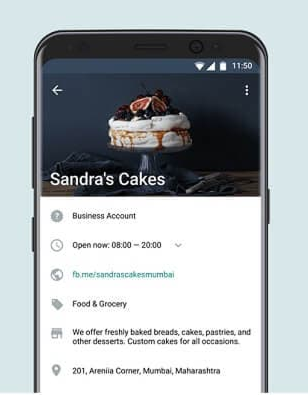
First things first. You need the WhatsApp Business app, which is different from the regular WhatsApp application. Download it from the Google Play Store or Apple App Store and register using a dedicated business phone number. This should be separate from your personal WhatsApp account.
Step 2: Create Your Business Profile
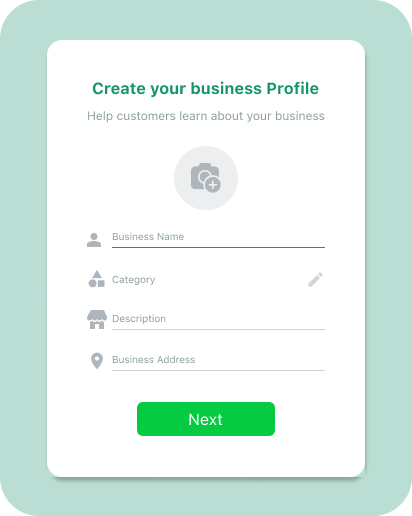
Your business profile is your digital storefront's front door. Make it professional and informative:
- Business Name: Use your official brand name for easy recognition
- Profile Picture: Add your logo or a high-quality brand image
- Business Description: Write a clear, benefit-driven description (e.g., "Organic handcrafted skincare | Free shipping on orders over $50")
- Contact Details: Include your location, business hours, email, website link, and category
- Verification: Get your business verified to display the green checkmark badge, which significantly increases customer trust
A polished profile establishes credibility and provides customers with all essential information at a glance. Think of it as your first impression, and you know what they say about first impressions.
Step 3: Set Up Your Product Catalog
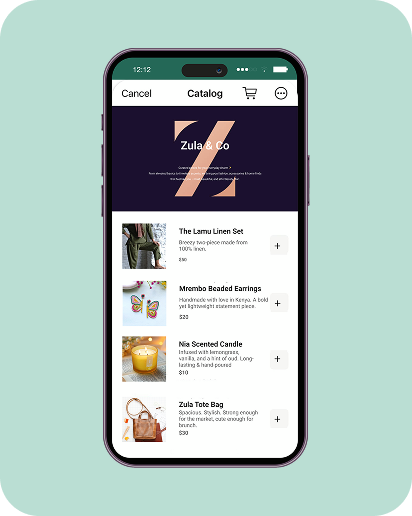
Now for the exciting part. Adding your products:
- Open WhatsApp Business and tap the three dots (⋮) in the top-right corner
- Go to Settings > Business Tools > Catalog
- Tap "Add new item" to begin adding products
- For each product, include:
- High-Quality Images: Add up to 10 clear, well-lit photos showing different angles
- Product Name: Clear, searchable names that customers will understand
- Price: Be transparent with your pricing
- Description: Write compelling descriptions highlighting benefits, not just features
- Product Link: Add your website URL if you have one
- Item Code/SKU: Helpful for inventory management
- Tap Save. WhatsApp will review your product (usually within minutes) to ensure compliance with their Commerce Policy
Pro Tip: You can also sync your catalog directly from Facebook Shop if you've already set up products there. This saves you time on manual entry.
Step 4: Organize Products into Collections
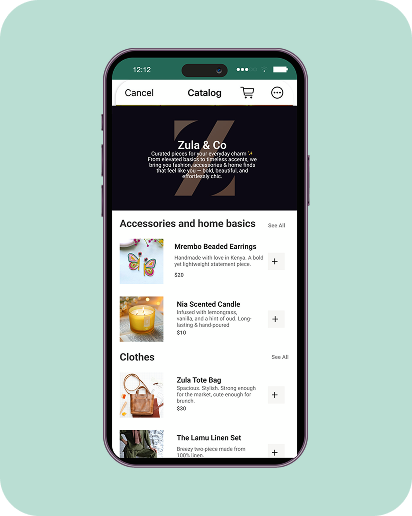
If you're selling multiple products, collections help customers navigate your catalog more easily:
- In your Catalog manager, tap "Add new collection"
- Name your collection (e.g., "Winter Collection," "Under $50," "Customer Favorites")
- Select which products to include
- Tap Done
Collections work like departments in a physical store. They make the browsing experience more intuitive and help customers find what they're looking for faster.
Step 5: Configure Business Features
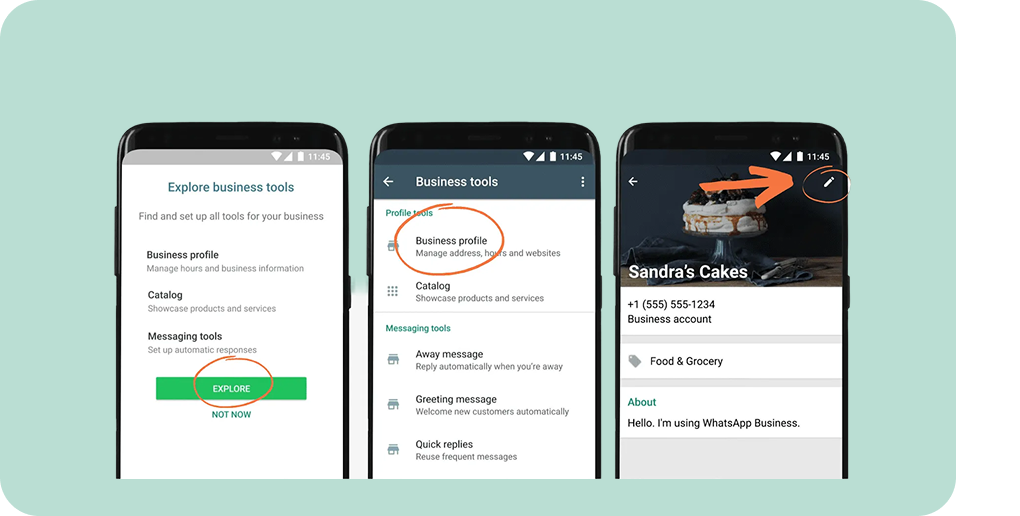
Maximize your efficiency with these WhatsApp Business tools:
- Quick Replies: Pre-write responses to frequently asked questions for instant answers
- Greeting Message: Set up an automatic welcome message for first-time contacts
- Away Message: Let customers know when you're unavailable and when to expect a response
- Labels: Create tags like "New Lead," "Payment Pending," or "Shipped" to organize your customer conversations
- Business Hours: Display your operating hours so customers know when they can reach you
Explore how Flowcart helps you guide customers with automated flows
Step 6: Enable WhatsApp Cart Feature
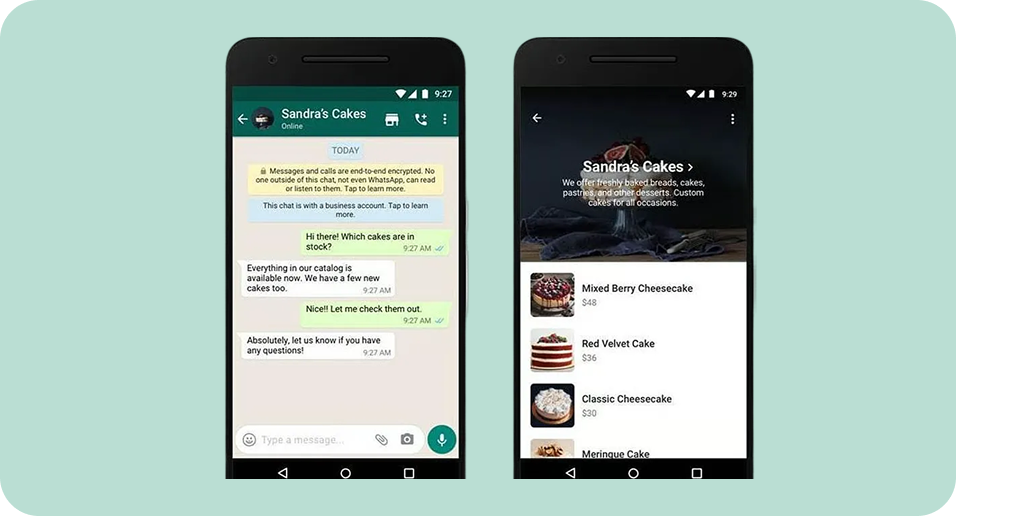
The cart feature allows customers to browse your entire catalog, add multiple items to their cart, and send their complete order to you in one message. This feature is automatically enabled once your catalog is approved and appears as a shopping cart icon on your business profile.
How to Promote Your WhatsApp Store and Drive Sales
1. Use Social Media
Share your WhatsApp catalog link across all your social media channels. Add it to your Instagram and Facebook bio, include it in your YouTube video descriptions, pin it to your Twitter/X profile, and share product highlights on LinkedIn if you're B2B.
You can also create engaging posts showing your products and directing followers to "Shop on WhatsApp" with a direct link.
The goal is to make it ridiculously easy for people to find you.
2. Run Click-to-WhatsApp Ads
Here's where things get interesting. Facebook and Instagram ads with a "Send Message" call-to-action button open directly into a WhatsApp conversation.
When setting up these ads:
- Target audiences who have shown interest in similar products
- Use eye-catching visuals of your products
- Include a compelling offer or hook in the ad copy
- Set up automated responses to engage users immediately when they message
Want to learn more? Our post on How to Run High-Converting WhatsApp Retargeting Campaigns in 2025 goes deep into this strategy.
3. Showcase Products on WhatsApp Status
Post your products, special offers, and behind-the-scenes content on your WhatsApp Status regularly. This feature works like Instagram Stories and keeps your brand top-of-mind for your contact list. Share new product launches, limited-time offers (creating urgency), customer testimonials and reviews, and "behind the scenes" content to build authenticity.
4. Build an Opt-In Subscriber List
You must obtain explicit consent before sending marketing messages on WhatsApp. Build your list through website pop-ups offering discounts for WhatsApp subscribers, social media campaigns promoting exclusive WhatsApp-only deals, in-store sign-ups, and email marketing campaigns.
Example message: "Join our WhatsApp community and get 15% off your first order! Text us at [number] to get started."
For more strategies on building your subscriber base, check out WhatsApp Lead Generation in 2026: Proven Strategies to Drive High-Quality Leads.
Best Practices for Selling Products on WhatsApp
1. Respond Quickly and Professionally
Aim to reply within minutes during business hours, use automated greeting messages to acknowledge contact immediately, set up quick replies for common questions to respond faster, and use away messages when you're offline so customers know when to expect a response.
See how Flowcart customer Darling Hair boosted sales by 300% by improving customer engagement.
2. Personalize Every Interaction
Generic, robotic messages don't convert. Make customers feel seen. Use their name in conversations, reference their previous purchases or browsing history, make product recommendations based on their interests, and remember details they've shared. Labels help with this.
Example: "Hi Sarah! I saw you loved our organic face cream last month. We just launched a matching serum that complements it perfectly. Want to take a look?"
Our article on WhatsApp Conversational Marketing: Strategies, Examples, and Best Practices shows you exactly how to nail this.
3. Use High-Quality Product Images
Use natural lighting or professional lighting setups, show products from multiple angles, include close-ups of important details or textures, and add lifestyle images showing products in use.
Remember: People buy with their eyes first. Poor photos equal lost sales.
4. Write Compelling Product Descriptions
Keep descriptions concise but informative. Include key benefits, materials/ingredients, size/dimension information, care instructions if relevant, and why it's special or different.
- Weak: "Cotton t-shirt, available in multiple colors"
- Strong: "Stay comfortable all day in our breathable 100% organic cotton tee. Soft, durable, and perfect for any occasion, from coffee runs to casual Fridays"
5. Keep Your Catalog Updated
Nothing frustrates customers more than wanting to buy something that's out of stock. Remove sold-out items promptly, add new products as soon as they're available, update seasonal collections, refresh product photos periodically, and adjust pricing for promotions.
6. Make Shopping Conversational, Not Transactional
WhatsApp is about conversation, not just transactions. Engage like you would in a physical store. Ask questions: "What's the occasion? Who is this gift for?" Offer guidance: "Based on what you're looking for, I'd recommend..." Be helpful beyond the sale: "Here are some styling tips to get the most out of your new purchase."
7. Implement Order Management Systems
Use labels to track order status (New Order, Payment Received, Shipped, Delivered), create a simple spreadsheet or CRM to track customer information, send order confirmations and shipping updates proactively, and follow up after delivery to ensure satisfaction.
8. Provide Clear Payment Options
Make it easy for customers to pay. Share payment links (PayPal, Stripe, Razorpay, etc.), use QR codes for quick UPI payments (in supported regions), and in countries where WhatsApp Payments is available, enable it for seamless in-app transactions.
WhatsApp Shopping vs. Traditional E-Commerce: What's the Difference?
You might be wondering: "I already have a Shopify store or WooCommerce site. Why do I need WhatsApp Shopping?" Here's how they compare.
Customer Interaction
- Traditional E-Commerce: One-way, impersonal browsing experience. Customers navigate your site alone.
- WhatsApp Shopping: Two-way, conversational experience. You guide customers personally through their purchase journey.
Conversion Process
- Traditional E-Commerce: Multiple steps. Browse, add to cart, create account, enter shipping info, add payment details, confirm order. High cart abandonment rates averaging 70%.
- WhatsApp Shopping: Streamlined. Browse catalog, message you with questions, confirm order, send payment. Significantly lower abandonment rates.
Customer Engagement
- Traditional E-Commerce: Limited to email marketing and retargeting ads to re-engage visitors.
- WhatsApp Shopping: Direct, real-time communication. Easy to follow up, send reminders, and build ongoing relationships.
Trust Building
- Traditional E-Commerce: Relies on reviews, trust badges, and professional design to build credibility.
- WhatsApp Shopping: Personal interaction creates immediate trust. Customers feel they're buying from a real person.
Cost
- Traditional E-Commerce: Monthly platform fees, domain costs, payment processing fees, ad spend to drive traffic.
- WhatsApp Shopping: Free to use (business app), minimal marketing costs, pay only for ads if you choose to run them.
Technical Requirements
- Traditional E-Commerce: Requires setup, maintenance, potential developer costs for customization.
- WhatsApp Shopping: Simple setup, no technical knowledge required, managed through an intuitive mobile app.
WhatsApp Shopping isn't meant to replace your e-commerce website. It's a powerful complement. Many successful businesses use both.
Common Issues When Selling on WhatsApp and How to Solve Them
Even with its simplicity, you might encounter some challenges when selling on WhatsApp. Here's how to overcome them.
Problem 1: Managing High Message Volume
As your business grows, manually responding to hundreds of messages becomes overwhelming.
Solution: Implement automation a WhatsApp Conversational Automation and CRM platform like Flowcart. You can set it up to handle common queries 24/7, automate order confirmations and status updates.
Problem 2: Keeping Track of Customer Conversations
Without proper organization, it's easy to lose track of who ordered what, payment status, and follow-ups needed.
Solution: Flowcart connects with Shopify, WooCommerce, and major CRMs to centralize customer data, order history, and conversation logs in one place.
Problem 3: No Built-In Analytics
The basic WhatsApp Business app provides minimal insights into message performance, customer behavior, or sales metrics.
Solution: Flowcart offers comprehensive analytics including message delivery and read rates, response times, conversion rates, revenue attribution, customer engagement metrics, and campaign performance tracking. Use this to segment customers and run more relevant campaigns.
Problem 4: Payment Limitations
WhatsApp Payments is only available in select countries (currently India and Brazil), limiting seamless checkout options.
Solution: Integrate with payment gateway providers and send secure payment links via WhatsApp. Flowcart enables automated payment link generation and checkout flows that work globally.
Problem 5: Scaling Beyond One Agent
If you're the only person managing WhatsApp conversations, your business growth is limited by your availability.
Solution: Implement multi-agent capabilities through the WhatsApp Business API. Flowcart allows multiple team members to access the same WhatsApp Business account simultaneously, with features like internal notes, conversation assignment, and performance tracking.
How Flowcart Can Transform Your WhatsApp Business
While the free WhatsApp Business app is great for getting started, serious businesses quickly outgrow its limitations. That's where Flowcart comes in. It's an AI-powered conversational commerce and CRM platform built specifically for WhatsApp that takes your selling capabilities to the next level.
Key Benefits of Flowcart:
1. Complete Customer Journey Coverage
Flowcart powers your entire sales funnel across three critical stages:
Acquisition:
- Click-to-WhatsApp Ads: Instantly turn clicks into carts with a pre-loaded WhatsApp flow
- WhatsApp Flows: Build no-code customer journeys that guide users from interest to purchase
Conversion:
- In-Chat Checkout: Instantly turn clicks into carts with a pre-loaded WhatsApp flow
- AI Generated Carts: Guide customers with personalized flows that build checkout-ready carts
- Abandoned Cart Recovery: Recover carts with automated, context-aware WhatsApp nudges
Retention:
- AI Powered Segmentation: Target smarter and reach the right customers
- Smart Broadcasts: Send tailored WhatsApp campaigns to boost interaction
- Loyalty Program: Reward repeat customers with points, in-chat redemption, and exclusive offers
2. Automated Catalog Management
Sync your product catalog seamlessly from Shopify, WooCommerce, or your existing e-commerce platform. When you update a product, price, or inventory level on your main store, it automatically updates on WhatsApp too. No manual work required.
3. AI-Powered Conversations
Flowcart's intelligent chatbot handles routine inquiries, product recommendations, and initial customer engagement 24/7. When a conversation needs a human touch, it seamlessly hands off to your team. It's like having a tireless sales assistant who never sleeps.
4. Advanced Marketing Automation
Create personalized drip campaigns, send abandoned cart recovery messages, schedule promotional broadcasts, segment customers based on behavior and purchase history, and run A/B tests to optimize messaging.
For more on automation, read WhatsApp Marketing Automation: The Complete Guide for 2025.
5. Streamlined Checkout Experience
Flowcart creates frictionless checkout flows directly within WhatsApp, allowing customers to browse, select products, and complete payments without leaving the chat. This has helped businesses achieve conversion rates 2.8x higher than traditional e-commerce.
6. Comprehensive Analytics Dashboard
Track every important metric: conversation-to-sale conversion rates, average order value through WhatsApp, customer lifetime value, message response times, campaign ROI, and agent performance.
7. Multi-Agent Collaboration
Your entire team can work from the same WhatsApp Business number simultaneously. Features include conversation assignment and routing, internal notes and tagging, performance dashboards, and workload balancing.
8. Seamless Integrations
Flowcart connects with your existing tech stack. E-commerce platforms (Shopify, WooCommerce, Magento), CRM systems (Salesforce, HubSpot), payment gateways (Stripe, Razorpay, PayPal), ERP systems, and analytics tools.
9. Retention Tools
Customer acquisition is expensive. Retention is profitable. Flowcart helps you send personalized post-purchase follow-ups, automate re-order reminders for consumable products, create loyalty programs, and nurture customer relationships with relevant content.
Want to see how Flowcart can specifically help your business? Schedule a demo or start your free trial today.
Final Thoughts: Is WhatsApp Shopping Right for Your Business?
The short answer: absolutely, if you want to meet customers where they already are and build genuine relationships that drive sales.
WhatsApp Shopping is particularly powerful for:
- E-commerce brands looking to add a personal touch to online shopping
- Small businesses wanting to compete with bigger companies through superior customer service
- Local retailers seeking to expand their reach beyond foot traffic
- Service providers (consultants, coaches, agencies) who sell through consultation
- B2B companies that rely on relationship-based selling
- International sellers reaching customers across borders with zero friction
Getting started is simple. Download WhatsApp Business, set up your catalog, and start having sales conversations. As you grow, platforms like Flowcart can help you scale your operations while maintaining that personal touch that makes WhatsApp shopping so effective.
Frequently Asked Questions
1. Do I need a WhatsApp Business account to sell products on WhatsApp?
Yes, you need the WhatsApp Business app (free to download) to access selling features like product catalogs, labels, quick replies, and business profile tools. You cannot create a product catalog using the regular personal WhatsApp application. However, you can use your existing business phone number. You don't need to get a new one.
2. How do I accept payments through WhatsApp Shopping?
Payment options depend on your location. WhatsApp Payments (built-in, commission-free transactions) is currently only available in India and Brazil. For other countries, you can share payment links from services like PayPal, Stripe, or Razorpay, use UPI payment QR codes (in India), accept bank transfers and share account details, use point-of-sale systems for in-person payments, or integrate with platforms like Flowcart that automate payment link generation.
3. Is WhatsApp Shopping available worldwide?
Yes, WhatsApp Business and its catalog/shopping features are available globally in over 180 countries. However, certain features have regional limitations. WhatsApp Payments is currently only in India and Brazil. Business verification (green checkmark) is available in most countries but requires meeting specific criteria. Click-to-WhatsApp ads are available worldwide through Facebook and Instagram advertising.
4. Can I link my WhatsApp store to my existing e-commerce website?
Absolutely. In fact, this is recommended for the best results. You can add website links to each product in your WhatsApp catalog, include your main website URL in your business profile, direct customers to specific product pages for additional information, and use platforms like Flowcart to automatically sync your website's product catalog with WhatsApp.
5. What types of businesses can benefit from WhatsApp Shopping?
- Retail: Clothing, accessories, electronics, home goods
- Food & Beverage: Restaurants, bakeries, meal prep services
- Health & Beauty: Cosmetics, skincare, supplements
- Services: Coaching, consulting, digital products
- B2B: Wholesale, distribution, professional services
- Handmade/Artisan: Crafts, custom products, personalized items
6. Can I manage customer orders and inquiries through WhatsApp?
Yes, and it's one of the platform's biggest advantages. You can receive and process orders directly in chat, send order confirmations, share tracking information and delivery updates, handle customer service inquiries, manage returns and exchanges, and collect feedback and reviews.
7. How do I promote my WhatsApp Shopping link to customers?
- Add the link to your social media bios (Instagram, Facebook, LinkedIn)
- Include it in your email signature
- Run Click-to-WhatsApp ads on Facebook and Instagram
- Share your catalog on WhatsApp Status
- Post the link in relevant online communities
- Display your WhatsApp QR code in your physical store
- Add it to product packaging and business card

.png)





%201.webp)




.png)