.png)
.png)

.png)
Key Takeaways
Learn when to use native WhatsApp Payments versus payment links based on friction, scale, and conversion impact.
Follow a clear, step-by-step setup flow from account verification to in-chat payment experiences for your business.
See how Flowcart adds in-chat checkout, Shopify sync, and automated recovery to scale WhatsApp payment conversions.
Shopping online used to feel like an obstacle course. Open a site. Scroll forever. Add to cart. Choose a payment method. Get redirected.
This long customer journey is transforming now with WhatsApp.
Now, buying can happen inside a conversation. Customers can browse, ask questions, add to cart, and even pay, all without leaving the chat. And because WhatsApp is already part of everyday life, shopping suddenly feels less like a task and more like a natural interaction.
So what really happens behind the scenes when someone pays inside a chat?
In this blog, we’ll break down exactly how payments work, how this flow reduces drop-offs, and how you can set it up for your business.
What Are WhatsApp Payments?
WhatsApp Payments lets customers send and receive money directly inside a chat, without switching apps, opening a browser, or jumping through checkout pages. It turns a conversation into a transaction.
Instead of clicking a “Buy Now” button and getting redirected to a payment page, the customer just confirms inside the chat and completes the payment there. The entire flow from product to price to payment stays in one place.
For businesses, this means fewer steps and fewer chances for customers to drop off. For customers, it feels effortless. They’re already talking to you, asking about products, negotiating, or confirming details. Paying becomes the natural next step, not a separate task.
Behind the scenes, WhatsApp Payments is powered by secure, regulated payment partners. That means transactions follow the same compliance and safety standards as other digital payment methods.
Also Read: WhatsApp Marketing for Small Businesses: Complete Guide for 2026
Who Can Use WhatsApp Payments? (Eligibility and Requirements)
There are a few boxes you need to tick before you can start collecting money inside WhatsApp. Here are the pointers to keep in mind:
1. Country Availability
WhatsApp Payments is fully supported in India through UPI, making it the most mature and widely adopted market for native, in-app WhatsApp payments. If your business operates in India and your customers use UPI apps, you’re in the best position to use this feature seamlessly.
In other countries, native WhatsApp Pay is either limited or not publicly available. However, businesses can still accept payments via WhatsApp using approved APIs, payment links, or in-chat Webview checkout experiences, depending on regional regulations and platform support.
These options allow brands outside India to sell via WhatsApp conversations, even if payment isn’t processed directly by WhatsApp Pay.
2. Business vs Personal Accounts
While individuals can send money using WhatsApp on personal accounts, businesses should use the WhatsApp Business ecosystem. A personal WhatsApp account isn’t designed to handle customer payments at scale, manage orders, or automate workflows.
3. WhatsApp Business App vs WhatsApp Business API
WhatsApp Business App is best for small businesses. You can set up a basic profile and catalog, and manually accept payments in chats.
On the other hand, WhatsApp Business API is for growing and enterprise businesses. It allows you to automate messages, integrate with CRMs, connect payment gateways, and build full payment workflows at scale.
If you’re highly dependent on using WhatsApp as a sales channel, WhatsApp Business API should be your choice.
4. Bank Account and UPI Requirements
To use WhatsApp Payments in India, you need:
- An active Indian bank account
- A valid UPI ID linked to your mobile number
- The same phone number connected to both your bank and WhatsApp
Once connected, customers can pay you using any UPI app, and the money lands directly in your bank account.
5. Compliance and Verification
Businesses using the API also go through verification and approval steps with WhatsApp and their payment partner. This ensures secure transactions and protects both you and your customers. Therefore, it is mandatory to follow the compliance steps to ensure a safe and speedy process.
WhatsApp Payments vs WhatsApp Payment Links
At first glance, both options let you get paid inside a chat. But WhatsApp Payments and WhatsApp Payment Links work very differently, and they suit different types of businesses and use cases.
Let’s look at each of these payment options in depth:
WhatsApp Payments (Native In-Chat Payments)
With WhatsApp Payments, the entire transaction happens inside the WhatsApp interface itself. The customer doesn’t leave the app at any point. They see the amount, confirm the payment, and complete the transaction right in the chat window.
There’s no browser redirect, no new page to load, and no “back” button that tempts them to drop off.
This makes the flow feel natural:
Conversation → Price → Confirmation → Payment →Order Placed.
For businesses, this means:
• Fewer abandoned checkouts
• Faster buying decisions
• A smoother, more trustworthy experience
However, setting this up usually requires using the WhatsApp Business API and working with an approved payment partner. It also involves compliance checks and business verification. That’s why in-chat payments are most commonly used by growing and enterprise businesses that want full automation and scale.
Use WhatsApp Payments if:
You want the cleanest, highest-converting chat-to-payment experience and plan to use WhatsApp as one of the primary sales channels.
WhatsApp Payment Links (Redirect-Based Payments)
Payment Links work differently. You generate a link from your payment gateway or store (Razorpay, Stripe, Shopify, etc.) and send that link to the customer in WhatsApp. When they tap it, they’re taken to an external checkout page in a browser or web view.
So the flow looks like this:
Chat → Click Link → Open Checkout Page → Fill Details → Pay → Return.
This approach is much easier to set up. You don’t need API access, advanced approvals, or deep integrations. If you already use an online payment gateway, you can start sending payment links almost immediately.
However, the tradeoff for this ease is friction. Every extra screen is a chance for the customer to hesitate, get distracted, or abandon the purchase.
Use Payment Links if:
You need a fast, low-tech way to collect money and don’t yet want to invest in full WhatsApp automation.
How to Set Up WhatsApp Payments for Your Business: Step-by-Step Guide
Setting up WhatsApp Payments involves choosing the right WhatsApp setup, getting verified, connecting your bank account, and building a payment flow that feels natural inside a chat. Below is a practical, end-to-end guide to follow:
Step 1: Choose the Right WhatsApp Setup (App vs API)
Before proceeding, decide how you’ll use WhatsApp for your business.
- WhatsApp Business App → Best for small businesses doing manual sales.
- WhatsApp Business API → Best for growing teams that want automation, CRM, and scalable payment flows.
If you’re a small business, download the WhatsApp Business App from the Play Store/App Store.
If you want automation, apply for WhatsApp Business API access via an official Business Solution Provider (BSP).
Step 2: Set Up and Verify Your Business Profile
Your business must look legit before you can process payments. Add the basic business details that customers would look for before moving ahead with the payment:
Open WhatsApp Business → Go to Settings → Business tools → Business profile
Add the following details:
- Business name
- Category
- Description
- Website/email
- Address (if applicable)
For API users:
- Complete Facebook Business Manager verification
- Upload business documents (GST, PAN, company registration, etc.)
Step 3: Enable WhatsApp Payments and Link Your Bank Account
In India, WhatsApp Payments works via UPI. Follow these steps:
Go to Settings → Payments → Add payment method
- Choose your bank
- Verify your mobile number
- Set up your UPI PIN
- Link your bank account
Requirements:
- Indian bank account
- UPI-enabled mobile number
- Same number for WhatsApp and bank
Step 4: Get API Access and Payment Partner Approval
If you’re using WhatsApp Business API, you’ll need:
- WhatsApp approval
- Payment partner onboarding
- Compliance checks
Choose a BSP (e.g., Twilio, Gupshup, etc.) and apply for the WhatsApp API by submitting business verification documents, use case description, and payment flow details.
Step 5: Build Your Payment Flow Inside Chat
Your flow should include:
- Product/service confirmation
- Price + tax breakdown
- Payment request message
- Auto confirmation after payment
Example flow:
“Your total is ₹1,499. Tap ‘Pay Now’ to complete your order.”
Step 6: Test the Entire Payment Experience
Before going live, test everything like a customer would. Here’s what you need to test:
- Payment request sent correctly
- UPI opens smoothly
- Payment confirmation arrives
- Order status updates automatically
Common Issues With WhatsApp Payments (and How to Fix Them)
Even though WhatsApp Payments feels simple to customers, problems can still pop up. Most of them aren’t serious technical failures; they’re usually caused by UPI delays, bank-side issues, outdated apps, or unclear processes.
Here’s how the most common problems show up in real life, and what you can do about them:
1. Payment Fails or Stays Pending
Sometimes a customer tries to pay, and the transaction either fails or gets stuck in “pending” mode. This usually happens because the network is slow, the customer’s bank app isn’t responding, or their internet connection is weak.
How to fix it:
- Ask the customer to retry after a minute
- Suggest switching to another bank
- Make sure they’re on a stable internet connection
- Resend the payment request, if needed
2. Customer Doesn’t See the Pay Option
At times, customers don’t see a payment button in the chat. This usually means WhatsApp Payments isn’t set up on their app yet, or their WhatsApp version is outdated. So even though you’ve sent the right message, they simply can’t act on it.
How to fix it:
- Ask them to update WhatsApp
3. Payment Is Deducted but Not Confirmed
In some cases, the money is deducted from the customer’s account, but neither side gets an instant confirmation. This usually happens because of bank-side processing delays or UPI network congestion, especially during peak hours. It creates anxiety for the customer and confusion for your team.
How to fix it:
- Wait 2–5 minutes before taking action
- Ask for the UTR / Transaction ID
- Check the status in your bank or payment dashboard
4. Refunds Feel Slow or Unclear
When customers ask for a refund, it can feel messy if there’s no clear system. The delay usually comes from bank processing times or from businesses handling refunds manually instead of through a payment partner or dashboard. Customers then feel unsure whether their money is coming back.
How to fix it:
- Set and share a clear refund policy
- Use your payment partner’s dashboard for refunds
- Always provide a refund reference number
5. Your Team Isn’t Confident Handling Payment Queries
Sometimes the problem isn’t the tech, it’s the people. If your team isn’t trained on how WhatsApp Payments work, they’ll struggle to answer questions about failures, delays, or refunds. That makes customers lose trust even faster.
How to fix it:
- Create simple SOPs for payment issues
- Train your sales/support teams on common scenarios
- Keep ready-made replies for FAQs and payment problems
Read More: How Flowcart Works: End-to-End WhatsApp Commerce Made Simple
How Flowcart Helps You Accept Payments on WhatsApp at Scale
Flowcart is built for one simple goal: to turn WhatsApp conversations into completed payments and confirmed orders. It’s not just a chat tool. It’s a full WhatsApp Commerce layer that sits on top of your business workflows and helps you sell, collect payments, and manage orders.
Once you connect Flowcart to your WhatsApp Business API and ecommerce stack, every customer chat becomes a potential checkout. Here’s how Flowcart powers payments at scale:
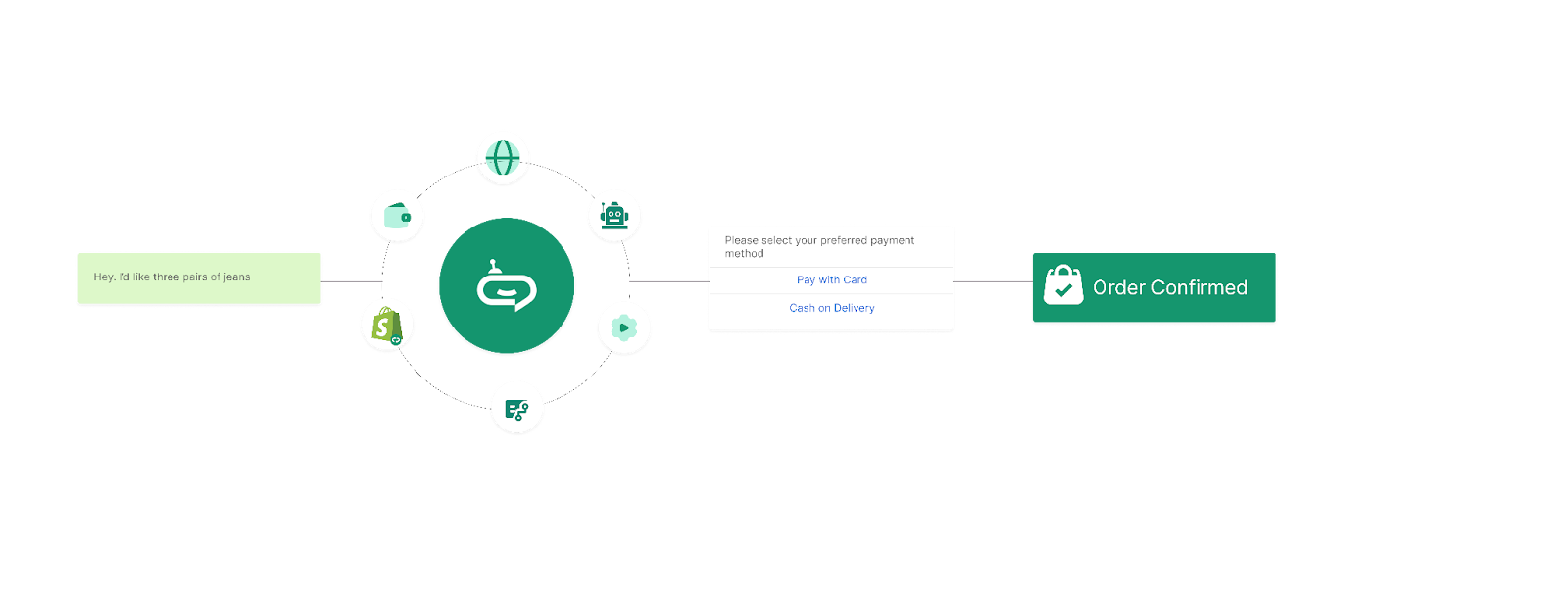
- In-Chat Payment Requests: Flowcart In-chat checkout feature lets your team (or your automations) send structured payment requests directly inside WhatsApp. Instead of typing prices manually, you can trigger clean, clickable payment CTAs that guide customers to pay instantly.
- Shopify and Ecommerce Integration: Flowcart connects with your Shopify store so your product catalog, pricing, and orders stay in sync. You can share product cards in chat, confirm carts, and move straight to payment without sending customers back to the website.
- WA Webview Checkout with 50+ Payment Gateways: Flowcart supports in-chat Webview-based checkout experiences connected to 50+ payment gateways. Customers complete payments in WhatsApp’s in-app browser, providing a smooth, low-friction experience without being forced through lengthy website forms.
- Abandoned Cart Recovery via WhatsApp: Flowcart abandoned cart recovery feature automatically follows up with shoppers who add to cart but don’t pay. Instead of generic email reminders, they get a personal nudge in WhatsApp with a direct path to complete payment
- Analytics on Conversations to Conversions: Flowcart shows you what’s happening between “Hi” and “Paid.” You can track which conversations convert, where people drop off, and how your team performs.
Here’s what the team at Mkurugenzi has to say about their experience implementing the Flowcart app for processing payments on WhatsApp:
“Our WhatsApp funnel used to stop at interest. Now it ends in revenue. In-chat checkout has changed the game for us.”
Explore how other businesses are benefitting from integrating Flowcart. Check out our success stories!
Making WhatsApp Your Revenue Engine
Customers want quick answers, simple decisions, and friction-free payments. When selling and paying happen inside the same chat, hesitation drops and conversions rise.
And the best part is that setting up WhatsApp Payments is no longer complicated. With the right tools and workflows, you can turn everyday conversations into smooth, secure checkouts without rebuilding your entire stack.
That’s where Flowcart comes in. Flowcart helps you turn WhatsApp chats into completed orders at scale with in-chat payments, Shopify sync, automation, and real revenue insights.
If you’re ready to boost sales and maximize conversions, book a demo with Flowcart now!
Frequently Asked Questions (FAQs)
How do WhatsApp Payments work for businesses?
WhatsApp Payments lets businesses collect money directly inside a chat. Customers confirm the amount and pay using UPI (in India) without leaving WhatsApp, turning conversations into instant transactions.
Is WhatsApp Payments available for businesses in India?
Yes. In India, WhatsApp Payments is supported via UPI, allowing businesses to receive payments straight into their linked bank accounts.
Do I need the WhatsApp Business API to accept payments?
For small businesses, the WhatsApp Business App can handle basic payments. But to automate flows, scale conversations, and integrate with ecommerce tools, you’ll need the WhatsApp Business API.
Can Shopify stores accept payments on WhatsApp?
Yes. With WhatsApp Commerce tools like Flowcart, Shopify stores can share products, recover carts, and collect payments directly inside WhatsApp.
Are WhatsApp Payments safe for customers?
Yes. Payments are processed through secure, regulated banking and UPI systems, with encryption and verification built into the flow.
What is the difference between WhatsApp Payments and payment links?
WhatsApp Payments happen entirely inside the chat with no redirects. Payment links send customers to an external checkout page, adding extra steps and friction.

.png)





%201.webp)




.png)