
.png)
Key Takeaways
- WhatsApp should have a dedicated role in your stack, rather than serving as a catch-all inbox.
- The Business app supports manual conversations and basic automation. The API supports scale, integrations, shared inboxes, and structured workflows.
- Accurate business details, category selection, and contact information build trust and reduce hesitation before a customer responds or makes a purchase.
- Working within the 24-hour window and marketing caps is foundational. High-intent timing matters more than message volume.
- Every business-initiated message depends on explicit customer consent. Clean opt-ins protect deliverability and long-term account health.
- Messaging changes based on lifecycle stage, engagement level, and purchase history. One-size-fits-all messaging underperforms.
- Reducing handoffs between chat and checkout improves completion rates and preserves context.
WhatsApp has nearly 3 billion active users worldwide, is the most popular messaging app in over 100 countries, and processes more than 100 billion messages per day.
In markets like India, Brazil, and parts of Africa, it’s the default way people communicate with businesses. It is already reflected in how WhatsApp generates revenue: nearly all of its $1.7 billion now comes from WhatsApp Business.
But scale alone doesn’t explain why WhatsApp works for small businesses. What matters is behavior. People open it to check updates, ask questions, confirm details, and make decisions quickly. That makes it fundamentally different from email, ads, or social feeds.
This guide looks at WhatsApp Marketing for Small Businesses through that lens. You’ll learn how small businesses are setting it up, where it delivers returns, and how to use it without spamming customers or creating an operational mess.
How to Set Up WhatsApp for Small Businesses?
Before choosing an app or platform, it helps to understand what role WhatsApp will play: answering pre-sale questions, following up with leads, sharing order updates, or handling repeat purchases. The setup should support these goals without adding unnecessary effort or risk.
In general, WhatsApp for small businesses can be divided into two paths. The right choice depends on message volume, team size, and the degree of integration required with existing tools.
Understanding your options: WhatsApp Business App vs WhatsApp API
The WhatsApp Business app is a free mobile app built for individual owners and small teams managing a limited number of conversations. It supports basic automation and is usually the first step for businesses testing WhatsApp as a channel.
The WhatsApp Business Platform (API) is designed for businesses that need automation, integrations, and shared access. It comes with per-message charges from Meta and, typically, a platform fee through a solution provider, but it supports scalability and structured workflows.
- Choose the Business app if your team handles conversations manually and message volume stays manageable.
- Choose the API if WhatsApp needs to connect with your CRM, ecommerce platform, or support system, or if multiple people handle customer chats.
Setting up the WhatsApp Business app
Getting started with the Business app is straightforward, but each step affects how professional and reliable your account appears to customers.
First, download the WhatsApp Business app from the Google Play Store or Apple App Store and accept the business terms. Register a phone number in international format. Using a dedicated business number keeps personal chats separate and avoids confusion later.
Once registered, verify the number using the SMS or call-based code. Grant contact and media permissions to streamline customer contact management and share files during conversations.
Next, complete your business profile. This profile appears whenever customers view your account, so accuracy matters.
- Add your official business name and a clear profile image, ideally a logo or brand visual.
- Select the most relevant business category to set expectations.
- Include your address, description, website, and email so customers can trust the account and reach you outside WhatsApp if needed.
Next Read: How to Measure ROI from WhatsApp Marketing Campaigns
Configuring core business tools
After the initial setup, configure tools that reduce manual effort and improve response quality.
- Business hours and contact details help customers understand when to expect replies.
- Away messages let you acknowledge messages outside working hours and set clear response timelines.
- Greeting messages introduce your business when someone contacts you for the first time, which helps create a consistent first impression.
Creating a product catalog
The product catalog turns WhatsApp into a lightweight storefront. Customers can browse products, ask questions, and start purchase conversations without leaving the app.

Browse, share, and sell, right inside the chat
- Each product should include a clear name, description, price, and image.
- Categories help customers find items faster and reduce back-and-forth messages.
- Catalog links can be shared directly in chats, making follow-ups more effective.
For businesses with changing inventory or online stores, catalog syncing and automation become easier at the API level.
Additional Read: WhatsApp Webview for Shopping: Complete Guide
Security, compliance, and brand safety
WhatsApp setup is not only about features. Compliance and account safety protect your number and your brand.
Customer consent is mandatory before sending business-initiated messages. Every marketing message should be sent only to users who have opted in, and opt-out options should be easy to use. This reduces spam reports and protects your account from suspension.
To combat spam, Flowcart places QR codes on your brand's offline storefronts, enabling customers to scan them and opt in to receive updates about your product.
Account security also matters.
- Enable two-step verification to prevent unauthorized access.
- Avoid using personal WhatsApp accounts for business communication.
- Limit access when multiple people manage conversations, so roles stay clear and data stays protected.
💡Consistent business information across your website, social profiles, and WhatsApp account also helps maintain trust and avoid verification issues later.
When to move beyond the free app
As message volume grows, manual handling becomes harder to manage. The WhatsApp API supports automation, shared inboxes, CRM syncing, analytics, and higher throughput. This shift usually makes sense when WhatsApp becomes a core revenue or support channel rather than an experiment.
The key is to start simple, build confidence with the basics, and move to more advanced setups only when the business model demands it. A thoughtful setup reduces risk, keeps effort predictable, and makes WhatsApp easier to maintain as the business grows.
Use Cases of WhatsApp for Small Businesses
This section outlines how small businesses use WhatsApp marketing and the outcomes that justify the effort.
E-commerce and retail
For ecommerce brands, WhatsApp delivers the highest returns when used after intent is already established. Cart activity, orders, and browsing history create natural moments for timely follow-ups that email often misses.
- Abandoned cart recovery reminders sent within a few hours, paired with product images and direct checkout links, recover a far higher share of carts than email.
- Order tracking updates reduce “Where is my order?” queries by proactively sharing dispatch and delivery window information as well as confirmation messages.
- Personalized recommendations based on purchase history drive stronger engagement than generic campaigns because they reflect known preferences.
- Catalog browsing lets customers explore products, ask questions, and complete purchases without leaving WhatsApp.
- Flash sales and exclusives perform well when sent to segmented audiences with short expiry windows.
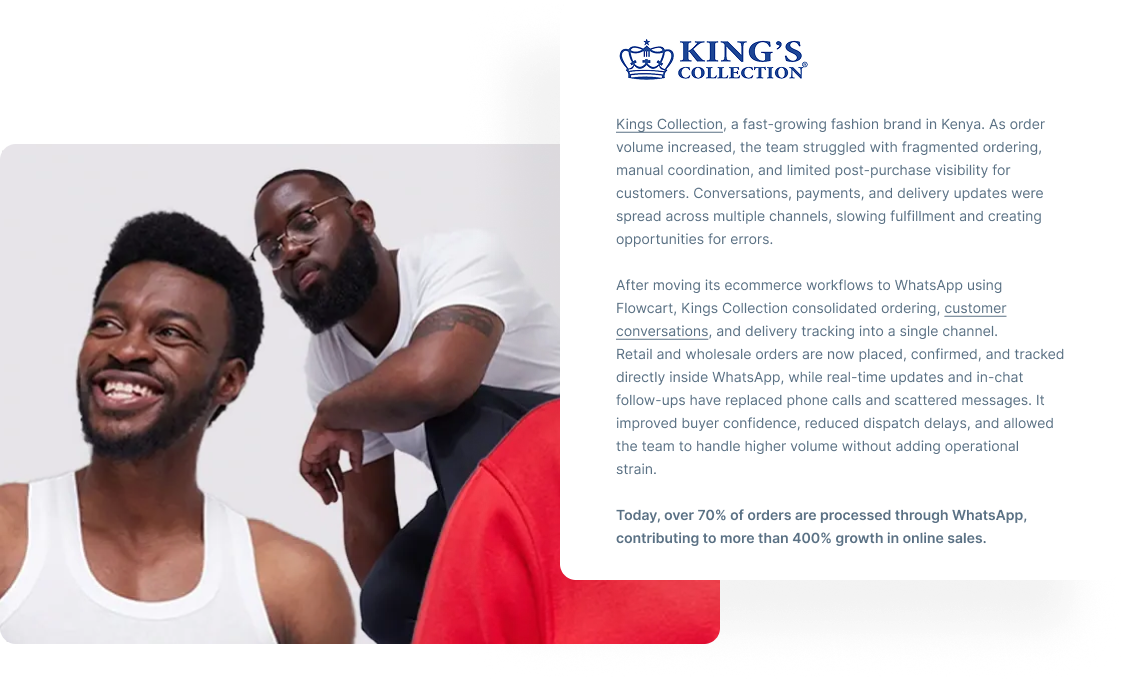
See how other ecommerce and retail brands are using WhatsApp
Restaurants and food businesses
Restaurants use WhatsApp to manage demand and reduce operational friction during peak hours.
- Digital menus and catalogs replace printed menus and reflect real-time availability.
- Table reservations and confirmations remove phone queues and reduce booking errors.
- Delivery updates reassure customers and cut down repeat inquiries.
- Promotions and loyalty messages reach diners quickly when timing matters.
Hotels and hospitality
In hospitality, WhatsApp supports both guest experience and revenue generation before and during the stay.
- Pre-arrival upsells promote room upgrades, spa services, or tours at moments when guests are most receptive.
- Digital check-in and service requests reduce front-desk workload and speed up response times.
- In-stay offers convert well when paired with urgency and clear options.
- Click-to-WhatsApp ads turn ad interest into direct conversations that lead to bookings.
Pro Tip: Run paid campaigns with click-to-WhatsApp ads
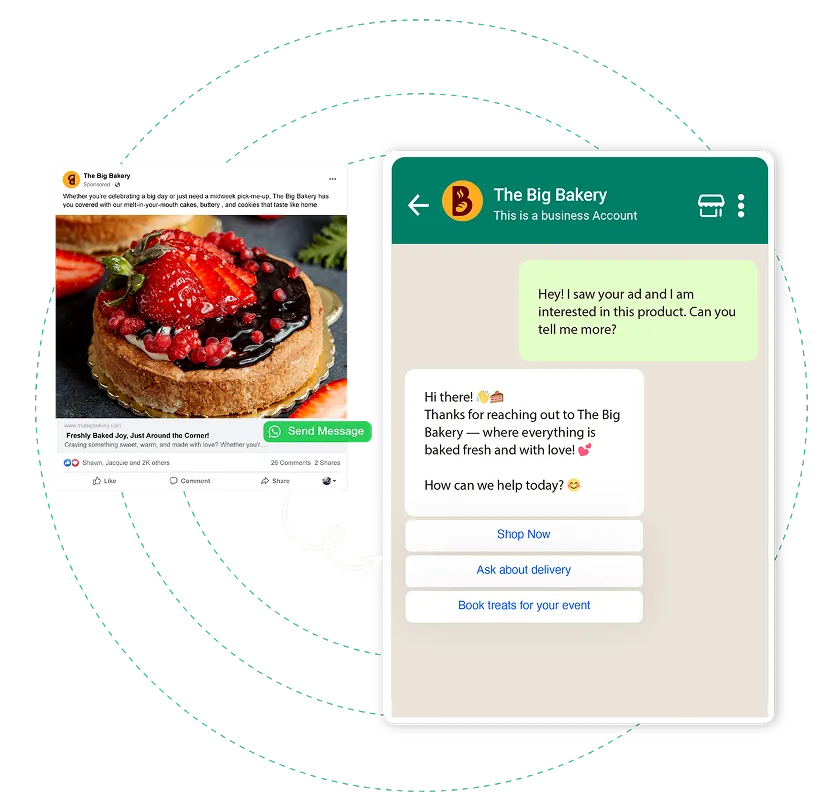
Turn ads into sales with click-to-WhatsApp ads in Flowcart
Instead of sending prospective guests to a landing page and hoping they convert, ads open a WhatsApp chat where interest is already high and questions can be answered immediately. It removes several drop-off points common in traditional booking flows.
Flowcart supports this model by handling the post-click experience. Incoming ad conversations are routed to guided WhatsApp journeys, where guests can view room options, see relevant add-ons, and receive real-time responses. Carts and offers are shared directly in the chat, so the path from inquiry to booking stays intact without jumping between pages or tools.
Because every interaction remains within WhatsApp, performance is easier to track. Campaign data links back to conversions, helping teams see which ads drive bookings, upgrades, or in-stay purchases. Over time, this creates tighter feedback between marketing spend and revenue without adding operational overhead for front-desk or reservations teams.
Sign up for a 7-day trial to explore this feature
Healthcare and medical practices
When implemented with consent and safeguards, WhatsApp can improve patient engagement without increasing staff workload.
- Appointment reminders outperform SMS and email in reducing missed visits.
- AI-based patient support answers common questions outside clinic hours.
- Medication and treatment reminders support adherence to chronic condition regimens.
- Pre- and post-visit instructions reduce confusion and the need for follow-up calls.
B2B wholesale and distribution
WhatsApp helps with relationship-driven B2B sales, but with clear limits.
- Catalog and price sharing ensure product information is seen.
- Order confirmations and delivery updates speed up turnaround.
However, as order volume grows, WhatsApp becomes difficult to manage for inventory, pricing tiers, and order history. For larger operations, it works best as a support and relationship channel alongside a dedicated B2B portal.
When WhatsApp makes sense and when it doesn’t
WhatsApp fits best when your business relies on frequent customer interactions, benefits from real-time responses, and needs to reduce drop-offs or no-shows. It is less effective for pure broadcast marketing or complex, high-volume B2B order management.
Best Practices for Using WhatsApp in Small Business
Small businesses that treat WhatsApp as a disciplined, intent-driven channel consistently see stronger engagement and lower operational friction than those that approach it like email or SMS. Follow these practices:
1. Design around the 24-hour rule
WhatsApp runs on a simple but strict principle. When a customer messages your business, a 24-hour conversation window opens. During this window, you can send unlimited free-form responses. Once it closes, only pre-approved templates may be used for business-initiated messages.
This makes early engagement critical. If someone asks about a product, abandons a cart, or starts a conversation, follow up within the same day. Waiting until the next morning often leads to templated outreach, which is more restrictive and easier to ignore.
Best practice: Build workflows that act quickly: cart reminders within a few hours, not the next day. Treat the first 24 hours as your highest-leverage moment.
2. Respect frequency caps to protect trust
Beyond the 24-hour window, WhatsApp limits how often you can send marketing templates. Most businesses are limited to two marketing messages per user per 24-hour period. Transactional messages, such as order confirmations or delivery updates, are exempt.
This forces prioritization. If you spend both marketing messages on low-intent promotions, you lose the chance to nudge a customer when it matters most.
Best practice: Reserve marketing messages for high-intent scenarios rather than routine awareness campaigns.
Additional Read: How to Boost Customer Engagement on WhatsApp
3. Match message frequency to customer intent
Not every customer should hear from you at the same pace. Frequency should change based on where someone is in their journey.
- New subscribers: Light touch, one or two messages a week focused on trust-building and context.
- Actively engaged users: More frequent, personalized messages tied to browsing or product interest.
- High-intent customers: Minimal but focused nudges designed to remove friction and prompt action.
- Repeat customers: Personalized updates, loyalty perks, and relevant re-engagement rather than generic blasts.
Best practice: Over-messaging early-stage users increases opt-outs. Under-messaging high-intent users leaves revenue on the table. Learn to gauge where your customer is in their shopping journey, then determine the messaging cadence.
4. Personalize with context
Personalization goes far beyond using a first name. Messages perform best when they reference something real: a product viewed, a past purchase, or a known preference.
Best practice: At a minimum, reference one concrete hint, like their purchase history, browsing behavior, or lifecycle stage, in every outbound message.
5. Treat templates as operational assets
Templates aren’t just a compliance requirement. They are reusable building blocks for your workflows.
Well-structured templates speed approval, deploy more reliably, and reduce errors during campaigns. Poorly written ones slow you down and increase the risk of rejection.
Best practice: Keep templates clear, contextual, and professional. Avoid shortened links, promotional copy inside transactional messages, and vague variables. Submit templates in batches, so you’re never blocked when you need to act quickly.
6. Use interactive formats to reduce friction
WhatsApp performs best when customers can tap instead of type. Buttons, quick replies, images, and carousels shorten the path to action and reduce drop-offs.
- Buttons increase response rates by removing effort.
- Images and short videos convey value more quickly than text.
- Carousels prevent message overload when showcasing multiple options.
Best practice: Every campaign should include at least one interactive element. Text-only messages consistently underperform.
Pro Tip: One way some businesses extend this principle is by keeping the entire purchase flow inside the chat. That removes form fills, page loads, and context switches: points where intent often drops.
With in-chat checkout, customers move from product selection to payment in the same conversation. Details like name, phone number, and address are already available, so checkout feels easier. Payment confirmation and order details are shared instantly in the thread, reassuring customers and reducing follow-up questions.
Flowcart supports this approach without requiring businesses to replace their existing ecommerce setup. Catalogs and payments integrate with existing systems, while checkout remains embedded in WhatsApp. For teams already using interactive elements, this becomes a natural next step: closing the loop from interest to purchase in one continuous exchange.
Enquire about Flowcart pricing and schedule a demo to understand this feature
7. Segment before you scale
Segmentation is what turns WhatsApp from a broadcast channel into a revenue driver. Sending fewer, better-targeted messages consistently outperforms sending more messages to everyone.
Start simple: segment by purchase behavior, engagement level, or recent activity. As your data improves, refine further.
Best practice: Master four to six core segments before expanding. Complexity without discipline leads to noise.
8. Respond fast or automate the first touch
Speed matters more on WhatsApp than almost any other channel. Customers expect near-immediate responses. Delays signal disinterest and push them toward competitors.
If manual response isn’t possible, automation should fill the gap. Even a clear acknowledgment sets expectations and keeps intent alive.
Best practice: Aim for a first response within five minutes, whether human or automated. Anything slower sharply reduces conversion odds.
Must Read: WhatsApp Lead Automation: How to Automate Lead Capture
9. Measure relentlessly and adjust often
WhatsApp rewards iteration. Track engagement, conversions, response times, opt-outs, and revenue attribution. Review performance weekly, look for patterns monthly, and adjust strategy quarterly.
Small changes compound over time.
Best practice: If something isn’t converting, diagnose the root cause before increasing volume. More messages with old mistakes will not fix structural issues.
Future of WhatsApp Marketing for SMBs
WhatsApp marketing is shifting from one-off messages to complete, conversation-led journeys. Customers increasingly expect to ask questions, compare options, complete purchases, and receive follow-ups without switching platforms.
As chat becomes the place where decisions happen, businesses that treat WhatsApp as a transactional add-on will fall behind those that design for continuity. The next phase is less about sending more messages and more about closing loops.
- Acquisition flows that start with ads or QR codes now extend naturally into conversations.
- Checkout no longer needs to live on a separate page. Webviews inside WhatsApp reduce handoffs by keeping product selection and checkout within the same conversation.
- Client retention depends on timely follow-ups that feel personal rather than automated.
In this model, WhatsApp becomes the thread that connects interest, purchase, and repeat engagement. However, this process can easily lead to tool sprawl, which is why focusing on a single platform, like Flowcart, can be ideal. It allows teams to use WhatsApp as the core interface and manage the rest of their operations around it.
If you’re considering where WhatsApp fits into your next growth strategy, it’s worth seeing how Flowcart’s flows work end-to-end. Scheduling a short demo can help you understand what’s possible when chat, checkout, and retention live in the same place.
FAQs
How much does WhatsApp marketing cost for small businesses?
Costs stay low when compared to ads or SMS. The WhatsApp Business app is free, while API-based tools charge per conversation and platform fees. Most small businesses start small and scale up only when results justify it.
What types of messages perform best for small business marketing?
Messages with clear intent perform best for small-business marketing. Order updates, reminders, restock alerts, appointment confirmations, and simple offers tied to past behavior see stronger replies than broad promotions.
Can WhatsApp be integrated with my existing CRM or sales tools?
Yes, with the WhatsApp API and an automation platform, WhatsApp can be integrated with your existing tools. Contacts, conversations, and deal stages can sync with CRMs so teams don’t lose context. This keeps sales and support activity in one place.
How can I avoid getting my number blocked when using WhatsApp marketing?
You can avoid getting your number blacked when using WhatsApp marketing by only messaging users who have opted in. Keep content relevant, control frequency, and avoid copy-paste blasts. Respecting user intent matters more than message volume.
Is WhatsApp Business good for small businesses?
Yes, WhatsApp Business is good for small businesses when used with clear goals. It works best as a follow-up and retention channel rather than a broadcast-only tool. For small teams, it offers a direct way to sell, support, and retain customers without heavy spend.






%201.webp)




.png)