
Key Takeaways
Most Shopify stores lose around 70% of carts, especially on mobile, but structured recovery flows can reclaim significant revenue.
Combining email, WhatsApp, and retargeting with incentives and reduced checkout friction drives higher completion rates.
Flowcart automates WhatsApp cart reminders, personalization, and one-tap checkout to reduce cart abandonment by about 30%.
Customers browse. They add to cart. They hover over checkout and then disappear.
Cart abandonment is the quiet revenue leak every ecommerce brand faces. Even when your products stand out, your marketing clicks, and your site works perfectly, shoppers still walk away. In fact, more than 70% of online carts are abandoned worldwide.
Here’s the good news: those carts aren’t gone for good. With the right nudge at the right moment, you can bring shoppers back and turn hesitation into a completed purchase.
This guide breaks down why shoppers leave and, more importantly, how to win them back on Shopify.
Why Cart Abandonment Happens on Shopify?
Shoppers often show clear buying intent by adding products to their cart, but something along the way causes them to pause or drop off. Understanding why this happens is the first step to fixing it and recovering lost revenue. Here’s why cart abandonment happens:
- Unexpected extra costs: Shipping fees, taxes, or additional charges showing up at checkout can surprise shoppers and make them abandon the cart.
- Long or complex checkout process: Too many form fields, forced account creation, or multiple checkout steps create friction and slow buyers down.
- Lack of trust signals: Limited payment options, unclear return or refund policies, or an insecure-looking checkout can raise doubts.
- Poor mobile experience: Slow loading pages, glitches, or a checkout not optimized for mobile screens frustrate users and lead to drop-offs.
- Comparison shopping behavior: Many customers add items to the cart just to compare prices or explore options before making a final decision.
- Waiting for better deals: Shoppers may abandon carts, hoping for discounts, offers, or free shipping later.
Cart abandonment isn’t always a lost sale; it’s often a signal. It highlights friction, uncertainty, or unmet expectations in the shopping experience that businesses can work upon.
Also Read: Can You Win Back Lost Sales Using WhatsApp Abandoned Cart Recovery?
Average Shopify Cart Abandonment Rate (Benchmarks)
When benchmarking your Shopify store’s performance, cart abandonment rate stands out as one of the most important metrics to understand and improve. Industry data shows that most Shopify stores see an average cart abandonment rate of around 70%, which means nearly 7 out of every 10 shoppers add products to their cart but leave before completing checkout.
The abandonment rate also varies significantly by device. Mobile shoppers tend to abandon carts more often than desktop users, with rates frequently crossing 75–80% on smartphones compared to roughly 65–75% on desktops. Smaller screens, slower load times, and less convenient checkout experiences all contribute to this gap.
Industry plays a role as well. High-consideration categories like fashion and luxury often see higher abandonment rates, sometimes exceeding 75–80%, while lower-friction categories such as groceries or digital products typically perform better, with rates closer to 50–65%.
For Shopify store owners, the key takeaway is that a cart abandonment rate of around 70% is normal and experienced by almost every e-commerce business. Instead of viewing it as a failure, it should be treated as a benchmark.
How to Recover Abandoned Carts on Shopify
A strong cart recovery strategy helps you step back into the conversation at the right moment and guide the shoppers smoothly toward checkout. Here are some tried and tested abandoned cart recovery strategies:
Use automated abandoned cart messages
Set up Shopify’s abandoned checkout emails to remind shoppers of the items they left in their cart while their purchase intent is still high.
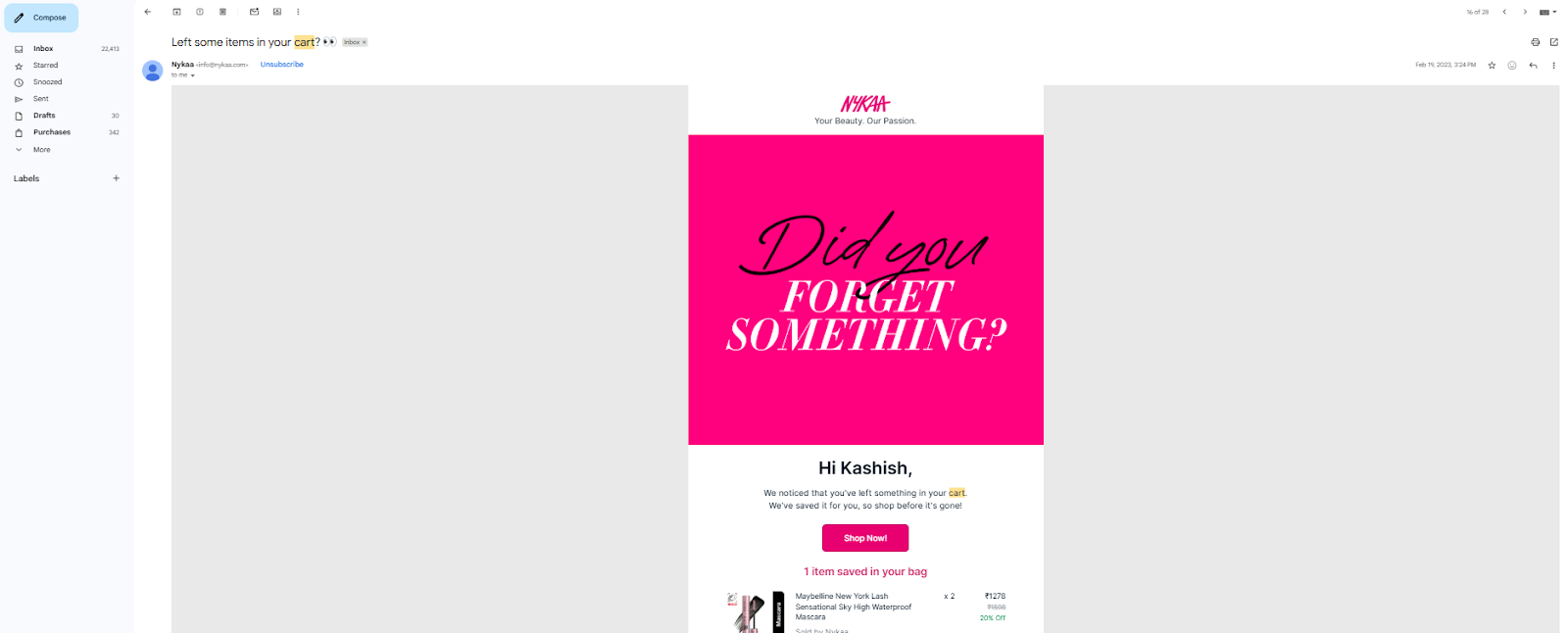
For example, Nykaa, a leading fashion and beauty brand, sends abandoned cart emails within just a few hours of a shopper leaving their cart. This timely follow-up catches customers while their interest is still fresh.
The email clearly showcases the items left behind, serving as a quick visual reminder, and includes a direct link to return to checkout and complete the purchase effortlessly.
Follow up across multiple channels
Go beyond email by using WhatsApp or SMS to reach customers where they’re more likely to respond, with direct links back to checkout.
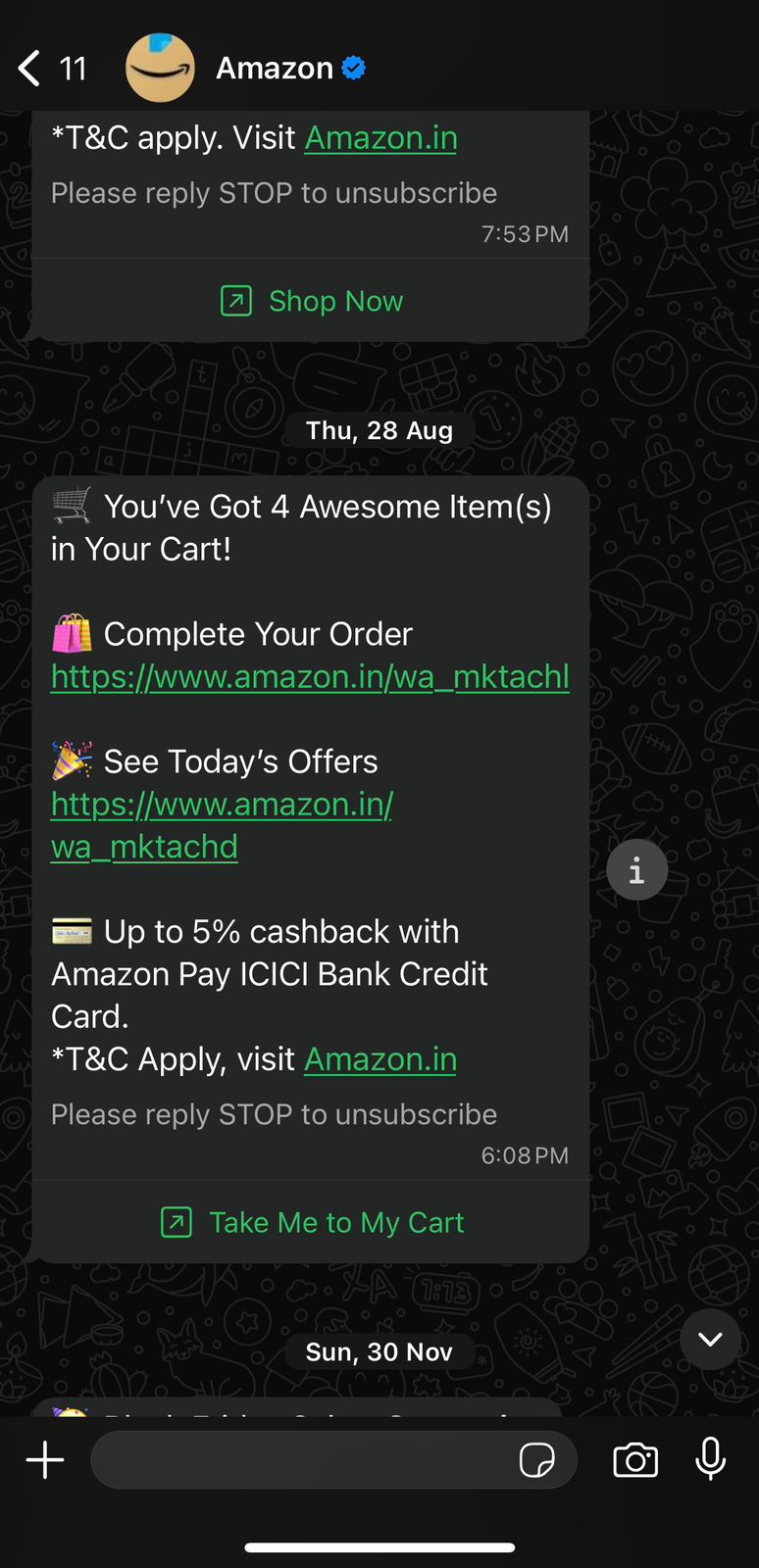
For instance, Amazon sends abandoned-cart reminders via WhatsApp with a clear “Take me to my cart” link, making it easy for shoppers to jump back in and complete their purchase with minimal friction.
Add smart, timely incentives
Offer limited-time discounts, free shipping, or small perks to help hesitant buyers overcome price or decision friction.
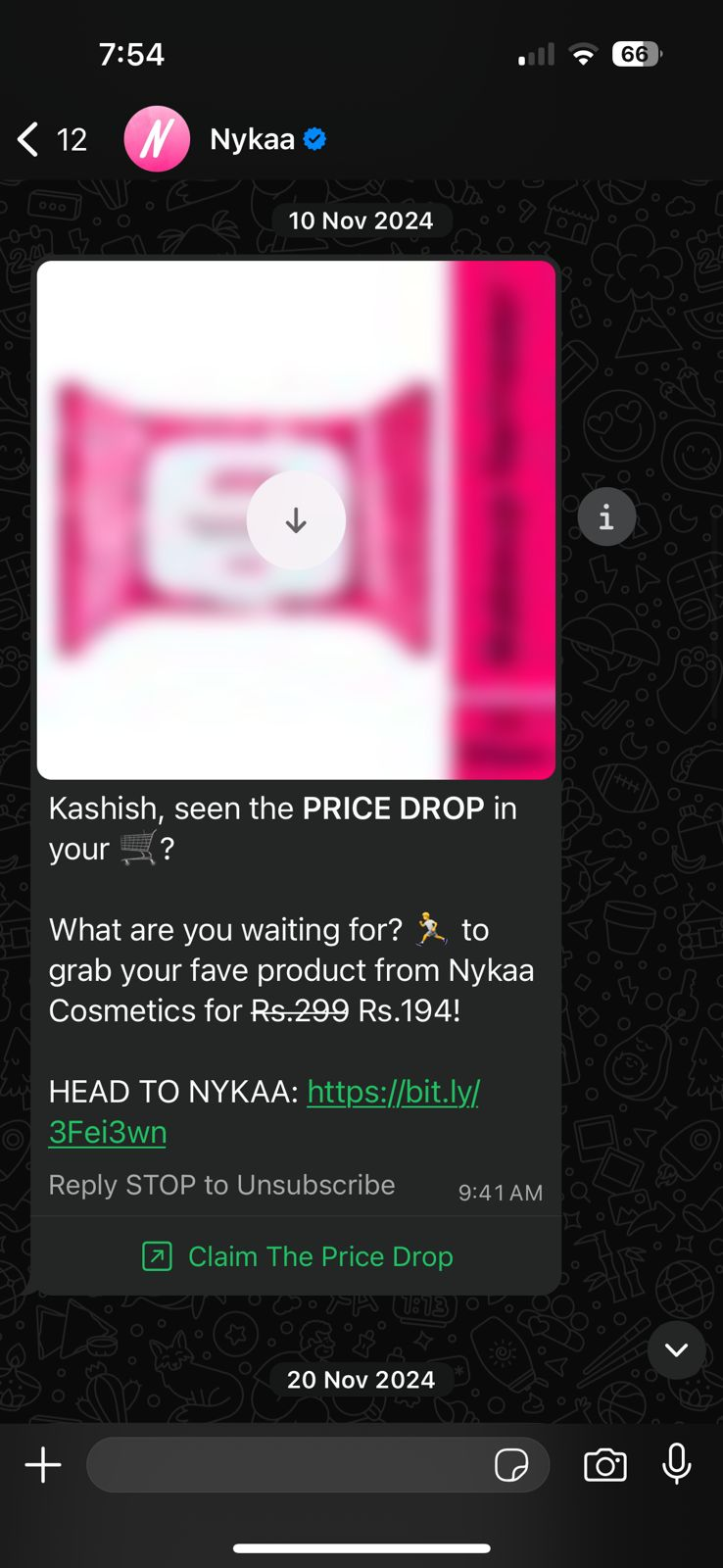
For example, Nykaa uses price-drop–based abandoned-cart messages to re-engage shoppers who didn’t complete their purchases. If the price of an item a customer added to their cart is reduced later, Nykaa sends a targeted message notifying them of the drop.
The message highlights the exact product, clearly shows the updated price, and creates a sense of urgency, prompting shoppers to return while the deal is still available and complete their purchase.
Reduce checkout friction
Nearly one in five shoppers abandon their carts at checkout because the process feels too long or overly complicated.
Make it as easy as possible for customers to complete their purchase once they return to the cart. Enable guest checkout so users aren’t required to create an account, reduce unnecessary form fields, and streamline the checkout flow.
Supporting multiple payment options such as UPI, wallets, and cards ensures shoppers can pay using their preferred method. A fast, mobile-optimized checkout is especially critical, as a large share of Shopify traffic comes from smartphones.
Build trust at checkout
Reassure shoppers at the final stage by removing any lingering doubts. Clearly display delivery timelines so customers know when to expect their order, and make return or refund policies easy to find and understand.
Adding visible security cues, such as trusted payment logos, SSL indicators, and well-known payment gateways, helps shoppers feel confident their information is secure, reducing hesitation and increasing the likelihood of completing the purchase.
Best Channels for Shopify Abandoned Cart Recovery
Choosing the right channels for abandoned cart recovery can significantly increase the number of shoppers who return to complete their purchases. Each channel plays a different role, and the most effective Shopify brands often use a mix rather than relying on a single channel.
- Email remains the most widely used channel for abandoned cart recovery. It’s cost-effective, easy to automate, and ideal for sharing detailed information such as product images, prices, and reminders.
When sent within a few hours of abandonment and personalized with the exact items left in the cart, recovery emails help re-engage shoppers while intent is still high.
- WhatsApp has emerged as one of the most powerful recovery channels, especially in markets where chat is the primary mode of communication. Messages feel more direct and personal, are opened quickly, and can include one-tap links that take shoppers straight back to their cart.
Because of its conversational nature, WhatsApp is particularly effective for nudges, reminders, and time-sensitive offers.
- Retargeting ads on platforms like Facebook, Instagram, and Google help bring shoppers back even if they ignore messages. These ads remind customers of the exact products they viewed or added to their cart, keeping the brand top of mind as they continue browsing elsewhere.
In practice, the most successful Shopify stores don’t choose one channel; they layer them. An email for context, a WhatsApp or SMS reminder for immediacy, and retargeting ads for reinforcement together create a consistent, high-conversion recovery strategy.
Read More: How to Use WhatsApp for Customer Service in 2026
How to Set Up Abandoned Cart Recovery on Shopify
Setting up abandoned cart recovery on Shopify requires no technical effort. Follow these steps to ensure shoppers who leave without completing their purchase are automatically reminded to return and complete their purchase.
Step 1: Go to your Shopify admin
Log in to your Shopify store and navigate to Settings from the left-hand menu. From there, click on Checkout.
Step 2: Enable abandoned checkout emails
Scroll down to the Abandoned checkouts section. Enable the option to automatically send abandoned checkout emails. This allows Shopify to send reminders to customers who leave items in their cart without completing payment.
Step 3: Set the email send timing
Choose when the recovery email should be sent. For most stores, sending the first email within 1–3 hours is effective, as purchase intent is still high. You can adjust this timing later based on performance.
Step 4: Customize the recovery email content
Click on Customize email to edit the subject line and message. Keep the copy simple and reassuring. Include the customer’s name, product details, and a clear call-to-action like “Complete your purchase.”
This is also a good place to briefly highlight return policies, delivery timelines, or customer support availability.
Step 5: Review and save your settings
Once you’re happy with the timing and content, save your changes. Shopify will now automatically send abandoned checkout emails to eligible customers.
Step 6: Add additional recovery channels (optional)
To improve recovery rates, consider adding WhatsApp or SMS reminders using Shopify apps. These channels are more immediate and often perform better for mobile shoppers, especially if the message is short and conversational.
Step 7: Monitor performance and optimize
Go to Analytics → Dashboards or Orders → Abandoned checkouts to track how many carts are being recovered and how much revenue is generated. Use these insights to refine email timing, messaging, or incentives such as free shipping or limited-time discounts.
With these steps in place, abandoned cart recovery runs on autopilot, helping you reclaim lost sales while you focus on growing your Shopify store.
Common Mistakes to Avoid in Shopify Abandoned Cart Recovery
There are certain things you must be careful about while sending abandoned cart messages, or all your effort might go down the drain. Here are some common mistakes to avoid:
Sending recovery messages too late
Waiting too long to follow up reduces the chances of conversion. The longer you delay, the colder the intent gets. Your first reminder should go out while the product is still fresh in the shopper’s mind.
Leading with discounts immediately
Offering a discount in the very first message can hurt long-term revenue. It conditions customers to abandon carts just to receive a deal. Start with a value-based reminder and save incentives for follow-ups.
Not addressing trust concerns
Many shoppers abandon carts due to uncertainty around delivery timelines, return policies, or payment security. If your recovery messages don’t reassure them on these points, hesitation remains.
Ignoring mobile optimization
Most abandoned carts happen on mobile, but recovery emails and checkout pages are often not mobile-friendly. Cluttered layouts, slow load times, or broken CTAs can kill conversions.
Using generic, impersonal messaging
Messages that sound automated or vague fail to reconnect with the shopper. Not using the customer’s name, product details, or context makes the reminder easy to ignore.
Sending too many reminders
Overloading customers with emails or messages can feel spammy and damage brand trust. A short, well-timed sequence performs far better than frequent follow-ups.
Recover More Abandoned Carts with WhatsApp Automation Using Flowcart
Speed and visibility play a major role in abandoned cart recovery. Email often gets buried in crowded inboxes, but WhatsApp messages are seen almost instantly. For shoppers who abandon carts on mobile (and that’s the majority), WhatsApp feels natural, personal, and far less intrusive.
A short reminder, sent at the right moment, can be enough to bring them back and complete the purchase. This is where Flowcart comes in.
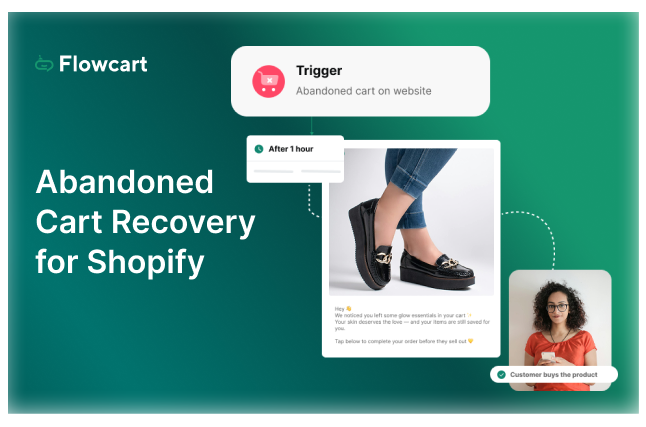
Flowcart is a WhatsApp commerce and automation platform built specifically for ecommerce. It reduces cart abandonment by 30% by turning WhatsApp into a high-converting recovery channel without manual follow-ups or complicated setups.
Here’s how Flowcart helps you manage abandoned carts more effectively:
- Automated WhatsApp cart recovery: Flowcart Abandoned Cart Recovery feature automatically sends WhatsApp reminders to shoppers who abandon their carts, ensuring timely follow-ups while purchase intent is still high.
- Personalized cart messages: Each message includes the customer’s name, abandoned products, and a direct checkout link, making it easy for shoppers to resume their purchase.
- Smart recovery sequences: Set up multi-step WhatsApp Flows with gentle reminders first, followed by incentives like free shipping or discounts if the cart remains unconverted.
- One-click checkout from WhatsApp: Shoppers can return to their exact cart with a single tap, removing friction and reducing drop-offs during the recovery process.
- Analytics and recovery insights: Track recovered carts, revenue generated, message performance, and conversion rates so you know exactly what’s working and where to optimize.
By combining WhatsApp’s immediacy with Flowcart’s automation, you can turn abandoned carts into real revenue opportunities. Check out Flowcart pricing here.
Conclusion
With the right setup, timing, and messaging, Shopify abandoned cart recovery can quietly become one of your most reliable revenue drivers.
The real difference, however, comes from meeting customers where they already are. Channels like WhatsApp make recovery faster, more personal, and far more effective, especially for mobile-first shoppers.
If you’re looking to turn abandoned carts into completed orders without manual follow-ups, Flowcart helps you do exactly that. With automated WhatsApp cart recovery built for Shopify, Flowcart makes it easy to re-engage shoppers and recover more revenue on autopilot.
Start recovering more abandoned carts with Flowcart today. Book a demo now!
Frequently Asked Questions (FAQs)
What is an abandoned cart in Shopify?
An abandoned cart happens when a customer adds products to their cart but leaves the store without completing the checkout.
Why do customers abandon carts in Shopify stores?
Common reasons include unexpected shipping costs, complex checkout, lack of trust, slow site speed, or distraction.
How does Shopify track abandoned carts and checkouts?
Shopify automatically records abandoned checkouts when a customer enters their email or phone number but doesn’t finish the purchase.
What is the best way to recover abandoned carts on Shopify?
Use automated recovery flows with timely reminders, personalized messages, and frictionless links back to checkout, ideally across multiple channels.
How long should we wait before sending an abandoned cart reminder?
Send the first reminder within 1–3 hours while purchase intent is still high.
Which channel works best for Shopify abandoned cart recovery—email, SMS, or WhatsApp?
Email is good, but WhatsApp and SMS usually perform better for mobile shoppers because they’re seen and opened faster.
Are abandoned cart recovery apps worth using on Shopify?
Yes. The right app automates follow-ups, improves timing and personalization, and helps recover revenue you’d otherwise lose.
LinkedIn Post
Abandoned carts don’t happen because customers aren’t interested.
They happen because something interrupts intent.
Unexpected costs.
Too many checkout steps.
Lack of trust.
Or simply… life getting in the way.
Now, to bring the shoppers back, email is useful. But it’s slow. Crowded. Easy to ignore.
If you want to recover abandoned carts in 2026, you need to meet customers where they already are, on WhatsApp.
WhatsApp is instant. Personal. Mobile-first.
And when a shopper gets a timely nudge with a one-tap link back to their cart, recovery becomes natural, not forced.
That’s exactly why we built Flowcart.
Flowcart turns WhatsApp into a high-converting cart recovery channel for Shopify brands. Not with spam. But with smart, automated, customer-friendly conversations.
Here’s how Flowcart helps brands recover more abandoned carts:
• Automated WhatsApp cart reminders sent at the right time
• Personalized messages with product details + checkout links
• Multi-step recovery flows (reminder → nudge → incentive)
• One-tap return to cart from WhatsApp
• Real-time analytics on recovered revenue and performance
• Seamless Shopify integration with zero manual effort
If you’re running a Shopify brand and are serious about recovering more carts without chasing customers manually, Flowcart is built for you.
Book a demo and see it in action.






%201.webp)




.png)