
Key Takeaways
WhatsApp helps brands deliver faster, always-on support across orders, refunds, feedback, loyalty, and troubleshooting.
Flowcart turns WhatsApp into a structured support channel with automation, self-serve flows, and in-chat loyalty journeys.
Using WhatsApp with Flowcart improves CSAT, speeds resolutions, and reduces repetitive workload for support teams.
Great customer service is synonymous with a competitive advantage. Customers expect instant answers, seamless hand-holding, and zero friction at every step. Yet for most brands, being consistently available, responsive, and helpful still feels out of reach.
That’s where WhatsApp changes the game.
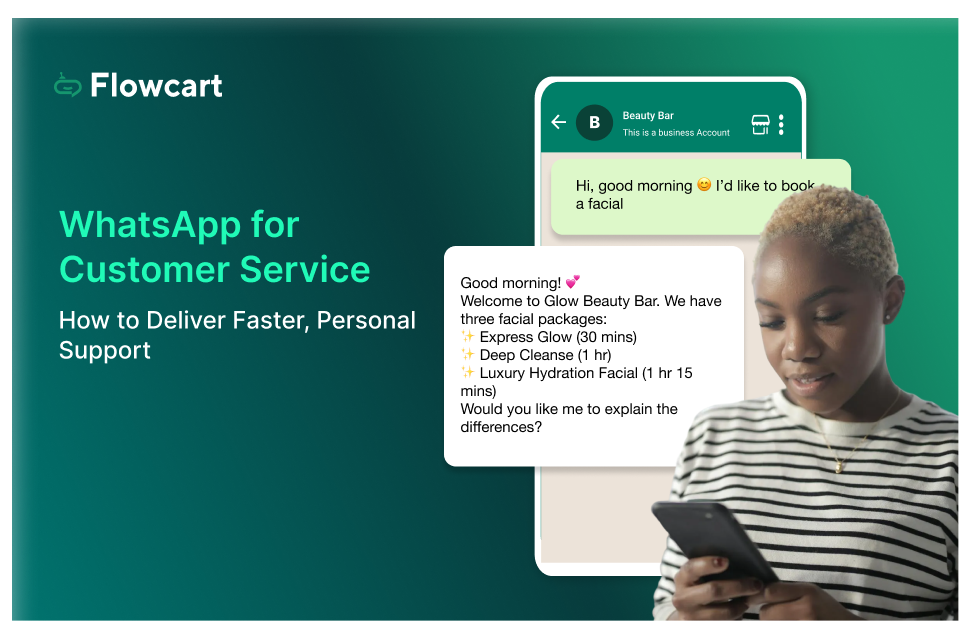
With WhatsApp for customer service, support becomes faster, more personal, and easier to access. Customers can reach you on a channel they already use daily, get real-time updates, resolve issues without long wait times, and even complete requests in a single conversation.
In this guide, we’ll break down how WhatsApp can transform your customer service experience.
Why Businesses Are Adopting WhatsApp for Customer Service
Whether it’s 2 in the afternoon or late at night, customers expect support to be available when they need it. They want quick answers, clear guidance through processes, and timely updates, all without having to make phone calls or bounce between long email threads.

WhatsApp meets these expectations effortlessly, keeping customers happy and businesses growing. In fact, businesses using WhatsApp Business have seen customer service performance improve by up to 2.25× compared with traditional support channels.
Here’s why WhatsApp has become the go-to platform for modern customer support:
Instant, Personalized Communication
WhatsApp enables real-time, two-way conversations that feel natural and personal. Unlike email or ticketing systems, there are no long wait times or rigid formats. Support agents can view past conversations, understand context instantly, and respond in a conversational tone.
Higher Customer Satisfaction (CSAT)
Speed and convenience directly impact how customers perceive support. With WhatsApp, customers receive quick acknowledgments, timely updates, and clear resolutions. This reduces frustration, shortens resolution times, and significantly improves CSAT scores.
Scalable Support with Automation
As message volumes grow, WhatsApp allows businesses to scale support without compromising quality. Automated replies, chatbots, and workflows can handle common queries like order status, refunds, appointment scheduling, or FAQs. At the same time, complex issues can be seamlessly routed to human agents.
Data Privacy and Trust
Trust is critical in customer service, especially when handling sensitive information. WhatsApp’s end-to-end encryption ensures conversations remain private and secure. For businesses, this builds customer confidence and makes WhatsApp a reliable channel.
Together, these benefits explain why WhatsApp has evolved from a simple messaging app into a powerful customer service channel.
How to Use WhatsApp for Customer Service in 2026
Customer service on WhatsApp goes beyond answering simple questions; instead, it's a proactive support channel. Here are the 6 best ways in which you can leverage WhatsApp for providing customer service:
1. Post-Purchase Support and Order Tracking
After a customer places an order, their biggest concern is knowing what happens next. WhatsApp makes post-purchase support simple by delivering real-time updates and easy access to help within a single, continuous conversation.
Businesses can use WhatsApp to share order confirmations, shipping updates, delivery status, and payment acknowledgments. If a customer has a question, they can reply directly to the message instead of searching for a support email or calling a helpline.
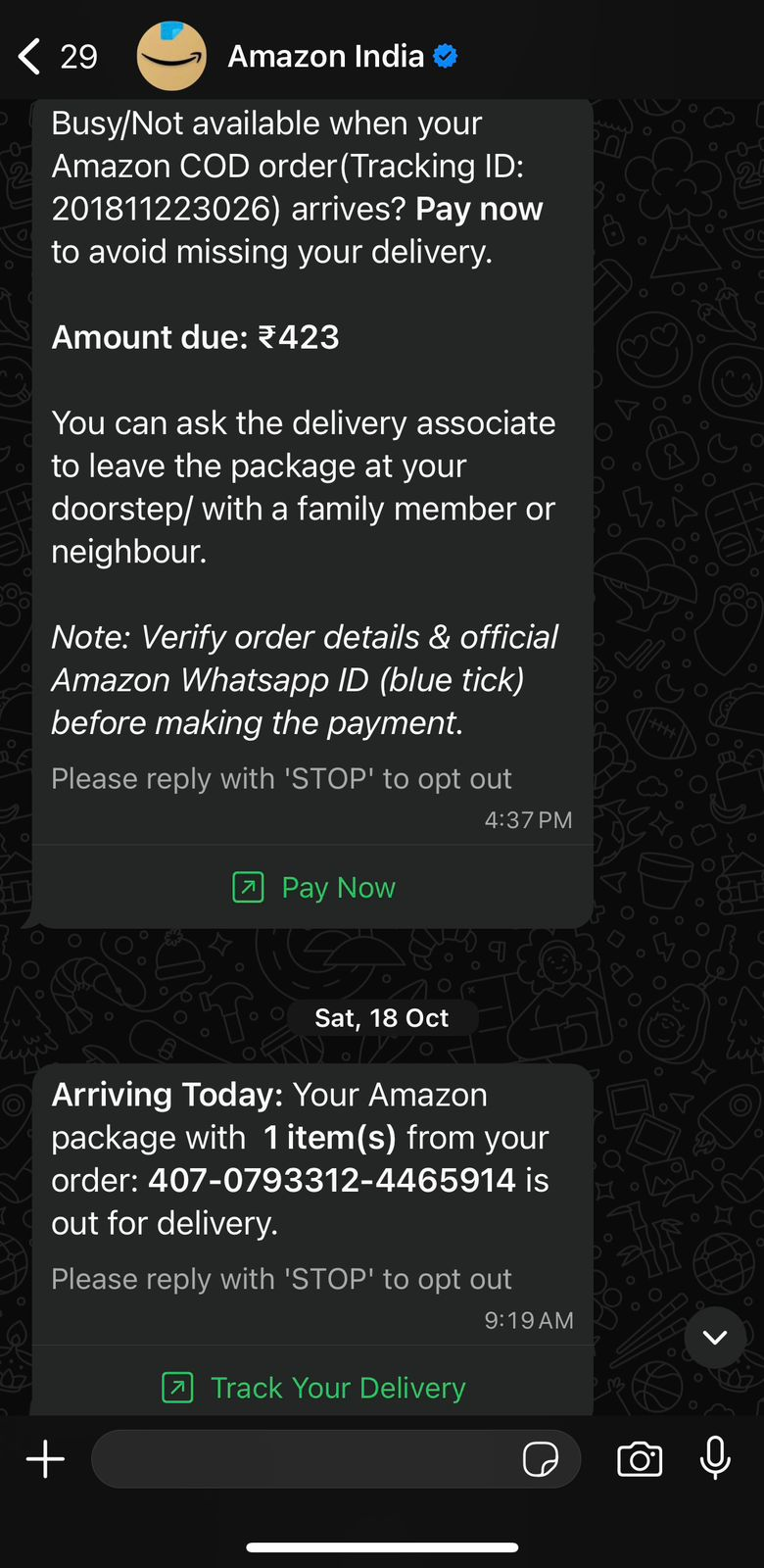
For example, Amazon sends its customers a message before they are about to deliver a customer’s order. They also provide a link to track the order or make an online payment beforehand within the same message. This keeps the customers posted on when their order is about to arrive and also facilitates seamless payment.
2. Refunds and Cancellations
Refunds and cancellations are as important in a customer's journey as placing an order. If the customer isn’t assured about a smooth cancellation/refund procedure, they might hesitate in placing an order with you.
Customers want clarity, speed, and reassurance that their money is being processed correctly. WhatsApp helps businesses manage these situations transparently and in real time so customers do not have to repeatedly follow up.
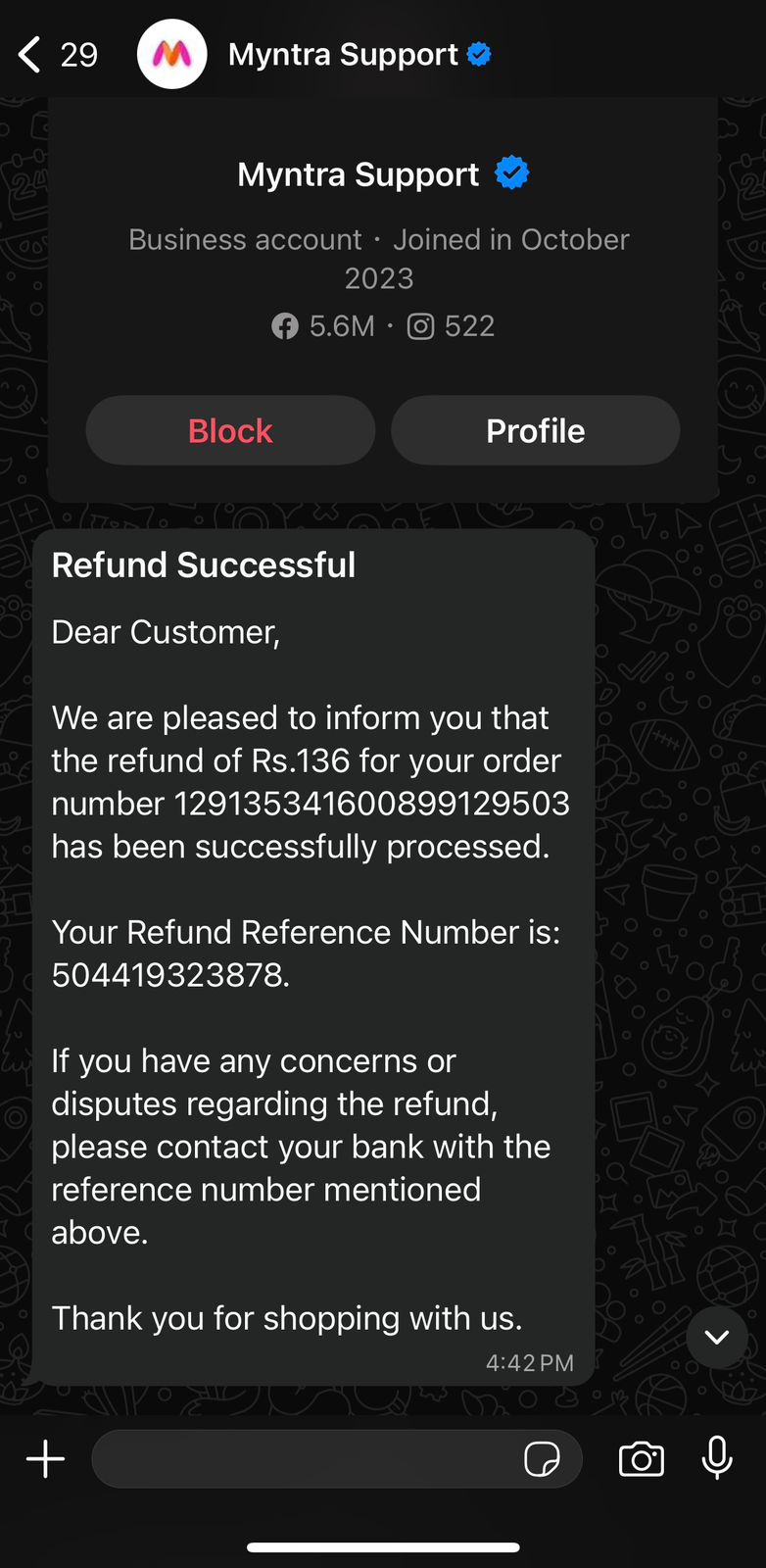
For example, Myntra uses WhatsApp to notify customers when a refund is initiated. The message clearly states that the order has been cancelled, the refund amount, and when the money will be credited back to the original payment method.
3. Feedback and Review Collection
Collecting feedback is essential for improving customer service, but traditional surveys often get ignored. WhatsApp makes feedback and review collection more natural by reaching customers on a channel they already use and trust.
Brands can send short, timely messages after an order is delivered or a support query is resolved, asking customers to share their experience. Simple prompts such as rating buttons or quick reply options make it easy for customers to respond without effort.
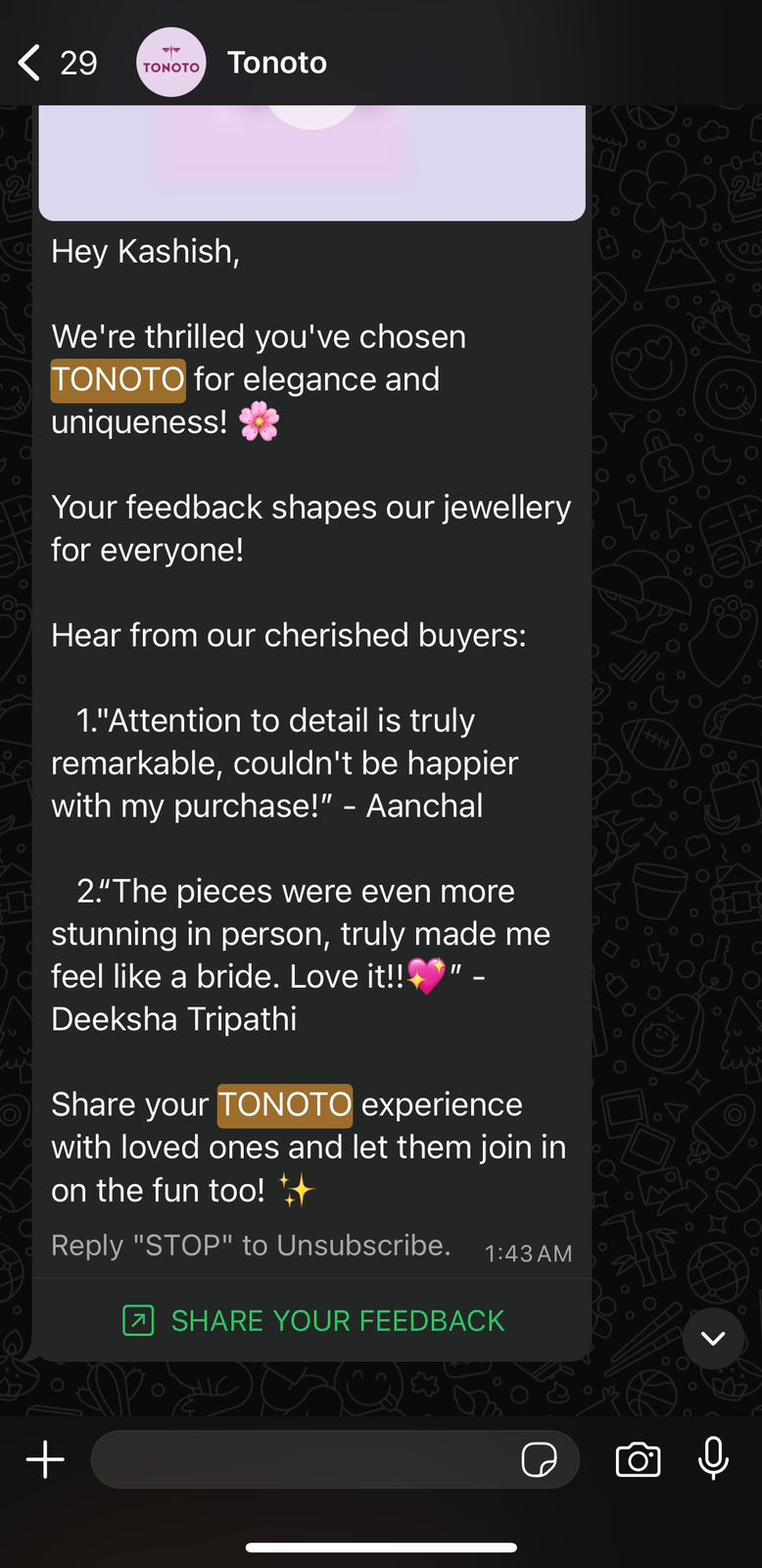
For example, Tonoto, a jewellery brand, uses WhatsApp to request feedback shortly after a customer receives their order. Customers get a message asking how their experience was, along with a quick option to leave a review. This approach helps the brand gather honest feedback that can be used to improve both products and service.
4. Personalized Loyalty and Reward Updates
Loyalty programs work best when customers clearly understand their benefits and feel rewarded at the right moments. WhatsApp allows brands to deliver personalized loyalty and reward updates that feel timely, relevant, and easy to act on.
Using WhatsApp, businesses can notify customers about reward points earned, tier upgrades, exclusive benefits, or expiring rewards. These updates arrive directly in the chat, where customers can ask questions or redeem rewards without switching channels.
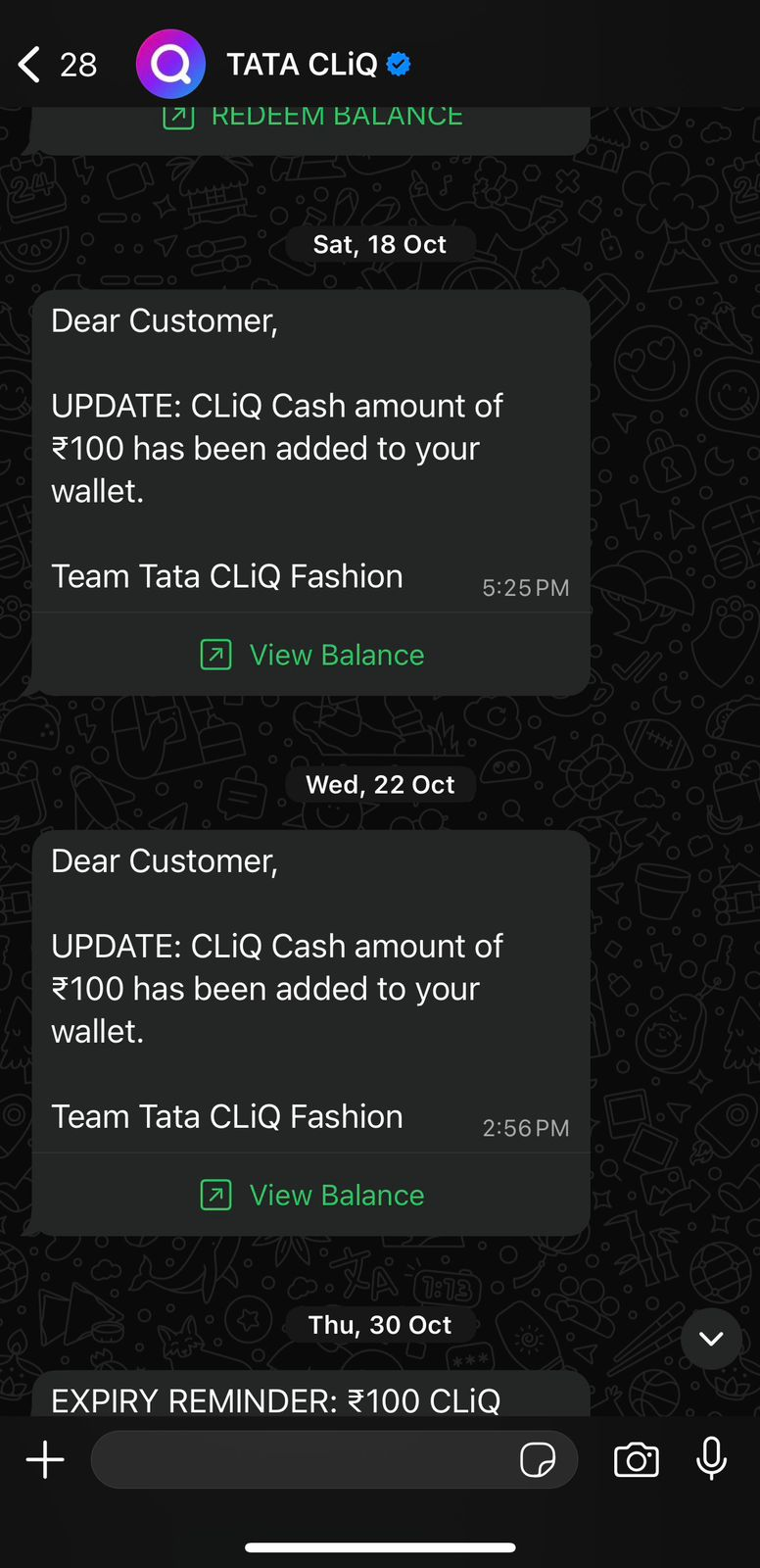
For example, Tata CLiQ uses WhatsApp to inform customers about loyalty points earned after a purchase and alert them when those points are ready to be redeemed. By sharing clear messages with current balances and next reward milestones, the brand keeps customers engaged.
5. Product Troubleshooting via Images and Videos
Explaining a problem over text alone can be frustrating for both customers and support teams. WhatsApp simplifies product troubleshooting by allowing customers to share images or videos that clearly show the issue to resolve problems quickly.
Customers can send photos of damaged items, error messages, or setup issues, while support teams can respond with visual instructions, short videos, or step-by-step images. This reduces misunderstandings and speeds up resolution without the need for calls or long explanations.
For example, an electronics brand can ask a customer to share a short video of a device that is not powering on. The support team can then reply with a quick video showing how to reset the device or identify whether it needs a replacement. This visual approach leads to faster fixes and a far better support experience.
6. Appointment Reminders and Rescheduling
Missed appointments are costly for both businesses and customers. WhatsApp helps prevent no-shows by sending timely appointment reminders and making rescheduling quick and effortless.
Businesses can notify customers about upcoming appointments, share date and time details, and include simple reply options to confirm, cancel, or reschedule. If plans change, customers can respond instantly without calling a support line or navigating a booking portal.
For example, a healthcare clinic can send a WhatsApp reminder a day before an appointment, asking the patient to confirm their slot. If the patient needs to reschedule, they can reply directly, allowing the clinic to update the schedule in real time and free up slots for other patients.
Read More: How to Boost Customer Engagement on WhatsApp in 2026
How Companies Are Using Flowcart to Provide Better Customer Service Through WhatsApp
As WhatsApp becomes a primary support channel, businesses need more than just a messaging app to deliver consistent, high-quality customer service. That’s where Flowcart comes in. Flowcart helps companies turn WhatsApp into a structured, scalable customer service channel that feels fast and personal, without overwhelming support teams.
By combining automation, intelligent routing, and rich in-chat experiences, Flowcart enables businesses to respond faster, reduce manual work, and resolve issues more efficiently. Here are some of the most relevant Flowcart features that directly improve customer service on WhatsApp:
- Built-in WhatsApp loyalty programs: Flowcart allows businesses to run fully integrated loyalty programs directly on WhatsApp. Customers can check reward points, unlock benefits, and receive loyalty updates in the same chat they use for support.
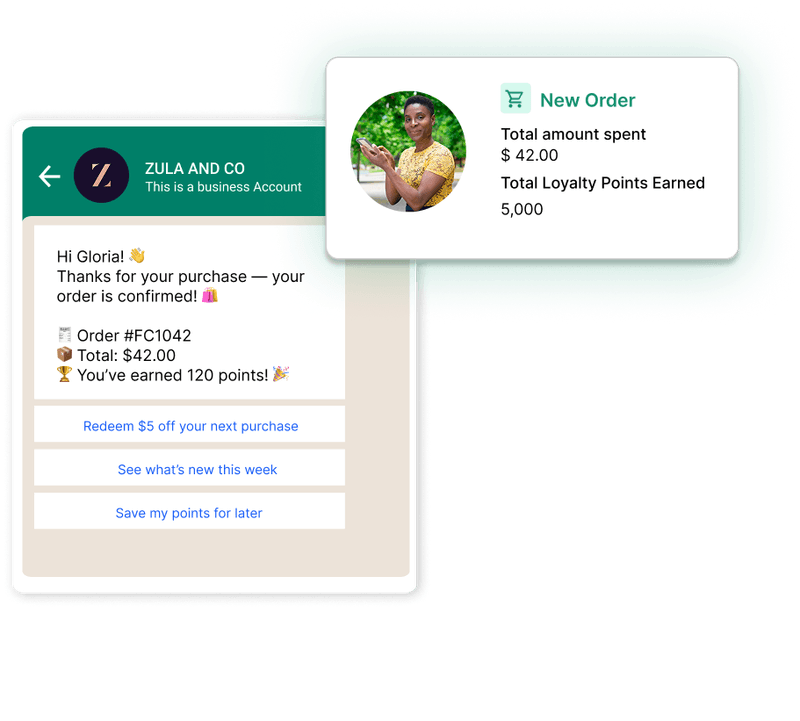
- Self-serve rewards and redemptions: Customers can view and redeem rewards directly within WhatsApp using interactive flows and webviews. This minimizes back-and-forth conversations and allows support teams to focus on complex issues instead of loyalty-related queries.
- Automated first responses: Flowcart instantly acknowledges incoming messages and answers common questions using automated no-code WhatsApp flows. Customers get immediate help, even outside business hours, while agents focus on more complex issues.
- Self-serve support journeys: With interactive WhatsApp flows and webviews, customers can track orders, request refunds, update details, or reschedule appointments on their own without waiting for an agent.
- Rich media support: Support teams can share images, videos, invoices, and step-by-step guides directly in chat, making explanations clearer and faster than text-only support.
Together, these capabilities help companies use WhatsApp not just to respond to customers, but to proactively support them, resolve issues faster, and build long-term trust through better service.
Here’s what the team of Bundles and Snuggles has to say about Flowcart,
“Our loyalty program used to be hidden on a webpage. Now it lives where our customers live on WhatsApp. We’ve seen a major bump in reorders since launching it with Flowcart.”
Explore how Flowcart has helped brands deliver faster, more personalized customer service while creating smoother, end-to-end customer experiences. Dive into these success stories.
You can also explore Flowcart’s pricing to understand how these capabilities fit your business needs and scale as your customer conversations grow.
Best Practices for Delivering Great Customer Support on WhatsApp
Providing excellent customer support on WhatsApp requires more than just being available. You have to continuously work to keep your conversations efficient and human. Below are some proven best practices to deliver high-quality support on WhatsApp:
Set clear response times and expectations
Let customers know when they can expect a reply, especially outside business hours. Auto-responders help acknowledge messages instantly and reduce frustration.
Example: An auto-reply saying, “Thanks for reaching out. Our support team will get back to you tomorrow between 10 AM and 6 PM,” reassures customers that their message has been received.
Personalize conversations
Using customer names and referencing past interactions makes support feel more thoughtful and less transactional. Contextual replies also speed up issue resolution.
Example: “Hi Ananya, I see your last order was delivered yesterday. How can I help you with it today?” feels far more personal than a generic response.
Use templates for FAQs
Pre-approved templates help handle common queries like order status, refunds, or delivery timelines quickly and consistently.
Example: A ready-to-use order tracking message sharing shipment details saves time for both agents and customers.
Train your support team
A friendly tone, empathy, and clarity matter just as much as speed. Well-trained agents can turn even a complaint into a positive experience.
Example: Responding with “I understand how frustrating this can be. Let me fix this for you right away,” builds trust instantly.
Integrate with CRM or helpdesk tools
When agents have access to customer history, orders, and past tickets, they can resolve issues without asking repetitive questions.
Example: An agent viewing previous refund requests can address a follow-up instantly instead of asking the customer to explain again.
Following these practices helps businesses deliver faster resolutions, more consistent service, and a better overall customer experience on WhatsApp.
Also Read: WhatsApp Broadcast Automation for Smarter Outreach in 2026
The Future of Customer Support Starts on WhatsApp
WhatsApp has evolved from a simple messaging app into a powerful customer service channel that meets customers where they already are. When used thoughtfully, it helps businesses respond faster, reduce friction, and deliver support that feels personal, timely, and trustworthy.
To truly scale this experience, brands need the right infrastructure behind their WhatsApp conversations. That’s where Flowcart helps by turning WhatsApp into a structured, automated, and customer-friendly support channel that grows with your business.
If you’re ready to deliver faster resolutions, reduce support load, and create better customer experiences on WhatsApp, book a demo with Flowcart now!
Frequently Asked Questions (FAQs)
How can I use WhatsApp for customer support?
You can use WhatsApp to handle customer queries, share order updates, send reminders, process cancellations, and provide real-time assistance.
Is WhatsApp Business free for customer service?
The WhatsApp Business App is free to download and use, making it suitable for small businesses with low message volumes. However, advanced setups like the WhatsApp Business Platform involve additional costs such as setup fees, monthly subscriptions, and per-message charges.
What’s the difference between WhatsApp Business App and API?
The WhatsApp Business App is designed for small teams and manual support, with limited automation and single-device access. The WhatsApp Business Platform (API) is built for larger teams and higher volumes, offering automation, integrations with other systems, and support for multiple agents.
Can multiple agents reply from one number?
Yes, multiple agents can respond from a single WhatsApp number, but this depends on the setup you use. App-based solutions have limited multi-device support, while API-based setups allow many agents to manage conversations simultaneously.
Is customer data secure on WhatsApp?
Yes, WhatsApp uses end-to-end encryption to protect messages, ensuring that only the sender and recipient can read the content. This makes it a secure channel for customer communication, provided businesses follow proper data handling and compliance practices.
LinkedIn Post:
Customer service today has one hard truth:
If support feels slow, fragmented, or hard to access, customers don’t complain. They leave.
That’s why more businesses are moving customer service to WhatsApp.
It’s already where customers spend their time. It’s instant, conversational, and frictionless. Order updates, refunds, troubleshooting, and reminders all happen in one familiar chat, without tickets, calls, or long email threads.
But using WhatsApp for customer service at scale is where most brands hit a wall.
Unstructured chats.
Rising message volumes.
Agents answering the same questions again and again.
No clear way to track, automate, or standardize support.
This is exactly the gap Flowcart is built to solve.
Flowcart turns WhatsApp into a structured, scalable customer service channel. It helps brands deliver fast, consistent, and personal support without overwhelming their teams. Here’s how Flowcart enables better customer service on WhatsApp:
• Automated first responses so customers are acknowledged instantly, even outside business hours
• Self-serve support flows for order tracking, refunds, cancellations, and appointment changes
• Built-in WhatsApp loyalty programs where customers can check points and rewards inside chat
• Self-serve reward redemptions that reduce back-and-forth support queries
• Intelligent routing so complex issues reach the right agent with full context
• Rich media support using images, videos, invoices, and guides directly in chat
The outcome is simple.
Faster resolutions for customers.
Lower workload for support teams.
And a support experience that actually scales as the business grows.
We’ve put together a detailed guide on how to use WhatsApp for customer service in 2026, including real-world use cases and best practices.






%201.webp)




.png)