
.png)
Key Takeaways
Learn how automated WhatsApp broadcasts beat native lists with better scale, targeting, and personalization for campaigns.
Get a practical, step-by-step framework to launch, test, and optimize your first automated WhatsApp broadcast.
See how Flowcart’s Smart Broadcast, segmentation, and analytics turn WhatsApp conversations into a predictable revenue channel.
Reaching thousands of customers in seconds, without typing a single message manually. Yes, that’s what WhatsApp Broadcast Automation is designed to do.
Over 50 million businesses use WhatsApp to reach their customers and engage with them where they are. Not only this, but brands are also using automated broadcasts to launch new products with impact, nurture leads with timely follow-ups, and run seasonal campaigns that feel personal at scale.
Want to know how it works? Explore the A-Z of WhatsApp broadcast automation and how to implement it in this guide.
What Is WhatsApp Broadcast Automation?
WhatsApp broadcast automation is a feature that allows businesses to send messages to multiple recipients simultaneously. The catch here is that it can be done automatically, without having to type or forward each message manually. You can think of it as a smarter version of sending a mass text, but on WhatsApp.
Just because the same message is being sent to many people doesn’t mean it has to feel generic. You can easily personalize each message, like adding the customer’s name, referencing their past purchases, or tailoring the content to their specific interests.
For example, imagine you run an online skincare brand. You’re launching a new vitamin C serum. Instead of messaging every customer one by one, your WhatsApp broadcast tool automatically sends a personalized message, such as “Hey Riya, we just dropped our new Vitamin C serum, here’s an exclusive 10% off for you!” to everyone who has shown interest in skincare.
Native WhatsApp Broadcast vs. Automated Broadcasts
Before delving deeper into the nuances of WhatsApp broadcast automation, let's first understand the two primary categories of WhatsApp broadcasts and their key features.
Here’s a comparison of the two side by side:
At a surface level, both native and automated WhatsApp broadcasts allow you to send a single message to multiple people. But the similarity ends there. The real difference lies in how they
function and the level of control, scale, and personalization they offer.
Also Read: WhatsApp Marketing Cost: Pricing, Factors, and How to Save Money
Key Benefits of WhatsApp Broadcast Automation
By combining automation with WhatsApp’s direct and personal nature, brands can engage customers in a way that feels both efficient and human. Here are some of the key benefits:
1. Reach a Wider Audience Instantly
With automation, you can send messages to thousands of customers in seconds. Whether you’re announcing a new product, promoting a sale, or sharing an update, automation eliminates the need for manual effort and ensures that every message is sent on time.
2. Personalization at Scale
Even though you’re broadcasting to many people, each message can feel personal. Automated systems enable you to include customer names, interests, or purchase history, ensuring every interaction feels tailored.
3. Consistent and Timely Communication
With automated scheduling and triggers, your broadcasts are sent at the perfect moment, such as a welcome message immediately after signup or a reminder just before a sale ends.
4. Data-Driven Insights
Unlike native broadcasts, automated tools provide detailed analytics. You can track delivery rates, open rates, and responses, helping you understand what’s working and optimize future campaigns for better results.
5. Seamless Integration with Your CRM
Automated broadcasts can sync directly with your CRM or lead database. This means your customer data is always up to date, and you can segment audiences automatically, for example, sending different messages to new leads versus loyal customers.
6. Higher Engagement with Lower Effort
When customers receive relevant, well-timed messages, they’re more likely to respond or take action. Automation helps you maintain high engagement levels with minimal manual input, freeing up your team to focus on strategy and creativity.
Also Read: WhatsApp Marketing Automation: The Complete Guide for 2025
Setting Up Your First Automated Broadcast Campaign
Here is a practical step-by-step guide to launching your first automated WhatsApp broadcast:
1. Define your goal and success metric
Decide what this broadcast must achieve and how you’ll measure success.
Example goals & metrics:
- Product launch → metric: click-throughs to product page.
- Trial-to-paid conversion → metric: number of converted accounts within 7 days.
- Event reminder → metric: attendance rate.
2. Choose Your Tool and Connect Your WhatsApp Channel
Start by selecting a reliable automation tool that supports the WhatsApp Business API, such as Flowcart.
Flowcart makes it simple to set up and manage broadcasts without any coding. Once you’ve created your account, connect your WhatsApp Business number and link your CRM or contact list. This ensures your customer data syncs automatically, so every new lead or contact is always up to date.
From there, you can start building your message flows, segment audiences, and schedule broadcasts effortlessly from one place.
3. Segment your audience
Break your list into small, meaningful groups based on behavior, purchases, or lifecycle stage. Segments make broadcasts relevant and increase response rates.
Example segments:
- New signups (last 7 days)
- Customers who bought in the last 90 days
- Abandoned cart users
4. Create message templates
Write short, friendly messages and include personalization tokens (name, product, discount code). If you’re using the WhatsApp API, create templated messages for notifications and get them approved if required by your provider.
Example template (launch):
- Hi {{first_name}} — our new Vitamin C serum is live! Early access for you: {{link}}. Use code VITC10 for 10% off. Reply “YES” to claim.
Quick Tip: keep it ≤ 2–3 short sentences, clear CTA, and one link or action.
5. Set timing and delivery rules
Decide when the message should go out and whether to schedule or trigger it.
Options: immediate trigger (signup), scheduled send (9:30 AM local), or drip series (3 messages over a week).
Example: Send a launch broadcast at 10 AM local time to all customers in that time zone; send a reminder 48 hours later only to non-openers.
6. Personalize and A/B test content
Create 2–3 variations (subject line phrasing, CTA, or offer) and test on small segments of your audience to see what performs best. Use personalization: first name, last purchase, or product category.
Example A/B:
- Version A: “{{first_name}}, complete your look with your saved items. Use your 10% discount before midnight.”
- Version B: “Our best-sellers are trending again. Grab your 10% discount when you shop today.”
7. Preview and Launch
Send test messages to internal team members first. Verify tokens render correctly, links work, and message formatting looks right on different phones. Check delivery and opt-out flow.
Once everything is smooth, schedule or trigger the campaign. Monitor delivery status in real time for failures or bounce spikes. Make sure customer replies are routed to the right inbox (inbox agent or CRM) for follow-up.
8. Measure, Learn, Iterate
Track your chosen metrics and refine copy, timing, and segments. Document learnings for the next campaign.
Key KPIs to watch:
- Delivery %
- Click-through %
- Reply rate
- Conversion rate
- Unsubscribe rate
Quick checklist before you hit send
- Verified opt-ins for this list
- CRM synced and segment correct
- Message template proofed and tokens tested
- Send time localized and scheduled
- Test sends completed and formatting OK
- Reply routing and team assigned to handle replies
- KPIs defined and dashboard ready
Best Practices For WhatsApp Broadcast Automation
To make the most of the automated WhatsApp broadcasts, here are the best practices to keep in mind:
1. Always Get Explicit Opt-Ins
Only message people who’ve clearly agreed to hear from you. Collect opt-ins through forms, checkboxes, or WhatsApp links, and keep a record of consent. It keeps you compliant and ensures your audience actually wants to engage.
2. Keep It Short and Valuable
Attention spans are limited on chat apps. Make your messages clear, conversational, and focused on one goal, like a new product launch, discount, or reminder. Avoid long paragraphs or multiple CTAs.
3. Personalize Every Message
Even automated messages should feel personal. Use tools like Flowcart to dynamically add names, preferences, or past purchases to your messages. A simple “Hey Riya” instead of “Dear Customer” instantly makes your outreach more relatable.
4. Segment Your Audience
Don’t blast the same message to everyone. Create segments based on purchase history, engagement level, or interest. For instance, send loyalty offers to repeat buyers and welcome messages to new subscribers. Relevance leads to higher engagement.
5. Time Your Broadcasts Right
Schedule your messages when your audience is most active. Avoid sending late-night or weekend messages unless it’s absolutely necessary. Timing can make or break engagement.
6. Monitor Performance and Iterate
Track delivery rates, open rates, clicks, and replies to understand what’s working. Use that data to refine your next broadcast. Continuous testing and improvement are key to long-term success.
How Flowcart Automates WhatsApp Broadcasts
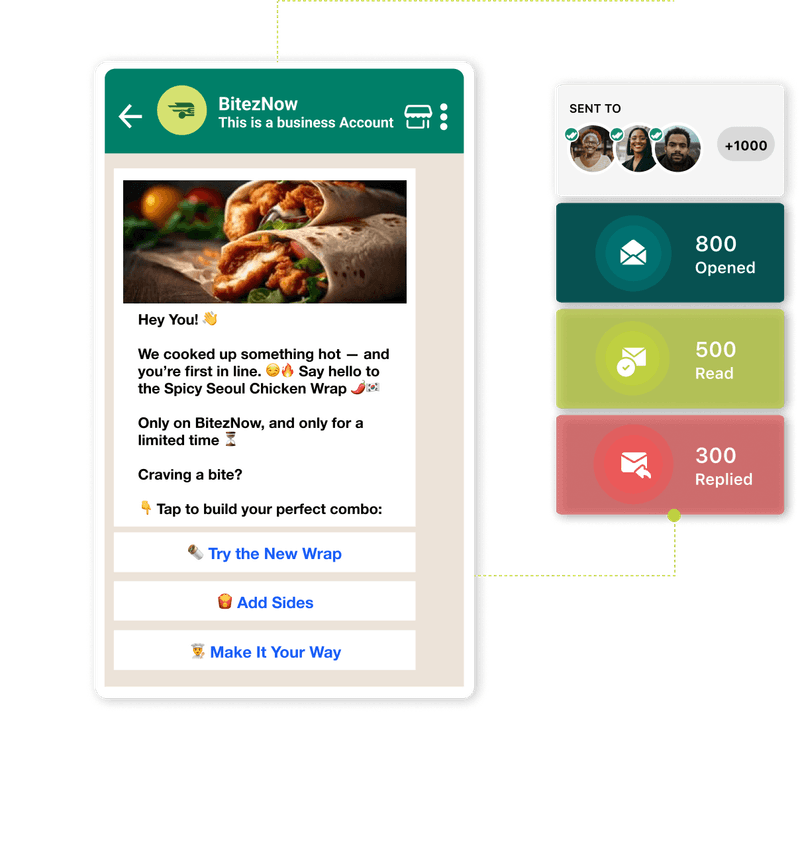
Flowcart is an all-in-one WhatsApp automation platform built to help businesses turn conversations into conversions without the manual effort. It simplifies how brands communicate on WhatsApp by automating broadcasts, managing customer journeys, and tracking performance in real time.
Whether you’re announcing a sale, launching a product, or nurturing leads, Flowcart Smart Broadcast ensures your message reaches the right people at the right time with the right context.
Key Features
1. Design Conversations Visually: Create structured customer journeys using Flowcart’s WhatsApp No-Code Flow Builder, a visual, drag-and-drop tool that lets you design message sequences without any coding. It helps you engage customers naturally, just like a human chat, while saving hours of manual work.
2. Send Personalized Messages at Scale: With Dynamic Message Personalization, Flowcart ensures every broadcast feels tailored to the recipient. You can automatically insert details like the customer’s name, location, or recent activity so your messages sound friendly, not automated.
3. Target the Right People: Flowcart’s AI-Powered Audience Segmentation feature allows you to group contacts based on behavior, purchase history, or engagement. With smart filters, you can make every broadcast relevant and increase your click-through rates.
4. Track Performance in Real Time: Get clear visibility into what’s working with Flowcart’s Campaign Analytics Dashboard. Monitor delivery rates, open rates, and click-throughs to measure your campaign performance instantly. These insights help you fine-tune future broadcasts and continuously improve engagement.
Pricing
Flowcart has customized pricing plans catering to all businesses, whether you are a growing business exploring conversational marketing or a large enterprise. Here are its four Flowcart pricing options:
- Starter: $69.99/month
- Growth: $129.99/month
- Pro: $199.99/month
- Enterprise: Custom
Ready to kickstart your WhatsApp conversational marketing journey? Start a free trial now!
Customer Testimonial
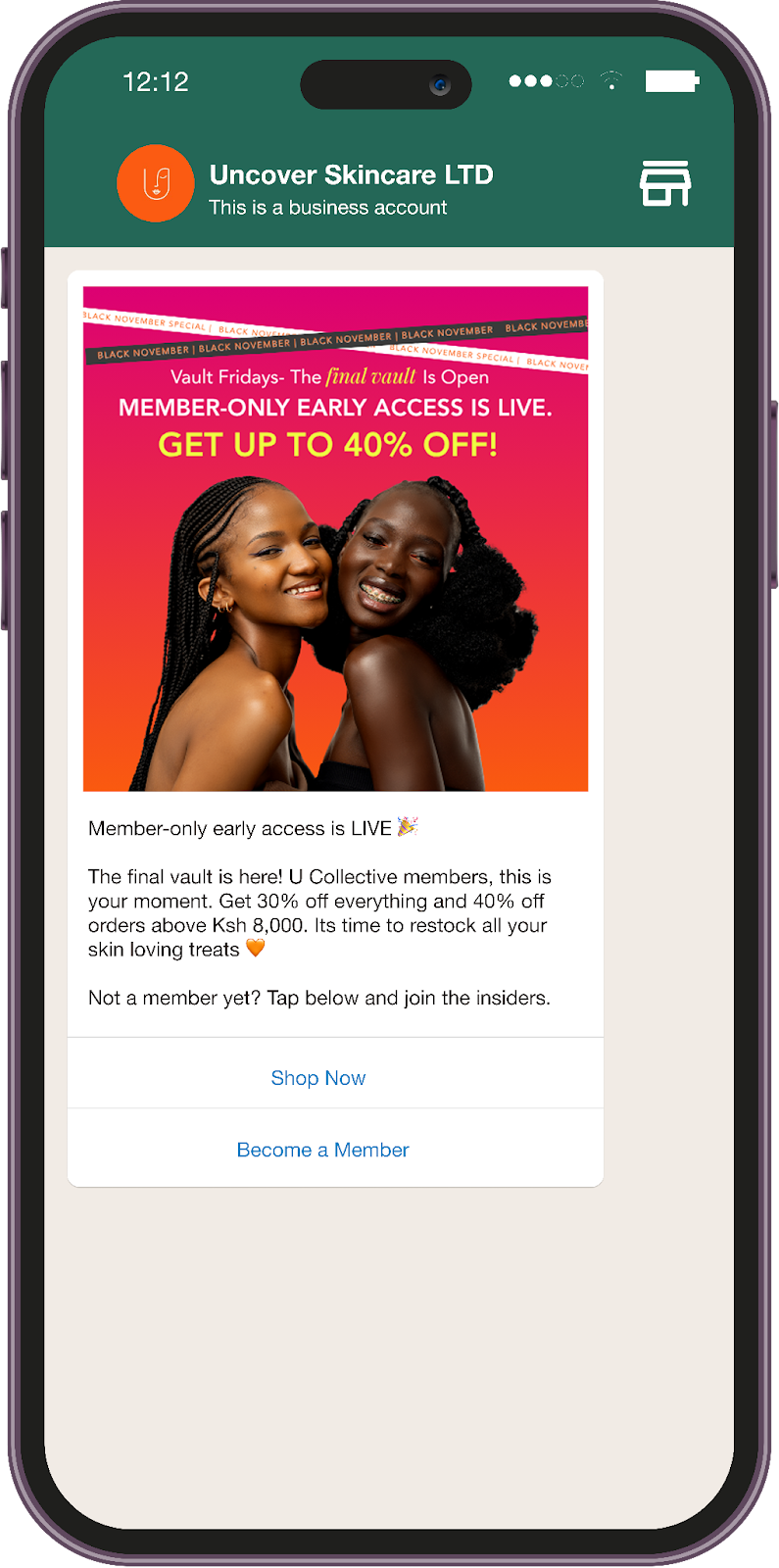
Uncover, a growing beauty tech brand, was struggling to convert its WhatsApp leads into sales. While engagement on WhatsApp was high, their manual follow-ups and broadcast messages lacked personalization and consistency. This led to delayed responses, low conversion rates, and a poor customer experience during campaigns.
Flowcart automated Uncover’s entire WhatsApp funnel from product discovery to checkout using its no-code flow builder and smart broadcast segmentation. By sending tailored follow-ups and automating recovery messages, Uncover achieved a 3x increase in conversions and cut manual response time by 70%. The result? A faster, more personalized buying journey that turned WhatsApp into one of their top-performing sales channels.
Sneha Mehta, the Co-founder of Uncover, says,
“With Smart Broadcasts, we turned WhatsApp into a revenue channel. Every message we send now has ROI built in. We send over 10,000 personalised messages a month and drive 3X more revenue than email.”
Explore more success stories and see how other brands achieved their growth goals with Flowcart in our Case Studies section.
Conclusion
WhatsApp broadcast automation has become essential for businesses seeking to reach large audiences quickly without compromising the personal touch. It streamlines communication, saves time, and ensures every customer gets timely and relevant updates.
With the right automation in place, brands can move beyond manual messaging to establish meaningful and scalable conversations. And that’s exactly where Flowcart helps, by making WhatsApp broadcast automation effortless, intelligent, and built for growth.
Frequently Asked Questions (FAQs)
1. What’s the difference between a WhatsApp broadcast and a WhatsApp group?
A broadcast lets you send the same message to multiple contacts privately, while a group creates a shared chat where everyone can see and reply. Broadcasts are best for announcements, promotions, and updates.
2. Is WhatsApp Broadcast Automation suitable for small businesses?
Yes, it’s a great fit. Automation helps small teams save time by scheduling messages, personalizing outreach, and tracking performance without requiring manual sending of each message.
3. Can I personalize messages in an automated broadcast?
Yes, most automation tools allow you to add personal details, such as the recipient’s name, location, or purchase history, so each message feels relevant and individual.
LinkedIn Post:
Most businesses don’t struggle to reach customers on WhatsApp, they struggle to do it consistently and personally at scale.
Teams spend hours creating lists, forwarding messages, and trying to keep up with replies. By the time the campaign is live, half the audience has already moved on.
That’s the real problem we built Flowcart to solve.
Flowcart automates every part of your WhatsApp communication from sending broadcasts to syncing your CRM and personalizing messages for every customer.
💬 You can design conversations visually (no code needed)
🕒 Schedule or trigger messages at the right moment
🎯 Segment audiences based on behavior and interests
📊 Track delivery, opens, and conversions in real time
Brands using Flowcart have cut manual response times by 70% and tripled engagement simply by letting the system do repetitive messaging.
If WhatsApp is where your customers are, Flowcart is how you scale the conversation without losing the personal touch.
📖 Read more: WhatsApp Broadcast Automation for Smarter Outreach in 2026





%201.webp)




.png)