
.png)
Key Takeaways
WhatsApp Catalogs turn basic chats into structured, visual product browsing that speeds up decisions and reduces friction.
Organized collections, clear visuals, and updated details make WhatsApp a scalable, conversion-ready sales channel—not just support.
Flowcart adds in-chat checkout and no-code flows so catalog views reliably convert into revenue from WhatsApp.
Today’s customers don’t want to jump between apps, websites, and payment pages. They want everything in one place. Browse. Decide. Buy. Done.
WhatsApp already handles conversations, order updates, and customer support. But one feature turns it into a true commerce channel, and many businesses still overlook it.
The WhatsApp Catalog.
Think of it as a mini storefront inside the chat itself. Customers can discover your products, view images, read descriptions, and move closer to purchase without ever leaving the conversation.
In this blog, we’ll break down what a WhatsApp Catalog is, how you can set it up for your business, and why it plays a critical role in delivering the fast, all-in-one experience.
What Is a WhatsApp Catalog?
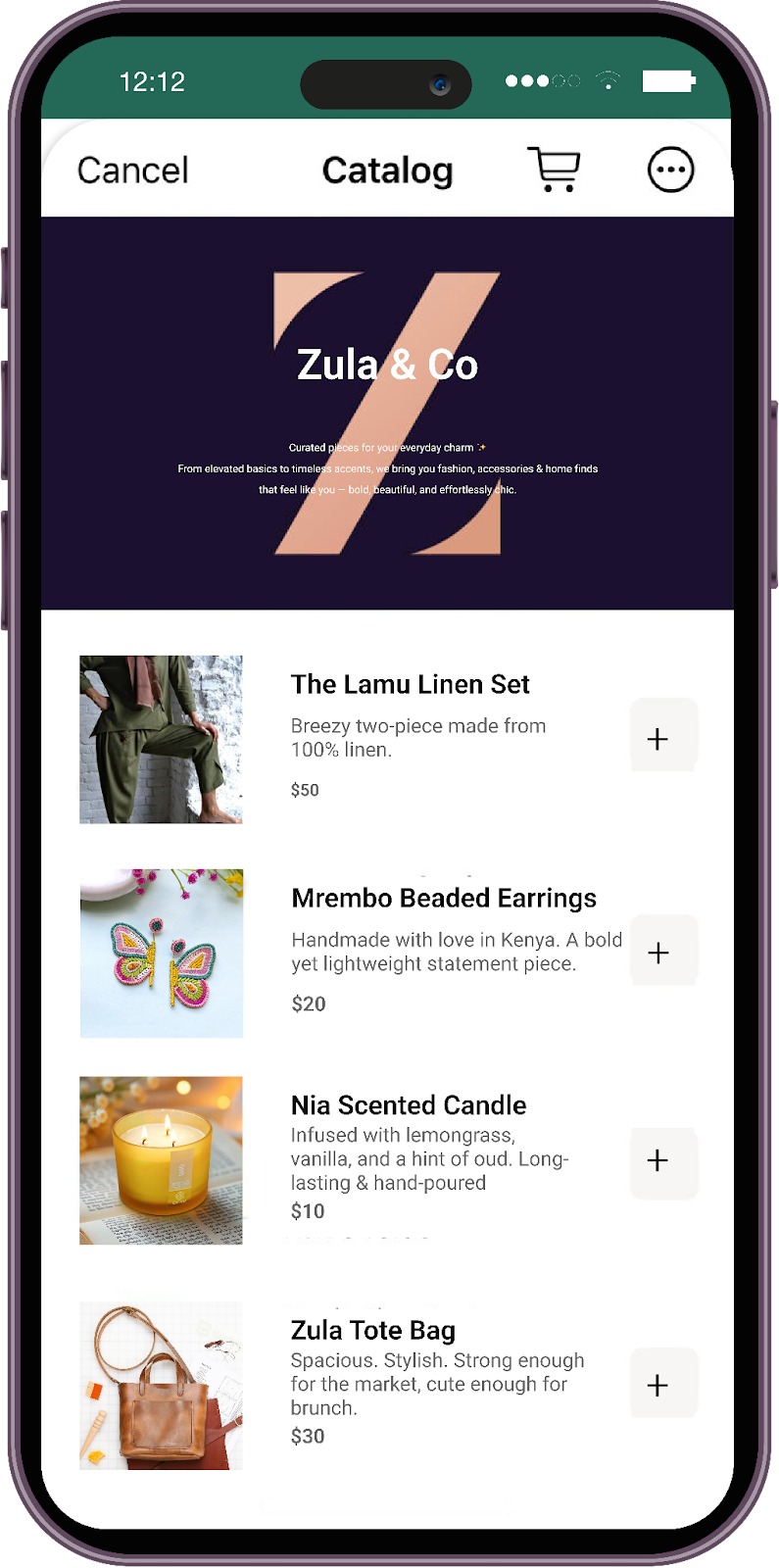
A WhatsApp Catalog is essentially a digital product shelf that lives inside your WhatsApp chat. Instead of sending product photos one by one or explaining prices over messages, you can showcase all your products in a structured, scrollable format right within the conversation.
It's like a normal catalog you would have for your business, only now in digital format that is available on WhatsApp. The benefit? Meta’s analysis of WhatsApp Catalogs found that about 83% of potential customers interact with catalog listings, and of those, approximately 75% go on to make a purchase.
For example, imagine a customer messages your business asking, “What products do you sell?” Instead of replying with multiple images and long descriptions, you simply share your catalog. The customer can scroll through products, tap on what interests them, view details, and continue the conversation, all without leaving WhatsApp.
What Details Can You Add to WhatsApp Catalog?
Each product in a WhatsApp Catalog can include the following information:
- Product name
- Product price
- High-quality product images or a video
- Short product description
- Product link or checkout link
- Product code or SKU for easy reference
- Variants such as size, color, or pack type
What You Should Know
- WhatsApp allows businesses to list up to 500 products or services per catalog.
- Each product may include up to 10 images, a title, a description, a price, and a product link.
- Whenever you add or update items in your WhatsApp Catalog, they undergo a review to ensure compliance with Meta’s commerce policies. In most cases, approval takes 24 hours or less.
This turns WhatsApp from a simple chat tool into a visual browsing experience, making it easier for customers to discover products and for businesses to sell without adding friction.
Read More: How to Build App-Like Shopping Journeys Using WhatsApp Webviews for Ecommerce
Benefits of Using WhatsApp Business Catalog
Before setting up a WhatsApp Catalog, it’s worth understanding why this feature has become so important for businesses selling through chat. With a catalog in place, your products are always ready to be viewed. Customers can browse at their own pace, revisit items later, and come back with more specific questions.
The results are clear. More than 40 million people use WhatsApp Business Catalogs each month to browse and shop from their favorite brands. Here’s how these benefits show up in real-world use cases:
Turns casual chats into guided shopping conversations
Instead of answering “What all do you sell?” with long explanations or scattered images, you can share a catalog that lets customers browse calmly within the chat.
Example: A small women’s apparel brand on WhatsApp can share its catalog when a customer messages “Looking for office wear,” allowing the customer to scroll through kurtas, co-ord sets, and prices before asking specific questions.
Cuts down repetitive questions and manual effort for your team
When product images, prices, variants, and descriptions are already visible, customers come back with clearer intent. This reduces endless back-and-forth and saves time for sales and support teams.
Example: A skincare brand no longer has to reply repeatedly with “Yes, it’s available” or “It costs $29.99” because those details are already listed in the catalog.
Helps customers discover more than what they originally asked for
Catalog browsing often leads to unplanned discovery. Customers may start with one product but explore related or higher-value options.
Example: A customer asking for a single gift item may end up browsing curated gift sets or festive bundles after opening the catalog, increasing average order value naturally.
Speeds up decision-making inside the chat
Seeing products side by side, with images, prices, and descriptions, helps customers quickly compare and decide without hesitation.
Example: A food brand selling multiple snack hampers can list all options in the catalog, making it easy for customers to choose one instead of repeatedly asking for recommendations.
Builds trust and credibility with first-time buyers
A well-organized catalog feels more reliable than random photos sent over chat. It signals that the business is legitimate, structured, and ready to serve.
Example: A jewelry/apparel brand sharing a clean catalog with product images, prices, and descriptions instantly feels more trustworthy to a new customer messaging for the first time.
Makes WhatsApp a scalable sales channel, not just a support tool
As your product range grows, the catalog helps you handle more conversations without losing consistency. Every customer sees the same structured information, no matter who is responding.
Example: During sale periods, a D2C brand can handle hundreds of WhatsApp inquiries without manually sharing product details each time.
By using a WhatsApp Catalog effectively, businesses move from answering questions to enabling self-led shopping, all within a conversation the customer already prefers.
How to Set Up Your WhatsApp Catalog
Setting up a WhatsApp Catalog is straightforward. You can do it directly from the WhatsApp Business app on your phone or through WhatsApp Web or Desktop. Here is a step-by-step procedure for each of these options:
On Android
- Open the WhatsApp Business app.
- Tap the three-dot menu in the top-right corner and go to Business Tools.
- Select Catalog and tap Add New Item.
- Upload product images from your gallery or camera. You can add multiple images to showcase the product clearly.
- Enter the required details, including the product name and country of origin.
- Add optional information such as price, description, product code, or a website or checkout link.
- Tap Save to submit the product for review.
On iPhone (iOS)
- Open WhatsApp Business and tap Settings at the bottom-right.
- Go to Business Tools and select Catalog.
- Tap Add New Item to create a product listing.
- Upload images or a short video to visually represent the product.
- Fill in the required product name and add any helpful optional details like price or description.
- Save the item and wait for WhatsApp to review and approve it.
On WhatsApp Web or Desktop
- Open WhatsApp Web or the Desktop app and ensure your account is linked.
- Click the three-dot menu above your chat list and choose Business Tools.
- Select Catalog and click Add New Item.
- Upload product images directly from your computer.
- Enter the product name and any optional details to complete the listing.
- Click Save to send the item for review before it goes live in your catalog.
How to Integrate WhatsApp Catalog with Your E-commerce Site
Once your WhatsApp Catalog is set up and approved, the next step is to integrate it with your e-commerce site so customers can seamlessly move from browsing your website to continuing the conversation on WhatsApp. Here’s a step-by-step procedure:
- Make sure you have a WhatsApp Business account and an active catalog with product images, prices, descriptions, and SKUs added.
- Choose an integration or plugin supported by your e-commerce platform that allows your product listings to connect with WhatsApp.
- Sync your store products with WhatsApp so customers can view catalog items directly within the chat.
- Add a WhatsApp chat or conversation button on your website to make it easy for visitors to reach out from product or landing pages.
- Use WhatsApp to respond to customer queries, share catalog items in chats, and send personalized product recommendations or offers to drive conversions.
How to Create and Manage Collections in Your WhatsApp Catalog
Collections let you organize products into groups, making it easier for customers to browse and discover what matters most. For example, you might create sections like New Arrivals, Bestsellers, Gift Sets, or Sale Items.
This structure prevents your catalog from feeling overwhelming and guides shoppers toward key products first. To create a new collection:
- Open the WhatsApp Business app and go to Business Tools > Catalog.
- Select Collections and tap Add Collection.
- Give your collection a clear, descriptive name.
- Choose the products you want to include in this collection.
- Tap Done to save. The collection may take up to 24 hours to be reviewed before it is visible to customers.
To update an existing collection:
- Open your catalog and go to Collections.
- Select the collection you want to modify.
- Add or remove products based on availability or inventory updates.
- Rename or reorder collections to highlight seasonal items, new launches, or special promotions.
By regularly updating collections, you can keep your catalog fresh, relevant, and easy for customers to navigate.
Best Practices for Optimizing Your WhatsApp Catalog
While the WhatsApp Catalog is a powerful tool for driving sales, its real impact depends on how well it’s set up and managed. To get the most value from this feature and create a smooth buying experience for customers, here are some best practices worth following:
- Use clear, high-quality visuals: Upload sharp product images that show the item from multiple angles. Good visuals reduce back-and-forth questions and help customers decide faster.
- Write short, helpful descriptions: Keep product descriptions concise and easy to understand. Focus on key benefits, use cases, or what makes the product worth buying.
- Keep pricing transparent: Always mention prices where possible to avoid confusion and drop-offs during conversations. Update prices regularly to stay accurate.
- Organize with collections: Group products into logical collections like new launches, bestsellers, or offers so customers can browse without feeling overwhelmed.
- Update your catalog regularly: Remove out-of-stock items, refresh images, and reorder collections to reflect current priorities, promotions, or seasons.
- Add links where it matters: Include product or checkout links to help customers move from interest to purchase without friction.
- Test the customer journey: View your catalog the way a customer would. Check if products are easy to find, information is clear, and the flow feels natural inside the chat.
Following these practices helps turn your WhatsApp Catalog from a simple product list into a smooth, conversion-friendly shopping experience.
Also Read: How to Boost Customer Engagement on WhatsApp in 2026
How Flowcart Helps You Build a WhatsApp Catalog
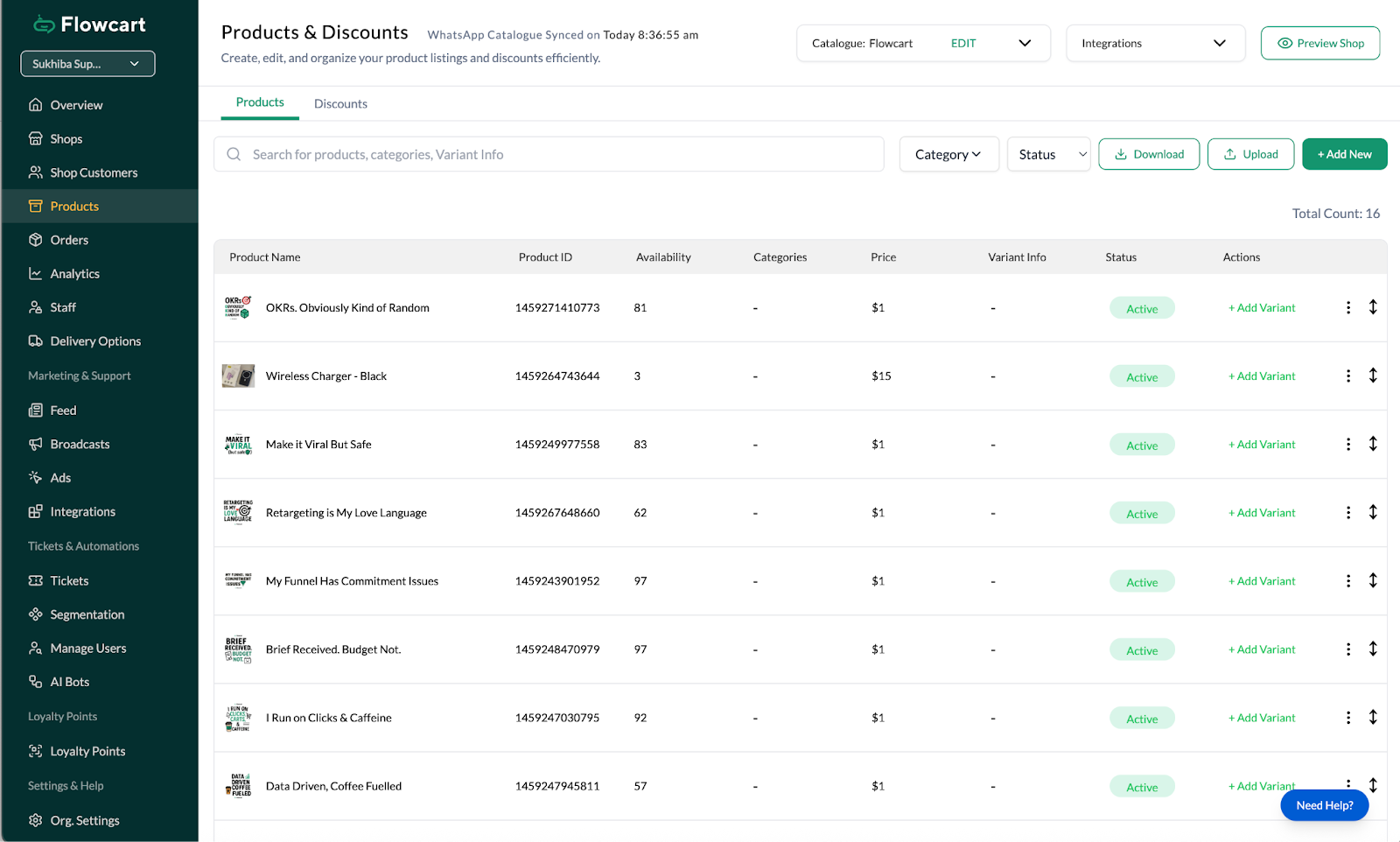
While WhatsApp Catalogs make product discovery easier, Flowcart adds the structure, automation, and checkout capabilities needed to convert browsing into actual purchases. It helps businesses create catalogs that are easier to manage and designed to drive sales directly from chat.
In-Chat Checkout That Removes Purchase Friction
Flowcart In-Chat Checkout enables customers to complete their purchase without leaving WhatsApp using a seamless webview experience. Once a customer browses your catalog and selects a product, they can add it to the cart, choose quantities, and proceed to checkout within the same chat using multiple global payment gateways.
Flowcart even auto-fills the customer’s name, phone number, and address from WhatsApp, and offers one-tap address sharing, so checkout feels effortless and fast. Customers can pay using cards, mobile wallets, or local payment methods, and receive real-time order confirmation within the conversation, keeping the experience smooth and trustworthy.
Because of this frictionless flow, businesses using Flowcart see up to a 70% reduction in average checkout time and up to an 800% increase in cart recoveries when paired with automated follow-ups.
As Mkurugenzi, one Flowcart merchant, put it: “Our WhatsApp funnel used to stop at interest. Now it ends in revenue. In-chat checkout has changed the game for us.”
Explore Flowcart case studies to see how other brands are benefiting from integrating their WhatsApp marketing with Flowcart.
No-Code WhatsApp Flows for Guided Product Journeys
Flowcart’s No-Code WhatsApp Flow Builder allows businesses to design structured shopping journeys without any technical setup. You can create flows that guide customers from catalog browsing to specific products, collections, or offers based on their intent.
These flows help scale conversations, keep responses consistent, and ensure every catalog interaction leads the customer one step closer to purchase. Retailers using these automated paths enable customers to reach products in under three taps and achieve up to 28% higher conversion rates in their first session than with unstructured chats.
Beyond product discovery and navigation, Flowcart’s flows can branch intelligently. For example, offering a product quiz to refine recommendations, triggering specific promotions for returning buyers, or escalating to a human agent when needed.
Because everything is built visually in a no-code environment, teams can create, test, and optimize multiple flows without relying on developers, making it easier to scale WhatsApp commerce operations.
Explore Flowcart pricing here.
Turn WhatsApp Conversations into Revenue
A well-structured WhatsApp Catalog facilitates a fast, visual, and frictionless buying experience. It replaces long conversations and repeated questions with clarity, speed, and intent-driven browsing.
If you want to take this a step further and turn catalog views into completed purchases, Flowcart helps you do just that with in-chat checkout and guided WhatsApp journeys. Transform WhatsApp conversations into revenue: schedule your Flowcart demo now!
Frequently Asked Questions
Can I sync my WhatsApp Catalog automatically with my website or e-commerce store?
Yes. Many e-commerce platforms offer integrations or plugins that automatically sync your product details with your WhatsApp Catalog.
How many products can I add to a WhatsApp Catalog, and are there size or format limits?
WhatsApp allows up to 500 products or services per catalog. Each product can include up to 10 images or a short video, along with basic details like name, description, price, and a link.
Do customers need to save my number to view or order from my catalog?
No. Customers can view your catalog and interact with it as long as they have an active WhatsApp conversation with your business.
How can I track analytics or performance data for my WhatsApp Catalog?
You can track performance using WhatsApp Business insights, link tracking, and analytics tools from your e-commerce platform to measure views, clicks, and conversions.
How can I automate product recommendations or catalog sharing with customers?
Automation can be set up using WhatsApp business tools or third-party automation platforms to send product suggestions, share catalog items, or respond to common queries based on customer actions.
What should I do if my product gets rejected or removed from the WhatsApp Catalog?
Review WhatsApp’s commerce policies, update missing or unclear information, improve product images or descriptions, and resubmit the item for approval once it meets the guidelines.






%201.webp)




.png)