.png)
.png)

Key Takeaways
Your WooCommerce store creates far more carts than orders. Baymard Institute reports an average abandonment rate of 70.22%, based on a meta-analysis of 49 studies. On a store with steady order volume, that gap can mean thousands of dollars in lost sales each day.
Abandoned cart recovery plugins exist to bring some of those sales back. Most follow the same basic sequence: capture the shopper's email at checkout, wait for the cart to be abandoned, then send a few reminders.
However, that approach recovers less than many store owners expect. For example, email-only sequences recover 8-12% of abandoned carts.
For a recovery attempt to work, two things have to happen. The reminder has to reach the customer while they still care about the purchase. Then they have to complete the payment, often on the same checkout page they left in the first place.
TL;DR: If your main goal is to recover abandoned carts, the six conventional plugins are broadly similar: they automate reminders and bring shoppers back to your site. The differences matter when you need something specific, such as earlier cart capture, guest-cart recovery, deeper automation, or integration with an existing setup.
Flowcart is the outlier for stores that want WhatsApp to function as a sales channel, not just a reminder channel. It keeps the customer in the conversation through recovery and payment, and can extend that same flow to new purchases and reorders. So expect the conventional plugins to work best when your existing checkout is already doing its job; consider Flowcart when the handoff back to your website is where you are losing customers.
Why your current WooCommerce abandoned cart plugin recovers so little
Almost every WooCommerce recovery plugin uses email because the checkout usually captures the shopper's email address and little else. The plugin saves that address as the shopper enters it, then sends a reminder after the cart has been inactive for a set period.
The problem starts after the message is sent.
Email is an asynchronous channel. The customer decides when to check it, if they check it at all. Abandoned cart emails average a 42% open rate. That means more than half of the people who abandoned a cart never see the reminder. Of those who do open it, some will click through, and only a portion of those shoppers will complete the purchase.
That is how a 42% open rate can still end in a recovery rate near 10%.
Timing makes the problem harder. A shopper who abandons a cart was considering a purchase during a live browsing session. A few hours later, that purchase may no longer be a priority. Most plugins send the first reminder about an hour after abandonment, followed by another the next day and a third two or three days later.
That schedule creates a squeeze. Your first reminder reaches the customer while they still want the product. Each later reminder reaches someone who cares less about it. By day three, most have moved on or bought the product elsewhere.
What causes cart abandonment on WooCommerce stores
Not every abandoned cart is a lost sale. Some customers are still comparing products or prices and were never ready to buy. Baymard found that 42% of US online shoppers abandoned a cart because they were browsing and not ready to buy.
The more useful group to look at is everyone who wanted the product but stopped because something in the buying process got in the way.
Here are the main reasons and what you can do about them:
- Extra costs appear late: Shipping, tax, or handling fees appear at the final step and push the total above what the shopper expected.
The fix: Show shipping costs on the product page, add a shipping calculator to the cart, and set a free-shipping threshold.
- Delivery takes too long: The shopper reaches checkout, sees a seven-day delivery estimate, and finds an alternate vendor offering faster delivery.
The fix: Show a realistic delivery date rather than a broad shipping window, and offer an express option for shoppers who need the item sooner.
- Payment trust and payment choice: Some shoppers leave because they don't trust the site with their card details. Others cannot find a payment method they use.
The fix: Display recognized payment gateway badges near the payment field and offer methods such as wallets, Paystack, or cash on delivery where they make sense for your customers.
- The store forces account creation: Asking shoppers to create a password before they can pay adds another step to the checkout.
The fix: Enable guest checkout in WooCommerce and offer account creation after the order is complete.
- The checkout runs too long: Baymard found that the average US checkout shows 23.48 form elements by default, compared with an ideal range of 12 to 14.
The fix: Remove optional fields, combine address fields, enable browser autofill, and reduce the form toward that range.
These changes can prevent some abandonments. However, they do not bring back shoppers who leave anyway. That is where a recovery plugin comes in. It gives those customers another chance to complete the purchase and, when appropriate, can address an objection such as price with a discount.
As you compare the plugins below, look at two things: how well each one gets the customer back and where they finish payment.
The 6 best WooCommerce abandoned cart plugins in 2026
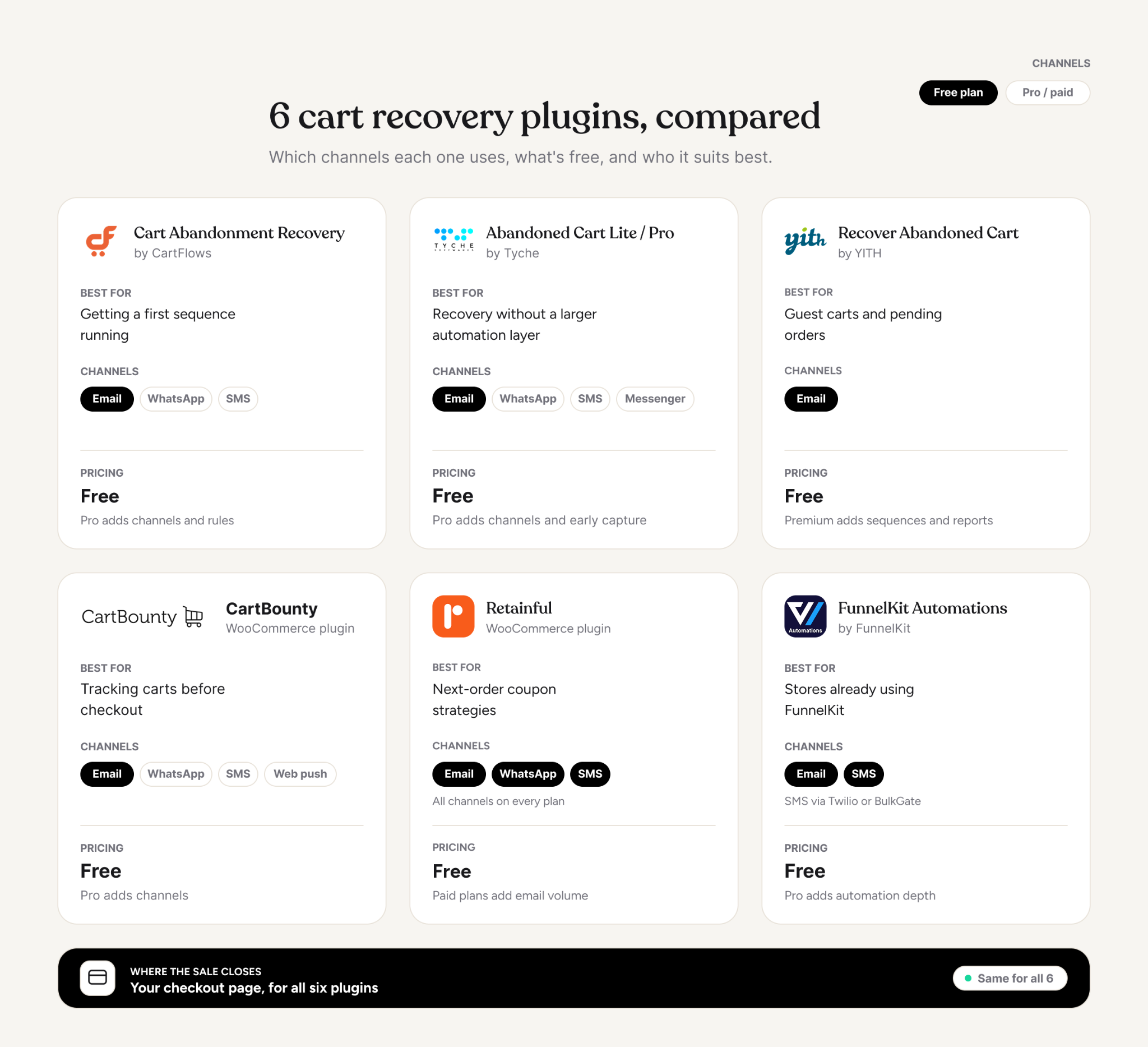
These six plugins cover the main ways WooCommerce stores handle cart recovery. They differ in when they capture a cart, which channels they use, and how much control they give you over the follow-up sequence.
When you compare them, focus on two things: how the plugin reaches the customer and where they complete the purchase. A plugin can add WhatsApp or SMS to the sequence, but that does not change what happens after the customer clicks through.
1. Cart Abandonment Recovery for WooCommerce (CartFlows)
Cart Abandonment Recovery by CartFlows captures the customer's email during the first checkout step, before the order is submitted. If you want a basic recovery sequence without changing your checkout, the setup is fairly straightforward.
- Recovery emails: Automated reminders, preset templates, and automatic coupon generation.
- Reporting: A recovery dashboard inside WooCommerce tracks the sequence and recovered orders.
- Other channels: The Pro version adds SMS and WhatsApp follow-ups, along with product-level reports and cart-value rules.
- Setup: The basic sequence is quick to configure. You need to switch on the checkout opt-in checkbox yourself for consent.
For a store starting with email recovery, CartFlows covers the basics without adding much complexity. The customer still has to leave the message and return to your checkout to complete the order.
2. Abandoned Cart Lite and Abandoned Cart Pro (Tyche Softwares)
Abandoned Cart Lite captures customer details at checkout, sends a configurable reminder sequence, and tracks recovered orders. It gives you control over the basic recovery flow without turning it into a larger automation system.
- Email recovery: Automated reminders, customizable templates, recovery tracking, and unsubscribe handling.
- Capture: The Pro version can capture email addresses when shoppers add products to their carts.
- Additional channels: Pro supports WhatsApp, SMS, and Facebook Messenger.
- WhatsApp recovery: Reminders can include a Resume Checkout button that takes the customer back to their saved cart.
Tyche suits stores that want more than basic email recovery but do not need a broader automation platform. The purchase still finishes on your WooCommerce checkout, so adding another channel changes how the shopper receives the reminder, not where they pay.
3. YITH WooCommerce Recover Abandoned Cart
YITH Recover Abandoned Cart separates abandoned carts from orders where the customer reached payment but stopped. That distinction is useful if your store has a lot of guest checkout traffic or customers who regularly drop off at the payment stage.
- Guest recovery: The plugin captures guest carts from checkout details, so shoppers can enter the recovery sequence without creating an account.
- Email control: You can create multiple templates, set different delays, and increase the discount across the sequence.
- Pending orders: You can handle customers who reach the payment stage separately from earlier cart abandonment.
YITH is a good choice when you need to distinguish between different types of abandonment. It still relies on email and sends the customer back to checkout, so the recovery path after the message is the same as most plugins.
4. CartBounty
CartBounty starts tracking a cart when a shopper adds an item, before they have entered an email address. That gives you a wider view of cart activity and where shoppers drop off.
It can also save anonymous carts, so you can see activity that other plugins may only capture once a customer reaches checkout.
- Cart tracking: Saves carts for both guests and logged-in users.
- Email recovery: Sends reminders through your WordPress mail server.
- Additional channels: The Pro version adds WhatsApp, SMS, web push, and exit-intent capture.
- Email integrations: Email sequences can connect with Mailchimp, ActiveCampaign, or GetResponse.
- Login links: Registered customers can receive magic login links through recovery messages.
CartBounty is useful when you want to see abandonment earlier in the shopping journey. Its additional channels give you more ways to contact shoppers, but they still lead back to the same WooCommerce checkout.
5. Retainful
Retainful builds cart recovery around the next purchase. Its emails can include a single-use coupon for the customer's next order so that the recovery sequence can support both the abandoned purchase and a later one.
- Next-order coupons: The recovery sequence can connect the abandoned cart with a future purchase incentive.
- Repeat-purchase focus: This approach makes more sense for products customers buy repeatedly.
- Automation: Recovery can sit alongside broader retention campaigns rather than operating as a standalone reminder.
Retainful makes more sense for replenishment products, subscription boxes, and other categories where repeat purchases matter. For a store selling one-off purchases, the next-order incentive may have less relevance.
6. FunnelKit Automations
FunnelKit Automations combines cart recovery with FunnelKit's checkout and funnel builder. It gives you a visual sequence builder that can work with customer and order data inside WordPress.
That matters when cart recovery is part of a larger set of customer journeys, not a standalone reminder sequence.
- Automation depth: Sequences can branch based on customer behavior, order history, and contact tags.
- Channel coverage: Email works natively, while SMS connects through services such as Twilio or BulkGate.
- FunnelKit integration: Checkout and automation data stay within the same system.
FunnelKit makes the most sense for stores already using its checkout and funnel tools. You can build cart recovery around the same customer data instead of adding a separate automation system.
Where these plugins hit the same ceiling
All six follow the same basic recovery path: detect the abandoned cart, send a message, and send the shopper back to your checkout.
Four of them now support WhatsApp on their Pro tiers: CartFlows Pro, Abandoned Cart Pro, Retainful, and CartBounty Pro. That gives you another way to reach the customer. It does not change what happens after they click.
The customer still lands on the checkout page they left earlier, and the shipping cost has not changed. At the same time, the form has not become shorter. Any problem that caused the original abandonment remains.
So there are two separate questions when you compare these plugins.
- Can the plugin get the customer to respond?
- What happens when the customer responds?
Most of the plugins above focus on the first question. Flowcart, a WhatsApp-first commerce platform-based plugin, changes the second scenario by letting the customer complete the purchase inside the conversation.
How Flowcart recovers WooCommerce carts inside WhatsApp
Flowcart is a WhatsApp commerce platform that connects with WooCommerce, Shopify, and Magento. Its Abandoned Cart Recovery feature handles the follow-up, while In-Chat Checkout lets the customer complete the purchase inside WhatsApp.
The difference becomes clearer when you follow the recovery process from the first contact to payment.
How Flowcart detects the abandoned cart
Flowcart connects directly to WooCommerce and reads your existing product catalog, cart events, and order records. You do not need a separate middleware layer or an export between your store and the messaging platform.
The bigger difference is how it captures the customer before they abandon their cart.
An email plugin can only recover shoppers who have entered an email address at checkout. Anyone who leaves before that point is outside the sequence. Flowcart can collect WhatsApp numbers earlier through a website pop-up that offers a discount code to visitors who have not identified themselves.
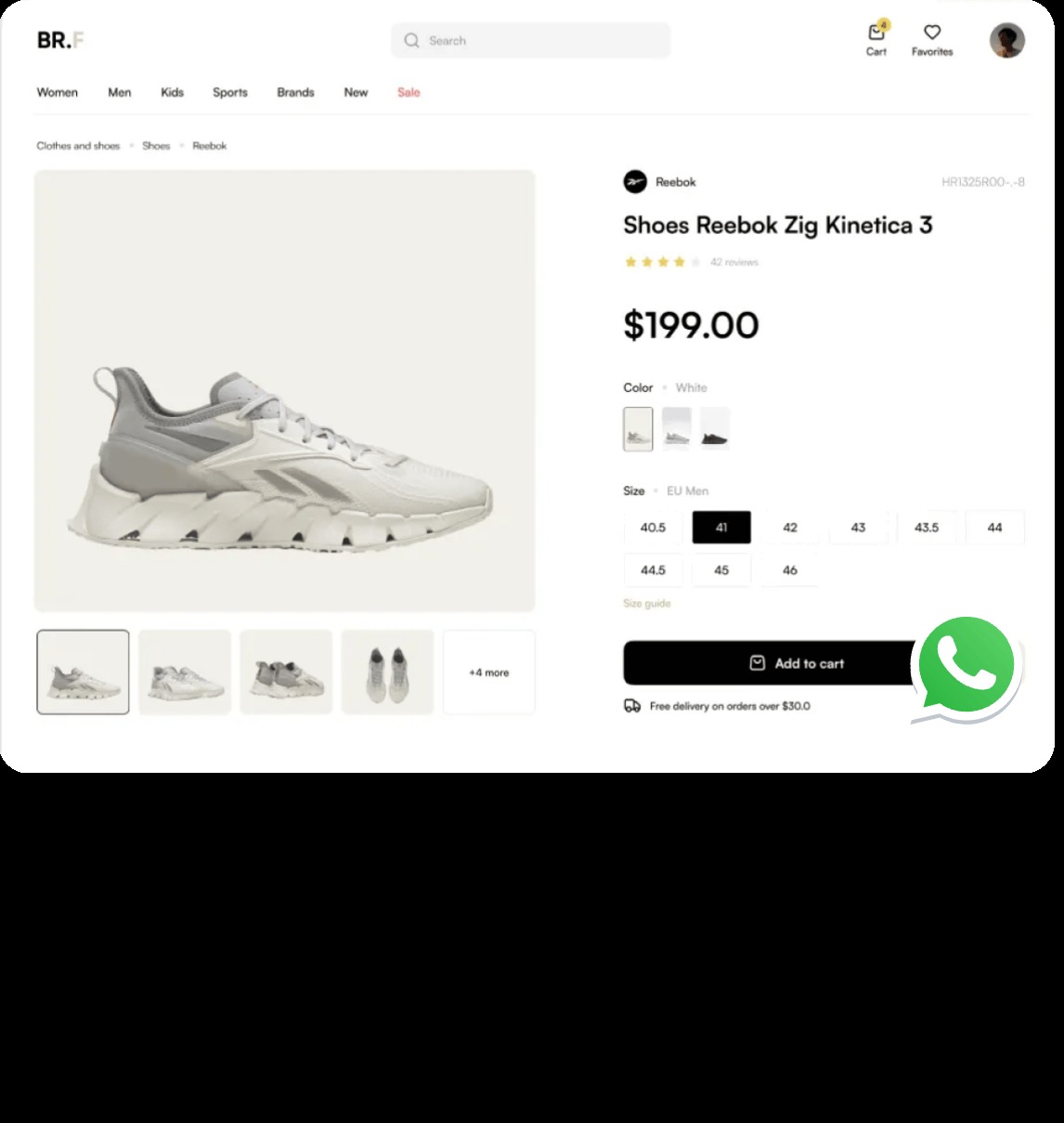
That gives you another pool of contacts to reach when those shoppers later abandon a cart.
What the recovery message contains
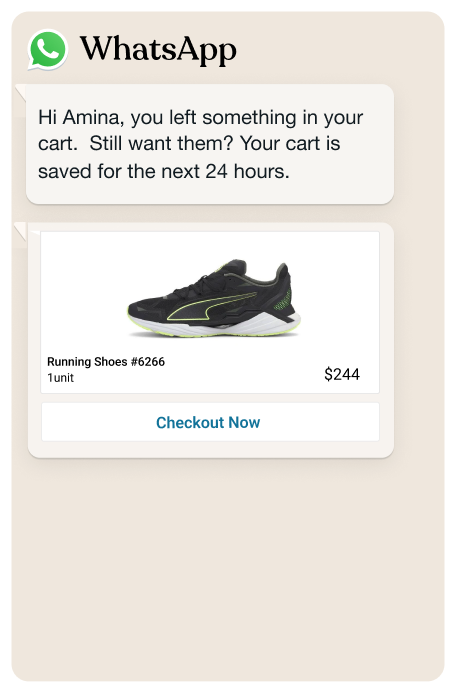
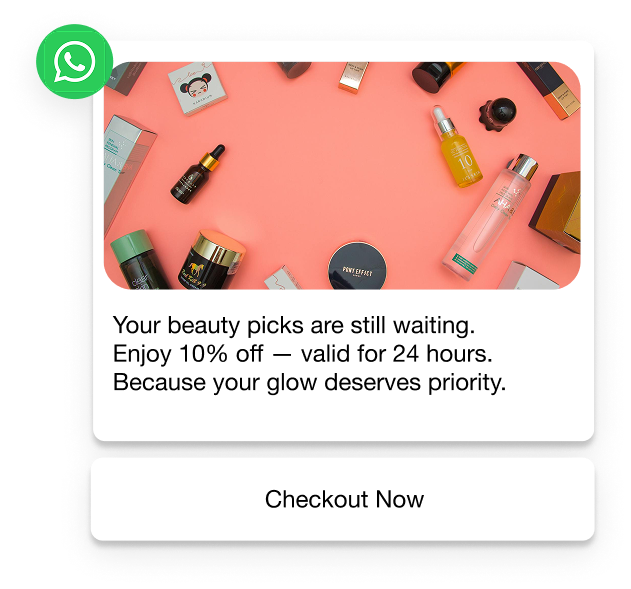
Flowcart sends the WhatsApp message after a delay you configure. Instead of asking the customer to remember what they were looking at, the message can show the products in their cart and include a discount code.
You control:
- Timing: When the first message goes out and when the follow-ups are sent.
- Cart contents: The products the shopper added, along with their prices.
- Discounts: You can include a percentage or flat-rate code in the message. This can address price or unexpected-cost objections.
- Replies: The customer can respond in the same WhatsApp thread instead of opening an email and returning to your store.
How the customer pays without leaving WhatsApp
In-Chat Checkout is the biggest difference between Flowcart and the plugins above.
Those WooCommerce plugins remind the customer about the cart and send them back to your checkout. Flowcart keeps payment inside the WhatsApp conversation, so the customer doesn't have to return to the checkout page they abandoned.
Flowcart supports more than 50 payment gateways across Africa, India, and other markets, including Peach Payments, Stripe, Razorpay, Cashfree, and DPO Networks. It also supports multiple currencies, including USD, ZAR, KES, NGN, and INR.
That changes the second attempt for shoppers who abandoned because of checkout friction.
- If someone left because the checkout was too long, they don’t have to complete the same form again.
- Someone who could not find a suitable payment method can pay through a supported gateway available in their market.
[Image placeholder: WhatsApp conversation mockup showing the in-chat payment step and order confirmation.]

The distinction also applies to WhatsApp tools that only add messaging to an existing recovery flow. A plugin can send the reminder through WhatsApp, but if the customer still has to return to the website to pay, the payment step has not changed. Flowcart keeps that step in the conversation.
The same applies to website pop-ups. Your customer can share their WhatsApp number, receive a product or offer in the conversation, and complete the purchase there. If they stop midway, Flowcart can follow up in the same WhatsApp thread rather than starting a new recovery journey through email.
Support conversations can also become sales conversations. If a customer asks about a product, size, availability, or another purchase detail, the support team can build and send a cart from the conversation. The customer can then pay without leaving WhatsApp. This is useful for products where customers need help before they buy, because the handoff from assistance to checkout happens in the same thread.
Reorders work in much the same way. A shopper who has already purchased can receive a reorder prompt in WhatsApp and complete the next purchase through the same checkout. Flowcart also supports post-purchase flows, broadcasts, and loyalty interactions in WhatsApp so that the channel can continue after the original order.
That makes In-Chat Checkout more than a way to finish abandoned carts. The same payment flow can serve several entry points: an ad, a website visitor, a support conversation, a recovery message, or a repeat purchase. You build the checkout once, then use it wherever a customer is ready to buy inside WhatsApp.
What recovery rates Flowcart reports
Flowcart has a 20–27% recovery rate across its stores, compared with roughly 10% for email sequences. Nectar Beauty is one of the clearest examples of how this works in a live store.
The Nigerian beauty wholesaler supplies 38 retail outlets and sells online through a commerce platform, while also reaching customers through Instagram and WhatsApp.
The problem was not a lack of demand. Customers found the store and started purchase conversations on WhatsApp. The drop-off happened when those conversations moved to checkout. Agents could build buying intent in WhatsApp, then send customers a product link to complete the order. Some customers never made the jump from the conversation to the website.
That same handoff limits the recovery flow used by most WooCommerce plugins. The reminder gets the customer interested again, but the purchase still has to move to a separate checkout.
Nectar Beauty moved both parts into WhatsApp: the recovery message and the payment. Here's what happened next:
- Recovery rate: The store recovered 144 of 588 abandoned carts, achieving a 24.49% recovery rate.
- Share of WhatsApp revenue: Cart recovery accounts for around 60% of Nectar Beauty's WhatsApp sales.
- Order size: Customers averaged 7.5 SKUs per order, with 4,507 units sold across 606 customers.
- Repeat purchases: 40% of WhatsApp orders came from returning buyers, with no loyalty program or re-engagement campaign beyond periodic broadcasts.
- Order volume: The store recorded 741 WhatsApp orders from 606 customers during ten months.
Look closely at the repeat-purchase figure here. A recovered cart is usually measured as one saved order. In Nectar Beauty's case, customers continued buying through WhatsApp after the original recovery. The same channel that brought back an abandoned cart also gave the store a way to sell to that customer again.
See how Flowcart can help your WooCommerce store
What happens after the cart is recovered
The WhatsApp conversation does not have to end when the order is complete. Flowcart can use the same thread for post-purchase and reorder flows, segmented broadcasts, and a loyalty program that customers can redeem through chat.
That gives the channel a role after the abandoned cart is recovered. For categories where customers buy repeatedly, the same WhatsApp contact can support the next purchase without restarting the relationship.
Food and Us, a Flowcart customer, reports that 60% of its sales now come from repeat buyers.
Setting up Flowcart alongside your existing WooCommerce store
Adding Flowcart does not require you to replace your WooCommerce setup. Flowcart connects to your store as an integration, so your existing storefront, checkout, and order management stay in place.
What stays as it is
WooCommerce remains the system handling the parts of the store it already manages.
- Product catalog: Flowcart reads your existing products, prices, and variants, so you do not need to maintain a second catalog.
- Orders: Recovered purchases appear in your normal WooCommerce order list, so fulfillment and reporting stay in one place.
- Checkout and payment gateways: Your existing checkout continues to handle customers who purchase directly from your website.
- Theme and hosting: The storefront does not need to change because the integration works with your store data rather than your theme.
There is no store migration or middleware layer to maintain.
Should you keep your existing email plugin?
Yes, there is little reason to remove your existing email plugin. WhatsApp can reach customers whose numbers you have, while email can reach customers whose numbers you don't have and those who don't respond to WhatsApp.
A simple setup is to send WhatsApp first, then follow with email. Give the WhatsApp message enough time to get a response before the email sequence starts.
First, stagger the sequences so the same customer does not receive both reminders within the same hour. Second, stop the email sequence when a customer completes the purchase through WhatsApp. Otherwise, someone could receive a discount reminder after they have already paid.
How to phase the rollout
Use a short test period so you can see what the new channel changes.
- Connect the store: Link WooCommerce to Flowcart and confirm that the product catalog and order data sync correctly.
- Build the sequence: Set the abandonment delay, write the WhatsApp message, and decide whether to include a discount.
- Stagger the email sequence: Delay your existing email reminders so they follow the WhatsApp attempt.
- Measure each channel for 30 days: Track recovered orders and revenue from WhatsApp and email separately. Compare the results with the same period last year, if you have that data.
Pro Tip: If your email sequence already recovers some carts, start without a discount on the WhatsApp message. That gives you a cleaner comparison between the two channels. You can add an incentive later if the recovery rate needs another push.
The channel decides how much of your abandoned revenue you recover
The plugins above solve the same basic problem: they remind a shopper that they left something in their cart. The bigger difference is what happens after the reminder.
With an email plugin, the customer has to notice the message, open it, click through, and complete the purchase on your website. WhatsApp removes some of those steps, and Flowcart keeps payment inside the same conversation. Which is why Flowcart has a 20–27% abandoned-cart recovery rate across its stores, compared with roughly 10% for email sequences.
The key comparison is the recovery path of each WooCommerce plugin: where does the customer receive the reminder, and where do they have to pay?
If the checkout itself is part of the abandonment problem, sending a customer back to that same checkout leaves that problem in place. Flowcart takes a different route by keeping the purchase inside WhatsApp.
Install Flowcart for WooCommerce to recover carts through WhatsApp, or book a demo to see how the abandoned-cart flow works with your store.

.png)




%201.webp)



.png)