
.png)
Key Takeaways
AI agents on WhatsApp understand intent, maintain context, and automate end-to-end conversations at scale, unlike basic chatbots.
Businesses use WhatsApp AI agents to drive in-chat sales, recover carts, and cut support load across multiple industries.
Flowcart turns WhatsApp into a full commerce engine with AI-led discovery, negotiation, cart recovery, and in-chat checkout.
WhatsApp has creeped up to become the channel where customers prefer to buy from; but most businesses aren’t in a space where they can serve customers there properly.
Manual response doesn't scale up. Generic chatbots break. And the gap between what customers expect and what businesses can deliver keeps growing.
Here's where AI agents come in.
Unlike the old chatbots that made everyone want to scream "SPEAK TO A HUMAN!", AI agents actually understand what people are asking.
Customer asks "is that blue one still available?" AI knows exactly which product they mean. Someone types in broken English or uses slang? It still works.
This guide shows you what AI agents can do that chatbots couldn't, which platforms actually deliver results, and how to implement this in your business.
What Are AI Agents on WhatsApp?
AI agents on WhatsApp handle customer conversations using natural language processing [NLP], and the WhatsApp Business API.
Aka these agents understand what customers actually want [by processing their words], and they can access all your business systems to get stuff done.
Take an example: Customer messages "I want running shoes under $100". AI agent asks about their running style, checks your inventory API for matching products, shows options with real-time stock levels. The agent can also process the payment [if the customer chooses to buy] through your integrated gateway. All without leaving WhatsApp.
This is the sort of automation [at scale too!] that closes sales, resolves support issues, and qualifies leads with relatively less involvement from human staff. [Bonus: Learn more about how WhatsApp chatbots differ from traditional automation.]
How AI Agents Actually Work
- The Language Layer interprets customer intent
- When someone says "Do you have this in blue?", AI understands "this" refers to a product mentioned earlier and "blue" means color availability, not browsing all blue products.
- The Memory Layer maintains context within conversations and across separate interactions
- It tracks discussed products and questions within conversations. Across conversations, it stores customer preferences, purchase history, and communication style.
- The Integration Layer connects to your business systems in real time
- It queries current inventory before confirming availability. For "where's my order?" it pulls live tracking information. For appointments, it checks your calendar and books while they're messaging. This accesses the same systems your team uses, not static data.
- The Logic Layer enforces your business rules
- You define parameters like "offer 10% discount on abandoned carts over $100" or "escalate refunds above $500 to human agents". The agent operates within these constraints while conversing naturally. Customers never see the rules, just smooth interactions that know when to offer incentives or bring in specialists.
The WhatsApp AI Agent flow
WhatsApp API receives message → Language layer interprets intent → Memory layer adds customer history → Integration layer queries business systems → Logic layer determines action → Response sends back through API. This happens in under a second.
What Separates WhatsApp AI Agents From Basic WhatsApp Business
The WhatsApp Business app has fundamental limitations:
- One device only, 256 contact broadcast cap
- Manual responses required
- No automation beyond auto-replies
It works for micro-businesses handling maybe 20-30 daily conversations manually.
AI agents require the WhatsApp Business API, which has no contact limits, supports multiple team members, enables complete automation, and integrates with external systems. The API requires Meta approval and only works through authorized providers like Flowcart.
This distinction matters because many businesses try the Business app, find it limiting, and assume WhatsApp can't handle their needs. They're evaluating the wrong product. The app is for micro-businesses. The API with AI agents is for businesses serving hundreds or thousands of customers through WhatsApp.
How WhatsApp AI Agents Differ from WhatsApp Chatbots
The architectural difference creates fundamentally different customer experiences and business outcomes.
Traditional Chatbots: Decision Trees and Keywords
Chatbots operate on if-then logic with keyword triggers. You program: "If message contains 'price' → display pricing menu" or "If message contains 'hours' → show business schedule." This requires mapping every possible phrase customers might use.
Memory doesn't exist between conversations. If a customer discussed a product yesterday and returns today asking "Is that still available?", the bot has no context for "that."
Maintenance scales badly with catalog size. Adding a product line means updating decision trees, creating conversation branches, mapping customer keywords, and testing every path.
AI Agents: Language Models and Context
AI agents use large language models that understand semantic meaning regardless of phrasing. "How much for the blue one?", "What's the price of the blue shirt?", "Cost of blue version?", and "Price on that blue item" all get interpreted as the same question: asking for pricing information about a specific blue product discussed earlier.
Context persists throughout conversations and across separate interactions. When a customer asks "Do you have that in large?" ten messages after mentioning a shirt, the agent understands "that" refers to the shirt and "large" means size availability. It maintains conversation state automatically.
Ambiguity gets handled conversationally. If a request is unclear, the agent asks clarifying questions: "I see you're interested in blue shirts. Are you looking at the cotton Oxford or the linen casual shirt?"
Functional Comparison
Understanding these differences is crucial when planning your WhatsApp automation strategy.
When Does Each Makes Sense?
- Chatbots work for highly specific scenarios: simple, high-volume interactions where you need absolute control over every word (legal compliance), or responses that must follow exact scripts mandated by regulations (certain healthcare or financial disclosures).
- AI agents fit most business conversations where customers phrase requests unpredictably, where personalization improves conversion, or where queries require checking multiple data sources. Product recommendations, order status inquiries, appointment scheduling, troubleshooting, and general support all fall here.
What Are the Key Features of a WhatsApp AI Agent?
Natural Conversation Handling
- The agent needs to understand intent regardless of phrasing. "What's the price?", "How much?", "Cost?", and "What does it run?" should all trigger the same pricing response without programming each variation separately.
- Multi-turn conversation tracking matters more than single-response accuracy. If someone asks "Do you have this in blue?" and follows with "What about large?", the agent must understand "this" references the earlier product and "large" means size. Losing context forces customers to repeat themselves, which kills conversions.
Persistent Memory Architecture
- Session memory maintains context within the current conversation. If a customer mentioned looking for running shoes 15 messages ago, the agent should still reference that context when discussing cushioning options or recommending accessories.
- User profile memory stores information across separate conversations. The agent should recall this customer's size from a purchase three months ago, their preferred delivery address, and previous product categories they've browsed.
- The business impact of memory is friction reduction. Customers who don't have to repeat information complete transactions faster. They also perceive the experience as more personalized because the business "remembers" them, which increases lifetime value.
Real-Time Business System Integration
Static data creates problems. An agent promising availability based on yesterday's inventory count creates angry customers when the item is actually sold out.
- Inventory Connections: The agent queries current stock levels before confirming availability. If you have two units left, it knows. If you're out of stock, it can suggest alternatives or offer backorder options immediately rather than promising something you can't deliver.
- Order Management Systems: Customers asking "Where's my order?" get real tracking information, current delivery estimates, and actual order status pulled from your e-commerce platform.
- CRM Integration: The agent accesses complete customer history: previous purchases, support tickets, communication preferences, and any notes your team has added. VIP customers get recognized automatically.
- Payment Processing: Handling transactions inside WhatsApp versus redirecting to external sites significantly impacts conversion. Integrated payment processing lets customers complete checkout without leaving the conversation thread, which is why WhatsApp commerce converts at rates traditional e-commerce can't match.
- Calendar and Scheduling: For service businesses, the agent checks actual availability in your calendar system and books appointments in real-time.
Intelligent Escalation Logic
- Well-implemented agents achieve most of the resolutions before needing human help. And then they hand over the other chats to human agents.
- Define specific triggers: complex product customization requests beyond the catalog, refund amounts above your threshold, legal or compliance questions, detected customer frustration through sentiment analysis, or explicit requests to speak with a human.
- When escalating, context transfer matters critically. The human agent should see the full conversation history, what the AI already tried, customer information from the CRM, and what information has been collected. Starting over frustrates customers and wastes time. Good WhatsApp automation systems pass complete context during handoff.
Proactive Automation Capabilities
- Transaction Updates: Order confirmations, shipping notifications with tracking links, delivery confirmations, and payment receipts send automatically. These reduce "where's my order?" support volume significantly while improving customer confidence.
- Campaign Execution: Send targeted messages to specific customer segments. Announce new product launches to customers who bought related items. Offer restock notifications to people who viewed out-of-stock items. These campaigns work because they're relevant, not broadcast spam.
- Abandoned Cart Recovery: When someone adds items but doesn't complete checkout, automated follow-up within 30 minutes while intent is high significantly improves recovery rates. The agent can answer last-minute questions or offer limited-time incentives to close the sale.
- Lead Qualification: Capture leads 24/7 with immediate qualifying questions about budget, timeline, and needs before routing to sales teams. Sales staff only spend time on qualified prospects, which multiplies their effectiveness.
Analytics and Continuous Improvement
Track metrics that connect to business outcomes: response time, resolution rate (percentage handled without escalation), customer satisfaction scores, conversion rate, and revenue attribution by channel and campaign.
Visibility into conversation patterns reveals opportunities. Which questions come up most frequently? Where do conversations fail or require escalation? Which products generate the most questions before purchase? This data guides both agent training improvements and product or policy changes.
8 Best Use Cases of AI Agents on WhatsApp
- E-commerce Customer Re-engagement
- Retailers use AI to automatically contact dormant customers with personalized messages referencing their specific past purchases. The agent handles questions about product changes and guides customers back to purchase, achieving significantly higher response and conversion rates.
- D2C Fashion Sales
- Fashion brands use Click-to-WhatsApp ads to move Instagram followers directly into sales conversations. AI handles sizing questions, material inquiries, and style recommendations while processing purchases inside WhatsApp.
- Real Estate Lead Qualification
- Property businesses deploy AI to respond to inquiries instantly with qualifying questions about budget, location preferences, and timeline. The agent shares relevant property listings and books showings directly into agent calendars, cutting response times from hours to seconds.
- Healthcare Patient Support
- Medical facilities automate routine patient interactions like appointment scheduling, prescription refill reminders, and lab result access. This eliminates wait times for administrative questions while freeing clinical staff.
Electromart's WhatsApp Commerce Success
Electromart sells electronics across Nigeria, Ghana, and Kenya. Using Flowcart, they turned WhatsApp into a complete shopping experience.
- SaaS Customer Support
- Software companies use AI to handle repetitive support requests like password resets, billing inquiries, and feature explanations. The agent accesses knowledge bases and customer accounts to resolve issues, achieving faster resolution times while reducing per-ticket costs.
- Travel Booking
- Travel agencies deploy AI to provide instant flight and hotel availability, answer visa requirements, and process bookings in real-time. This eliminates the days-long email threads typical of travel planning while capturing the large segment of customers who research and book outside business hours.
- Education Admissions
- Universities use AI to handle prospective student inquiries about programs, admission requirements, entrance exams, and fee structures around the clock. This captures international prospects across time zones while qualification questions ensure admissions counselors only spend time with serious applicants.
- Cart Abandonment Recovery
- Retailers send automated WhatsApp messages within minutes when customers abandon carts. The AI answers last-minute questions about specifications, compatibility, or returns while offering time-limited incentives, achieving recovery rates far above email campaigns by engaging while purchase intent is still high.
Best WhatsApp AI Agent Tools to Try in 2025
Platform capabilities vary significantly. Here's what each offers and who should use them.
How Flowcart Helps Businesses Scale with WhatsApp?
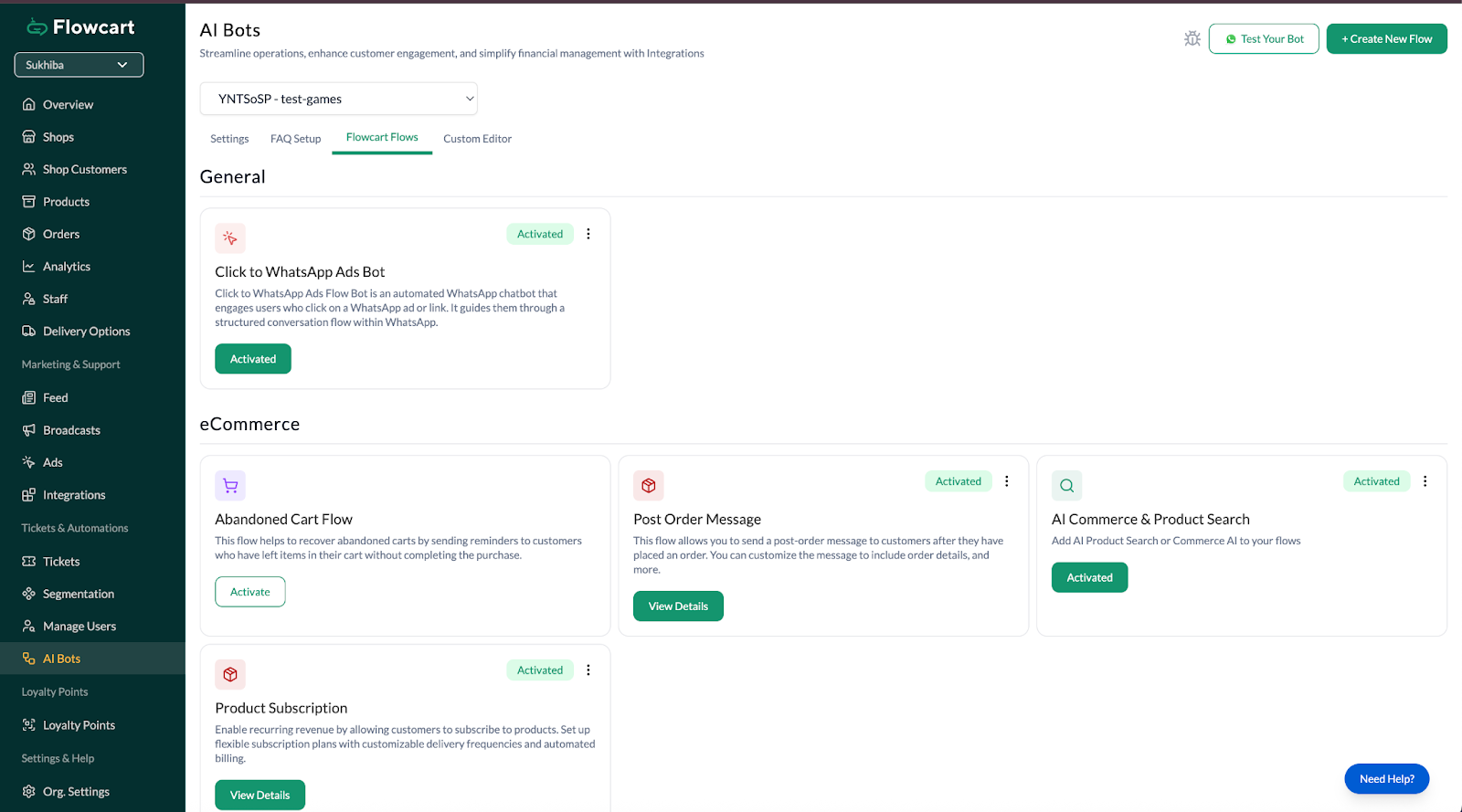
Most WhatsApp platforms added AI as a feature. Flowcart built the entire platform around it.
The difference shows up in what the AI can actually do. Flowcart's AI negotiates prices, recovers abandoned carts, recommends products based on behavior, and completes transactions. It doesn't just respond. It sells.
This matters because WhatsApp commerce only works when the entire purchase happens inside the conversation. Redirect customers to your website and you could lose them on the way.
Flowcart's architecture is built for this: everything from product discovery through payment happens in-chat, powered by AI that understands what customers want and knows how to close the deal.
What Makes It Different
- WhatsApp Webview Forms: Collect detailed customer information without leaving the chat. Instead of forcing customers to a separate website, Flowcart's webview lets them fill out multi-step forms, surveys, or checkout details directly inside WhatsApp, reducing drop-offs and keeping the conversation flowing.
- AI Negotiation: Set parameters like "offer 10% off carts over $150" and the AI automatically negotiates when customers hesitate. This converts price-sensitive buyers without requiring human approval or letting them walk away.
- AI-Powered Cart Recovery: When someone abandons a cart, the AI follows up within 30 minutes, references specific products they left behind, answers hesitation questions, and offers contextual incentives.
- Conversational Product Discovery: Customer types "running shoes for marathon training" and the AI asks about cushioning, injuries, budget, then recommends specific products explaining why each fits. Natural language search works without forcing customers through category menus.
- Complete In-Chat Commerce: Customers browse, cart, and pay inside WhatsApp without redirects. Integrates with Stripe, Razorpay, M-Pesa, UPI, and PayTab for one-click checkout.
- Real-Time Inventory Sync: Two-way integration with Shopify, WooCommerce, Magento, Zoho, and Odoo. AI only recommends products you actually have in stock, checking inventory before confirming availability.
- Built-In Gamification: Loyalty points, scratch cards, and spin-to-win wheels inside WhatsApp. Increases repeat purchases without requiring customers to visit external sites.
- Revenue Analytics: Track actual sales by campaign, ROI on Click-to-WhatsApp ads, conversion funnel drop-offs, and customer lifetime value by segment. Focus on revenue, not just message volume.
Results
D2C Beauty: WhatsApp revenue 3x email, 80% of total D2C sales through WhatsApp
Hair Care (East Africa): 300% sales increase, 7x customer base growth
Food Delivery (East Africa): 1,500+ customers in 7 months, 60% repeat buyer rate versus industry's 20-30%
Conclusion
AI agents on WhatsApp have moved past the experimental phase. Businesses across industries are using them to automate conversations that manual teams can't scale and basic chatbots can't handle, seeing measurable improvements in conversion rates, support costs, and revenue.
If you're running an e-commerce business, the question isn't whether to implement AI agents on WhatsApp. It's whether you can afford to keep losing customers to competitors who already have. Start with cart recovery or order automation, prove the value, then expand. The ROI shows up quickly when you're focused on revenue.
FAQs
What's the difference between WhatsApp Business app and WhatsApp Business API?
The Business app is free but limited to one device, 256 broadcast contacts, and manual responses with no automation. The Business API (what AI agents use) has unlimited contacts, supports multiple team members, enables full automation, and integrates with business systems, but requires Meta approval and authorized providers.
How much does WhatsApp Business API cost?
Meta charges per conversation (24-hour messaging window), typically $0.005-$0.08 USD depending on country and conversation type, with the first 1,000 service conversations free monthly. Watch for platform markups: some providers add 12-39% on top of Meta's rates, while platforms like Flowcart include unlimited conversations with no markup.
Do I need coding skills to set up an AI agent?
No, platforms like Flowcart provide no-code builders with drag-and-drop flows, pre-built templates, and visual interfaces for business rules. Complex customizations might benefit from developer help, but basic implementation doesn't require coding.
Can AI agents handle voice messages and images?
Yes, modern AI agents transcribe voice messages to text, analyze images customers send using computer vision, and process PDFs for information extraction. This lets customers communicate however they prefer rather than forcing everyone to type.
What's the 24-hour messaging window?
WhatsApp allows free-form messages within 24 hours of a customer's last message to you, with the window resetting each time they reply. After 24 hours, you can only send pre-approved template messages (order confirmations, shipping updates), not promotional content.
When should the AI agent escalate to a human?
Set clear triggers: complex customization requests, refunds above your threshold, legal questions, detected customer frustration, or explicit requests for human contact. The escalation should pass full conversation context so customers don't repeat themselves.
Can I run marketing campaigns through WhatsApp?
Yes, within 24 hours of customer contact you can send any content including promotional messages. Outside that window, use pre-approved template messages. Click-to-WhatsApp ads on Facebook and Instagram are highly effective for acquiring opted-in contacts. Learn how to run high-converting WhatsApp marketing campaigns.






%201.webp)




.png)