.png)
.png)

.png)
Key Takeaways
A customer adds a skincare bundle to her WooCommerce cart and reaches the checkout. But she sees an unexpected shipping charge in the order total and closes the tab.
If she leaves before entering her details, WooCommerce has little information to work with. The cart exists in the session, but you may not have an email address or phone number to use for a follow-up. By the time you identify the abandoned cart, there may be no way to connect it to the person who left.
That tracking gap is where you lose revenue because cart abandonment is widespread. The Baymard Institute puts the average cart abandonment rate at 70.22% across 50 studies. Every abandoned checkout represents acquisition spend that has not converted into revenue.
Recovering those sales requires more than sending a reminder. You need to capture cart data, identify customers before they leave, and trigger follow-ups through the right channels. Your recovery flow should also address the reason for abandonment, whether it is unexpected shipping costs or a payment failure.
This guide covers how to recover abandoned carts in WooCommerce, from capturing cart activity to sending recovery messages and completing the sale. It also covers the tools and tactics you can use to build the process.
TL;DR: WooCommerce gives you basic ways to identify incomplete orders and send a single recovery email. The problem is that the email still depends on the customer opening the message and returning to the same checkout. A stronger approach is to capture the customer's contact details, use Flowcart to connect WooCommerce cart activity with WhatsApp, and run a recovery sequence that moves from a reminder to objection handling and, if needed, an incentive. Flowcart's In-Chat Checkout then lets the customer complete the purchase inside WhatsApp instead of returning to the website checkout. You get a recovery path that addresses both sides of cart abandonment: bringing the customer back and reducing the friction that caused it or could cause it again.
Why WooCommerce Cart Recovery Stalls on Email
Email gives WooCommerce stores a way to follow up after a cart is abandoned, but not without constraints. Until version 11.0, WooCommerce had no abandoned cart recovery feature in its core platform. WooCommerce 11.0 introduced an experimental feature that sends a single recovery email. For tracking and multi-step reminders, most stores still install a plugin. Those plugins fill the feature gaps, but they still rely on email to bring shoppers back.
The message can sit unopened
A recovery email cannot bring a customer back if she never opens it. Abandoned cart emails average a 50.5% open rate, according to eDesk. Roughly half of your reminders go unread, so even a well-written email reaches only part of the people who leave checkout.
The recovery link can send customers back into the same friction
Getting a customer back to your store does not guarantee a completed order. WooCommerce's core recovery email sends customers to the order payment page. If an unexpected shipping charge or payment issue caused the abandonment, the customer encounters the same problem on the second attempt.
A generic “complete your purchase” email does little to address a price objection, either. If the final price caused the abandonment, the customer sees the same total when they return. They still have to work through the same checkout to place the order.
Guest carts can remain unidentifiable
Email recovery only works when the store has an address to send the message to. That creates a problem for guest checkout, where customers can add products and leave before providing contact details.
A plugin can follow up with a guest who entered an email address before abandoning the cart. If the customer leaves before reaching that field, the store may have the cart data but no way to associate it with a person.
Tracking an abandoned cart tells you what was left behind. Recovery requires knowing who to contact and having a channel through which to reach them. A system that captures the first but not the second can report abandoned carts without giving you a practical way to recover them.
The numbers reflect these limitations. Sender reports an average email recovery rate of 10.2%. Subject lines and email copy can improve performance within the channel, but they cannot fix an unopened message or a checkout that still contains the original friction.
How to View Abandoned Carts in WooCommerce
WooCommerce offers a few ways to identify incomplete orders, but each captures a different stage of checkout. The native order view shows only carts that reached a certain point. Its built-in recovery feature adds email follow-up, while a dedicated cart tracking plugin gives you a broader view of abandoned sessions.
Filter Your Orders by Status (Free, No Plugin)
Go to WooCommerce > Orders and filter by Pending payment and Failed. WooCommerce defines Pending payment as an order received without payment. Failed means the payment failed or was declined.
If you use the Checkout Block, also check the Draft sub-tab on the Orders page. WooCommerce creates a draft order when a customer clicks Place Order. A daily cleanup process then removes drafts that are no longer active.
This gives you useful information about customers who reached the later stages of checkout. It does not show every abandoned cart. Someone who leaves at the cart or shipping stage may never create an order record, so the Orders page has nothing to display.
Turn On the Built-In Recovery Email (WooCommerce 11.0)
WooCommerce 11.0 added an experimental abandoned cart recovery email to core. It is disabled by default. To enable it, go to WooCommerce > Settings > Advanced > Features and turn on the feature. Then go to Settings > Emails > Abandoned cart recovery and enable automatic sending.
The feature gives you a basic recovery flow, but it has several limits:
- It sends one email per order with no follow-up sequence.
- Automatic emails go out two hours after a checkout becomes a pending order.
- The customer needs a valid billing email on the order.
- The recovery link sends the customer to the order payment page.
That makes the native feature useful for basic email recovery, but not for tracking every abandoned session or building a multi-step campaign. Switch to tools such as AutomateWoo and MailPoet when you need more advanced recovery workflows.
Install a Cart Tracking Plugin
A cart tracking plugin gives you more information than the native Orders view. It can record cart contents, checkout activity, and contact details entered before the customer leaves.
The critical limitation remains identification. A plugin can only send a recovery message when it has captured a contact method. For a guest checkout, that usually means the customer entered an email address or phone number before abandoning the cart.
This creates an important distinction: tracking an abandoned cart does not mean you can contact the person who abandoned it. To recover more guest carts, you need to capture a contact method earlier in the buying journey.
Capture the Customer's WhatsApp Number at Checkout
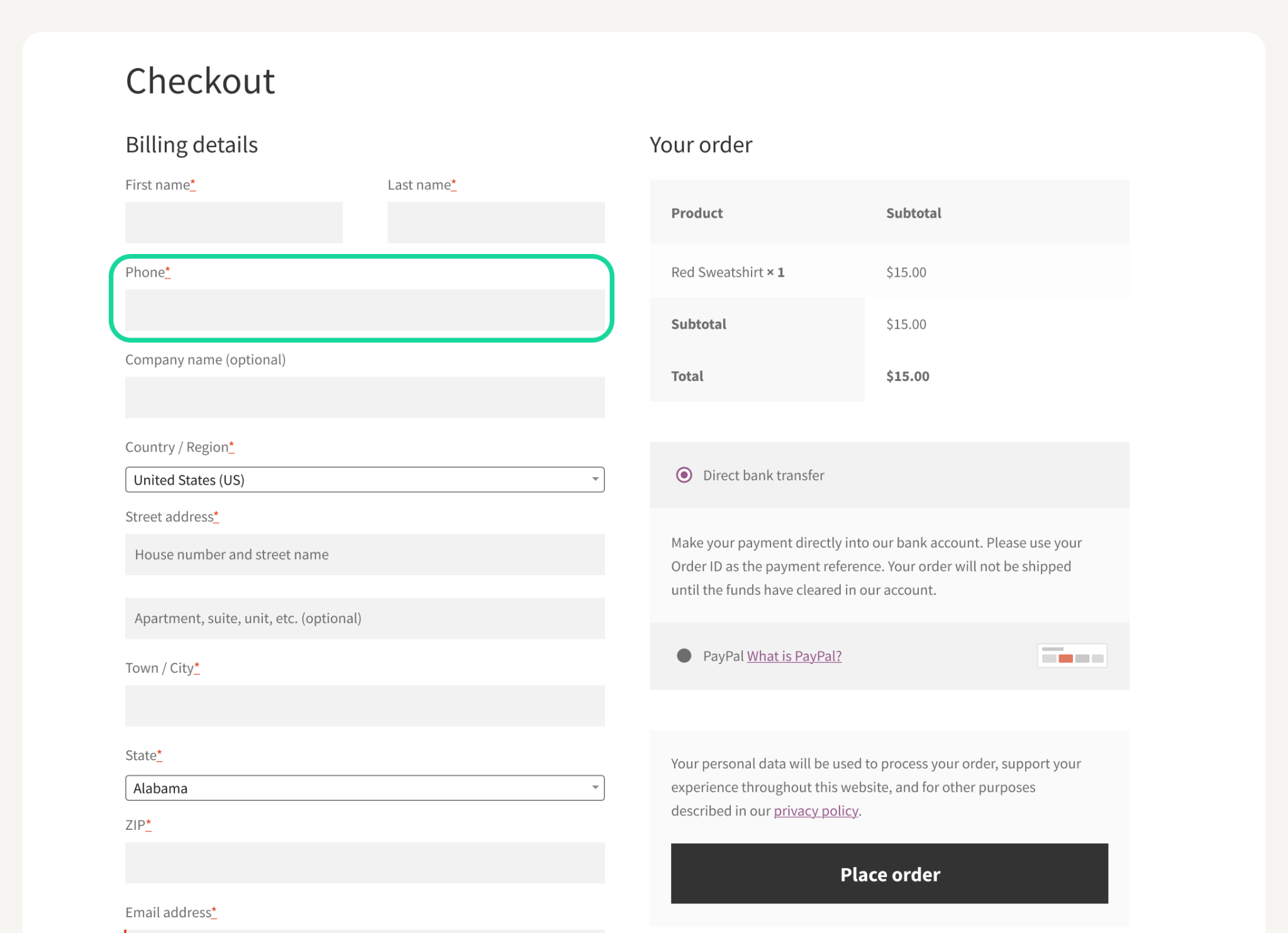
The billing phone field is one way to capture a WhatsApp number before checkout is abandoned. Set it as a required field so customers provide the number as part of the checkout process.
- In the classic checkout, set Phone to Required under Appearance > Customize > WooCommerce > Checkout.
- In the Checkout Block, use the Site Editor to change the phone field settings.
- Move the phone field higher in the form if your checkout structure allows it.
- Add a clear WhatsApp opt-in beside the field and identify your business by name.
Meta requires businesses to obtain consent before sending WhatsApp messages. The opt-in must clearly identify the business that will contact the customer. However, customers who leave before reaching checkout never see the phone field. The Flowcart WhatsApp pop-up feature can capture the number earlier in the session.
Why Most WordPress Abandoned Cart Setups Stall Near 10%
With email, customers have to leave their inbox and return to your website to complete the purchase. Adding SMS or WhatsApp changes where the reminder appears, but it does not necessarily change what happens after the customer clicks it.
WooCommerce plugins now support these channels alongside email. Abandoned Cart for WooCommerce can send SMS reminders through Twilio when a recovery email fires.
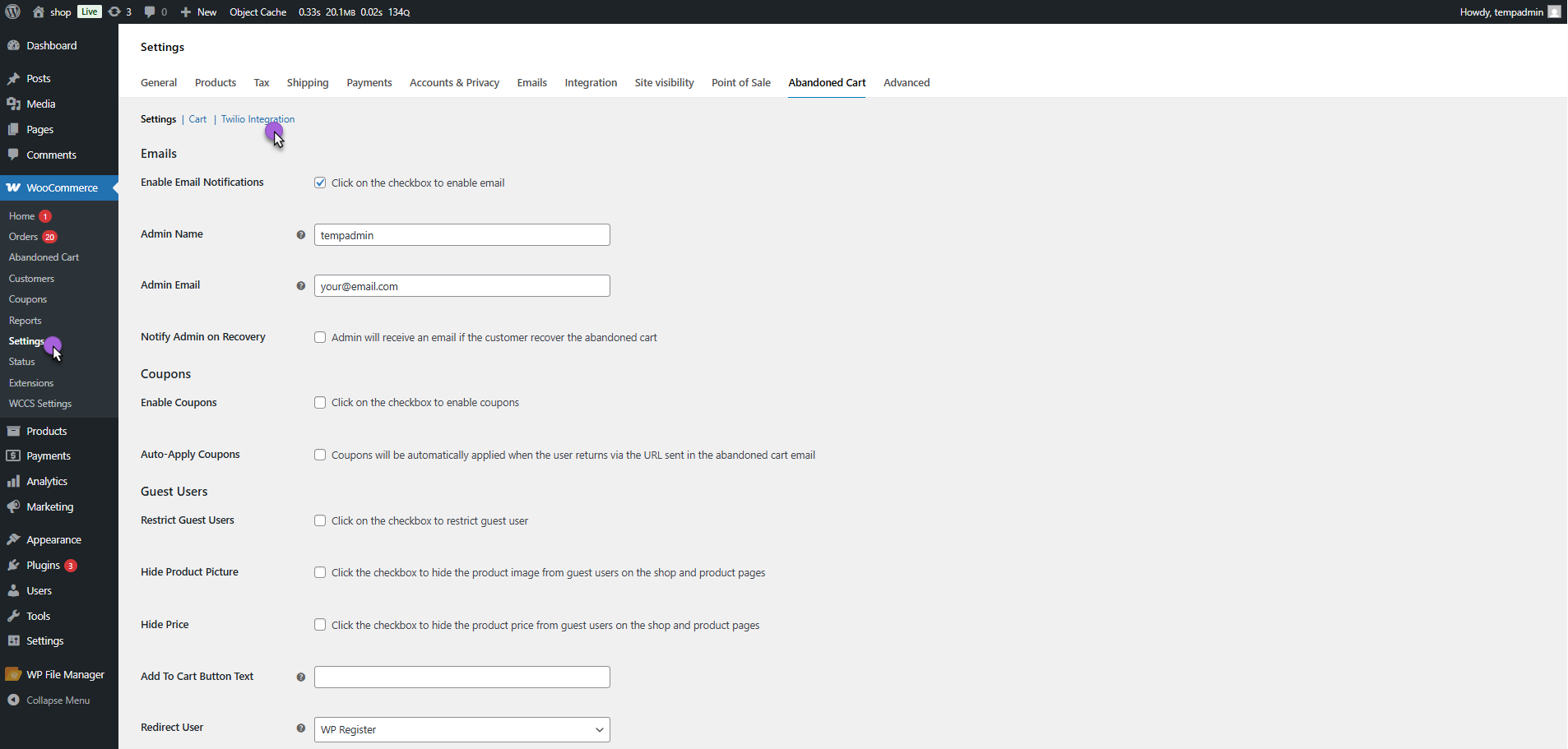
via WooCommerce Docs
Plugins like Retainful, CartFlows, and Abandoned Cart Pro also offer WhatsApp reminders.
We compared the main WooCommerce abandoned cart recovery plugins in our guide.
Important to know: Most plugins track guest and logged-in carts and send timed reminders. Free options cover these basics well for smaller stores. The differences come down to reporting and discount controls. Results stay similar across them, because their reminders send buyers back to the website checkout.
The channel can change the speed of the reminder without changing the checkout journey. A customer who receives a WhatsApp message may see it sooner than an email, but a link that sends her to the website still adds the same steps: leave the conversation, wait for the site to load, review the order, and complete payment.
Industry benchmarks reflect the limits of adding another reminder channel. Sender reports an average SMS recovery rate of 8.7%, compared with 10.2% for email. Sending the message through a faster channel does not remove the friction between the reminder and the completed order.
The bigger opportunity comes from shortening that path. If the customer can review the order and pay inside WhatsApp, the recovery message becomes part of the checkout rather than another prompt to return to it.
The WooCommerce Abandoned Cart Recovery Sequence on WhatsApp
A WhatsApp shopping recovery flow works best when each message has a different job. The first reminder brings the customer back while the purchase is still fresh. The second addresses the reason she may still be hesitating. The final message creates a clear reason to complete the purchase now.
Before building the Woo cart abandonment recovery sequence, you need four pieces in place.
What You Need Before the First Message
- A WhatsApp Business Platform account, set up with Meta directly or through a provider.
- The customer's opt-in, collected at checkout or through a pop-up that clearly names your business.
- Marketing message templates approved by Meta, since abandoned cart reminders fall under marketing messages.
- A WooCommerce-connected recovery tool that detects abandoned carts and sends the approved messages.
Message 1: The Reminder, Shortly After Abandonment
The first message should work as an instant reminder. Show the product name and image, remind the customer what they left behind, and give them a direct button to continue the order.
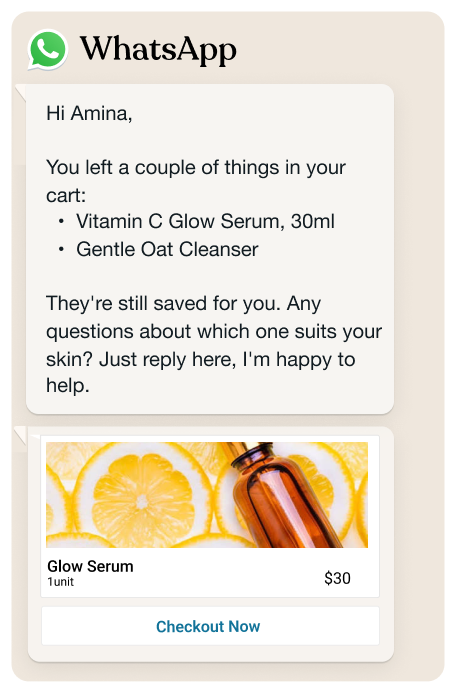
Do not lead with a discount. The customer may have left because of a distraction, a slow checkout, or a momentary interruption. It’s better not to give up margin when a simple reminder may be enough to recover the sale.
Give the customer a way to ask a question, too. For example, a quick-reply option such as “Need help with sizing?” turns the message into a conversation, replacing a generic automated reminder. Once the customer replies, WhatsApp opens a 24-hour customer service window. Messages sent within that window follow Meta's customer-service rules.
Message 2: The Follow-Up, the Next Day
If the cart remains open, send a second message the following day. At this point, repeating the first reminder adds little. Use the message to address a reason the customer may still be holding back.
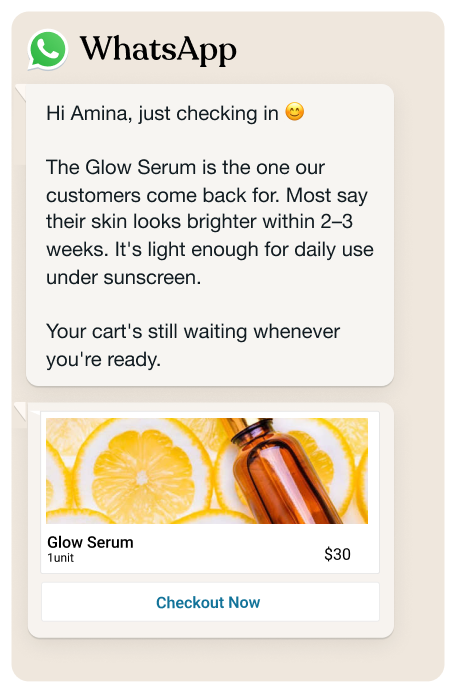
For a fashion store, that could mean answering a sizing question. For an ecommerce store with a longer delivery window, it could mean clarifying shipping times. You can also point to the returns policy or offer help from a real person who can answer questions directly in the chat. Put simply, the second message should reduce uncertainty without repeating a templated message.
Message 3: The Last Call With an Incentive
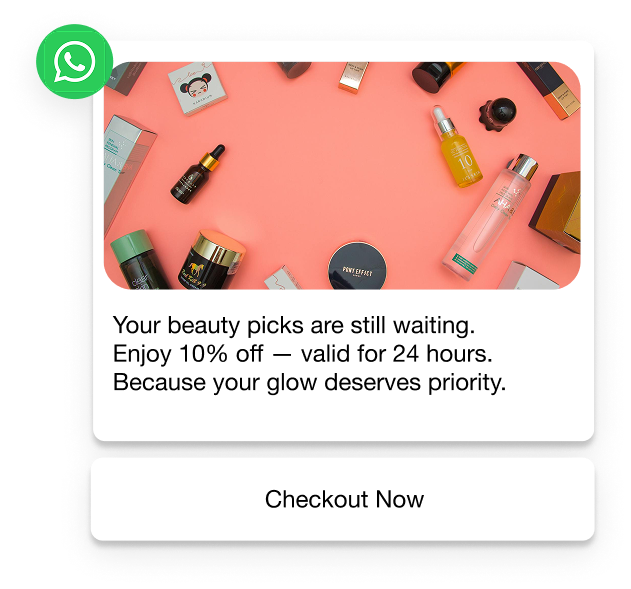
If the cart is still abandoned, the final message can introduce an incentive. A time-limited discount, such as 10% off for the next 24 hours, gives the customer a concrete reason to complete the purchase.
State the expiry clearly. “10% off for 24 hours” gives the customer a specific decision window; “Limited-time offer” does not.
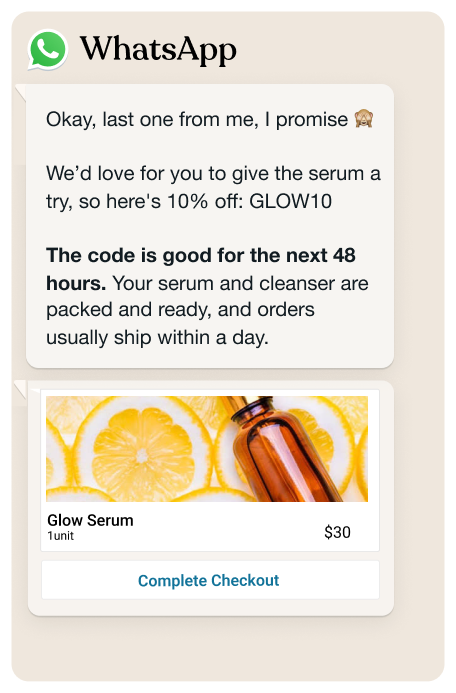
Discounting every abandoned cart can train customers to wait for an offer. If protecting your margins is a priority, use a reward mechanic such as a Spin the Wheel campaign instead of automatically giving every customer the same discount.
Treat these timings as a starting point. Test the delays, message content, incentives, and recovery rate against your own checkout data. With Flowcart's abandoned cart recovery, you can set the delays and discount codes for the sequence. Each discount code is unique and single-use, which limits reuse across customers.
Why a Full Sequence Beats a Single Reminder
A single reminder gives the customer one opportunity to return. A sequence creates several opportunities, with each message as a genuine reminder. The first brings the customer back, the second addresses hesitation, and the final message gives the purchase a stronger reason to happen now.
Black Camels, a modest fashion store, saw a clear difference after moving from one reminder to a three-message sequence. Its initial campaign sent one WhatsApp reminder an hour after abandonment, with no discount, and recovered 7.8% of abandoned carts. After introducing three messages and a timed discount, recovery reached 25.47% within one month.
Nectar Beauty, a Nigerian beauty brand, recovered 144 of 588 abandoned carts through WhatsApp. That represents a 24.49% recovery rate, with WhatsApp payment completed inside the chat.
These case studies point to two factors working together: repeated contact and a shorter path to payment. Black Camels improved recovery by giving customers more than one opportunity to return. Nectar Beauty removed another step by keeping payment inside the WhatsApp conversation.
Both stores run their recovery flows through Flowcart, and report recovery rates above Sender's 10.2% average for email.
Check Where WhatsApp Recovery Can Reach Your Customers
WhatsApp recovery only works when the customer can receive marketing messages on the platform. Meta applies country-specific delivery rules, message limits, opt-in requirements, and per-message charges, so check these constraints before building the sequence.
- Meta treats abandoned cart reminders as marketing templates, so marketing-message rules apply.
- WhatsApp does not currently deliver marketing templates to US phone numbers.
- Meta may limit the number of marketing messages a customer receives based on their recent engagement.
- These per-user limits do not currently apply in the EEA, UK, Japan, or South Korea.
- Meta charges for each delivered marketing message, with rates varying by country.
For US customers, use email and SMS for abandoned cart recovery. In other markets, compare recovered revenue with message costs before expanding the sequence. A channel only makes sense when the additional recovered revenue justifies the cost of reaching the customer.
How to Run WhatsApp Recovery Alongside Your Email Reminders
You do not need to replace your existing email recovery system to add WhatsApp. Instead, make the channels work together. Without clear sequencing, the same customer can receive several reminders for one abandoned cart.
Use these rules to coordinate the flow:
- Send WhatsApp first to customers who have opted in, with email as the backup channel.
- Delay the first email until after the first WhatsApp message.
- Stop all recovery messages as soon as the customer completes the order.
- Use email or SMS for US customers because WhatsApp marketing messages cannot reach US phone numbers.
- Turn off WooCommerce's core recovery email if another plugin already sends the recovery sequence.
WooCommerce recommends using one recovery flow or deliberately coordinating overlapping flows. Your recovery system should have one source of truth for cart status, so a completed order stops every pending reminder.
Flowcart connects directly to WooCommerce. This means you can add the recovery flow without replacing your existing theme or product catalog. Larger operations can also connect Flowcart with ERPs such as Zoho, Odoo, SAP, and NetSuite.
How to Fix WooCommerce Abandoned Checkout Problems
Recovery messages only address the problem after someone leaves. If the checkout itself creates friction, you will keep generating carts that need recovery.
Baymard surveyed US online customers about why they abandoned purchases, excluding people who were only browsing. The findings point to several checkout changes worth making before you spend more effort on recovery.
*The image below is based on the data mentioned in the Baymard study.
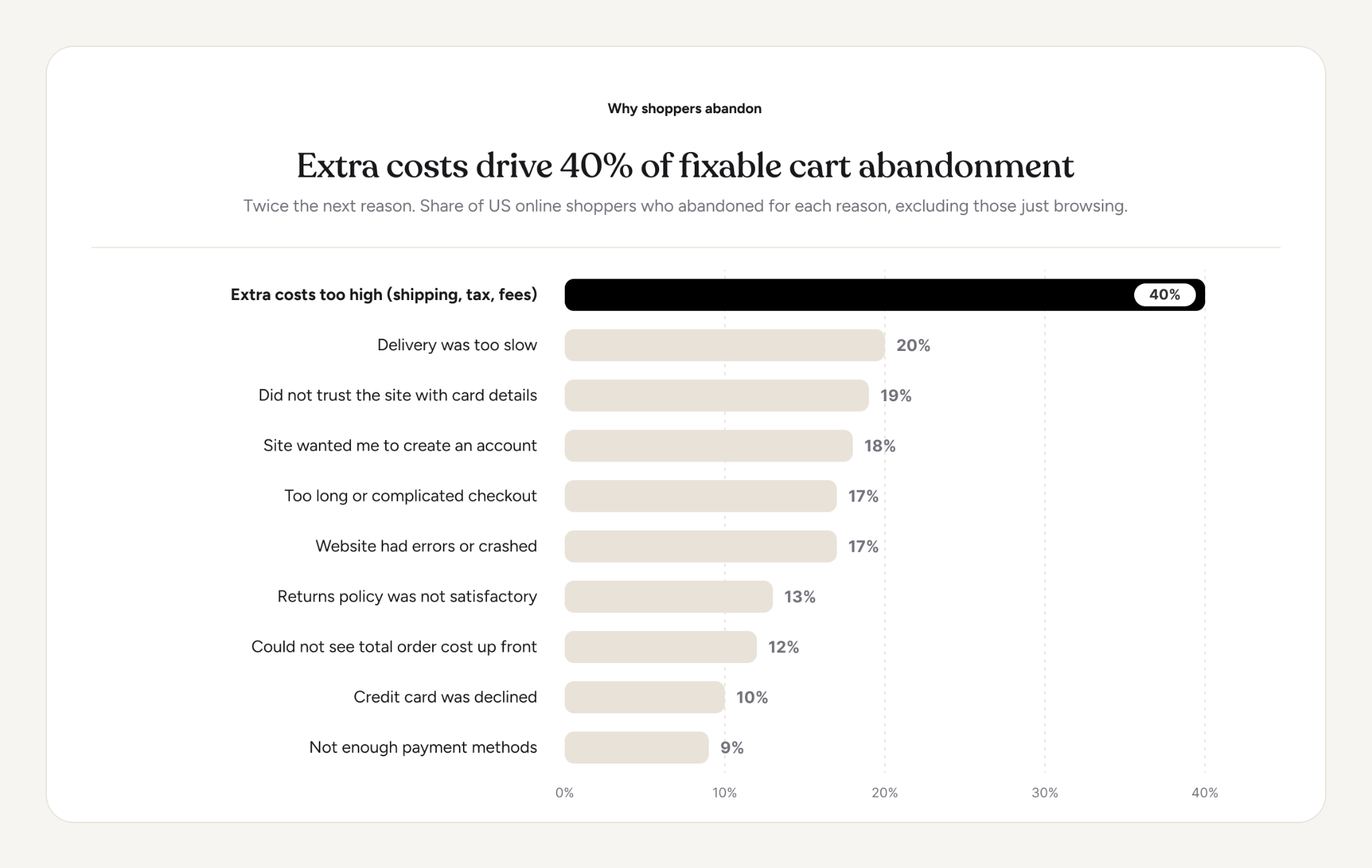
via Baymard.com
Apply these fixes first:
- Show estimated shipping costs on the product or cart page before checkout begins.
- Turn on guest checkout under WooCommerce > Settings > Accounts & Privacy.
- Reduce unnecessary checkout fields. Baymard's research puts the ideal checkout at around 7–8 fields.
- Add the local payment methods customers expect, such as UPI or mobile money.
- Place security cues and a clear returns policy near the payment section.
Field count also deserves attention. Baymard found that the average US checkout displays 14.88 form fields by default. Every unnecessary field adds another point where a customer can stop or leave the process unfinished.
Why the Recovered Customer Should Pay Inside WhatsApp
Fixing checkout friction helps every customer, but recovery creates a separate problem. You are asking someone who already abandoned checkout to try again. Sending that customer from WhatsApp to a browser adds another step at the point when purchase intent is already fragile.
Flowcart's In-Chat Checkout removes that extra trip. The customer can review the cart, confirm the order, and pay inside the WhatsApp conversation without opening a browser or returning to the website checkout.
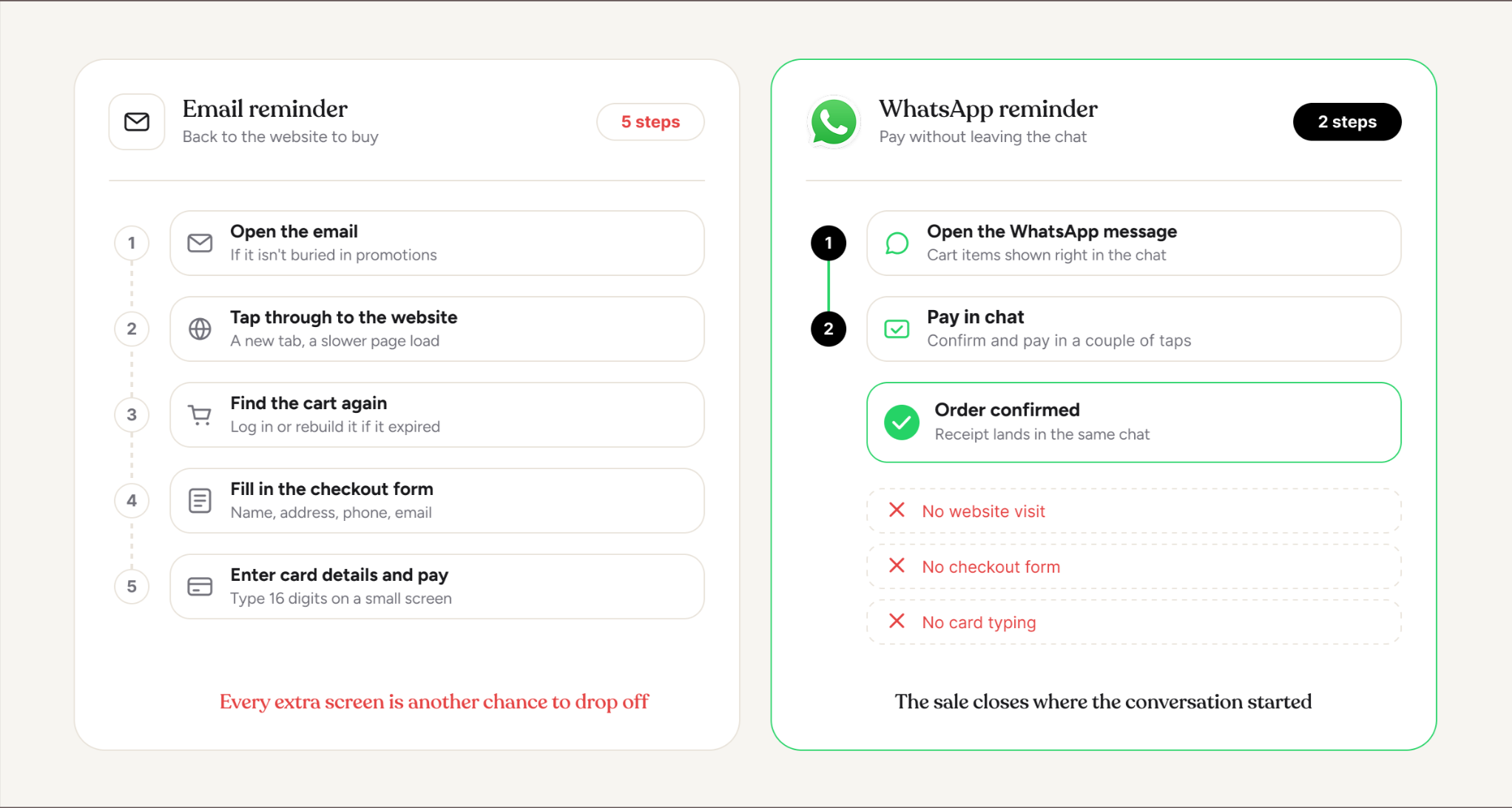
That changes the role of WhatsApp in the recovery process. The message no longer has to persuade the customer to leave the conversation and complete the purchase somewhere else. The cart, product information, and payment step can stay within the same thread.
The same setup also supports sales conversations outside abandoned cart recovery. A support agent can build and send a cart while answering a product question. An AI agent can guide a customer from an ad or product query to a completed order. The customer can move from conversation to purchase without switching channels.
For payment, Flowcart supports 50+ gateways across Africa, India, and global markets, including Razorpay, Cashfree, Stripe, Peach Payments, and DPO. It also supports card embedded payments through its integration with Mastercard. Stores can continue using their existing payment infrastructure while moving the checkout experience into WhatsApp.
Flowcart reports WhatsApp cart recovery rates of 22–27% across its customer base, compared with the roughly 10% average cited for email recovery. Individual results vary by store and recovery flow, but the advantage is that customers can act on purchase intent without leaving the conversation.
How to Keep the Customer You Recovered
Recovering the first order is only the first opportunity. Once a customer completes a purchase, the same WhatsApp relationship can support the next purchase without restarting the acquisition process.
The timing should follow the product. For example, a skincare store can send a replenishment reminder based on how long a product typically lasts. Similarly, a fashion store might follow an order update with related products or a new collection. Then, in the case of a grocery store, you can prompt a repeat order sooner, based on the customer's buying cycle.
The message also does not have to be promotional every time. Order updates, delivery information, product questions, and post-purchase support give customers reasons to keep the conversation active. Those interactions create opportunities to recommend the next product when there is a clear reason to do so.
Flowcart's post-purchase and reorder flows support these interactions through WhatsApp. That turns the recovery channel into an ongoing customer channel rather than a tool used only when a cart is abandoned.
Food and Us, a Flowcart customer, now gets 60% of its sales from repeat buyers. For the full retention strategy, read our guide to WhatsApp retention campaigns.
Recover More WooCommerce Carts on WhatsApp
Think back to the customer who closed checkout after seeing the shipping charge. The abandoned cart was not the only point of failure. She left the site, the recovery message depended on her opening an email, and the recovery link sent her back to the same checkout.
A stronger recovery flow changes what happens after that first exit. Capture a contact method with consent while the customer is still reachable. Follow up on WhatsApp with messages that match the reason for hesitation. Then remove another drop-off point by letting her complete payment inside the conversation.
The same channel can continue after the recovered order. Order updates, support, replenishment reminders, and repeat-purchase campaigns give you reasons to stay in contact without sending the customer back through the acquisition funnel.
That makes cart recovery part of a larger ecommerce flow. Capture the intent, recover the order, complete the payment, and create the next purchase. WooCommerce stores seeing results and recovering the most carts are doing more than writing “better” emails. They follow the customer to WhatsApp and close the sale in chat.
Book a Flowcart demo to see how WhatsApp cart recovery can work with your WooCommerce store.
FAQs
Can you see abandoned carts in WooCommerce?
You can see some abandoned carts in WooCommerce by filtering orders by status. Pending payment, Failed, and Draft orders show shoppers who reached the payment step. To see carts abandoned earlier, you need a cart tracking plugin.
Does WooCommerce have built-in abandoned cart recovery?
WooCommerce has basic built-in abandoned cart recovery from version 11.0 onward. The feature is experimental, disabled by default, and sends one email per order. Multi-step sequences and WhatsApp reminders still need a WordPress abandoned cart plugin or integration.
Why do abandoned cart emails underperform?
Abandoned cart emails underperform because they sit unopened and lead back to the same checkout. Guest shoppers who never entered an email cannot receive them at all. Sender reports an average email recovery rate of 10.2%.
What is a good abandoned cart recovery rate?
A good abandoned cart recovery rate for email sits around 10%, based on Sender's 10.2% average. Flowcart stores recover 20% or more of abandoned carts on WhatsApp on average. Black Camels reached 25.47% after one month of tuning its message sequence.
Can I recover abandoned checkouts from guest users in WooCommerce?
Guest cart recovery in WooCommerce works only when you capture the guest's contact details. Make the checkout phone field required and add a WhatsApp opt-in line beside it. A WhatsApp pop-up captures guests who leave before they reach checkout.

.png)




%201.webp)



.png)