.png)
.png)

.png)
Key Takeaways
See 15 proven WhatsApp workflows for sales, support, logistics, and retention that directly impact revenue and operations.
Learn how brands use automation, flows, and in-chat checkout to shorten buying journeys and boost conversions on WhatsApp.
Understand where Flowcart adds CRM, segmentation, and analytics to turn scattered chats into scalable, trackable revenue systems.
Most teams already use WhatsApp in some capacity, such as sending order updates or responding to queries. The trouble starts when they try to move from scattered chats to structured, revenue-driving workflows. They know the channel works. What they don’t know is which use cases actually matter.
That’s why this guide focuses on practical, proven examples. If you’re trying to understand where WhatsApp fits in your sales, marketing, and support systems, this list gives you a clear starting point and a look at how teams shift from manual chats to scalable automation with Flowcart.
Why WhatsApp Is Essential for Business Workflows
WhatsApp has moved far past personal messaging. It’s now one of the most dependable channels for sales, support, and day-to-day operations. With a 98% open rate, it anyway become impossible to treat WhatsApp as optional. Teams use it because customers already live there.
The impact shows up everywhere. Brands see higher click-through than email, faster responses, and stronger intent from shoppers who want direct communication. Some teams even report stronger purchase behaviour from customers who interact on WhatsApp. Support teams feel the shift too: automated flows, quick replies, and shared inboxes cut workload and speed up resolution.
Cost is another reason WhatsApp sits at the centre of modern workflows. Customer-initiated chats stay free within the 24-hour window, automation cuts routine inquiries, and businesses reduce phone support and email volume. For many, this becomes a direct operational saving.
The platform also integrates seamlessly with existing systems. Once WhatsApp connects to a CRM, teams get cleaner lead management, instant follow-ups, automated routing, and a complete record of every interaction. This tightens sales cycles and removes the lag that kills conversions.
Beyond customer-facing work, teams use WhatsApp to coordinate internally—HR updates, onboarding, sales alignment, and cross-functional communication happen faster when everyone is already active on the app.
With features like interactive templates, Flows, in-chat catalogs, and secure messaging, WhatsApp has grown into a full business layer rather than a simple chat app. For companies competing on speed, experience, and personalization, it is one of the strongest channels for building reliable, scalable workflows.
Also Read: WhatsApp Webviews: Complete Guide
15 Best WhatsApp Business Use Cases (With Examples)
These real-world use cases highlight how companies across industries are building smoother workflows, improving response times, and driving measurable impact.
Use Case #1: E-Commerce Product Sales and Shopping
WhatsApp removes friction from online shopping by letting customers browse products, ask questions, and complete purchases in the same conversation. Instead of navigating websites or switching between tabs, buyers get a guided, chat-based experience with instant product details, personalized suggestions, and checkout built directly into the thread.
For example, Samaking, a farm-to-retail platform in East Africa, redesigned its entire buying experience using Flowcart’s WhatsApp Storefront. Customers now browse fish products, build carts, adjust quantities, and pay without leaving WhatsApp, replacing a fragmented process that previously involved calls, emails, and scattered messages.
By having all transactions flow through a single WhatsApp entry point, Samaking created a smooth, repeatable sales journey that works for both B2B and B2B2C buyers. Broadcasts keep customers updated on availability and offers, while a shared team inbox consolidates all conversations for faster response times.
It led to a 50% month-over-month topline growth, moved 100% of orders onto Flowcart, and increased sales from both new and returning customers.
Use Case #2: Grocery and Food Delivery Management
Restaurants and food delivery brands automate order capture, menu browsing, payment collection, and delivery updates. This reduces dependence on aggregator platforms and creates a direct relationship with customers.
For example, over 3,000 restaurants in Dubai use ChatFood, enabling commission-free ordering that allows restaurants to retain more revenue while customers enjoy a seamless ordering experience within the chat interface.
Use Case #3: Banking and Financial Services
Banks and fintech companies use WhatsApp to deliver account updates, enable bill payments, share statements, and guide users through financial products—making banking accessible to populations traditionally underserved by digital channels.
For example, Absa introduced ChatWallet, a WhatsApp-based wallet enabling South African customers to send and receive payments, purchase airtime and data, manage beneficiaries, and withdraw and deposit cash. The service promotes financial inclusion for South Africa's unbanked population.
Absa also launched "Abby" in Kenya, enabling bill payments, balance inquiries, and transfers between bank accounts and mobile money services like M-Pesa.
Use Case #4: Beauty and Fashion Retail Personalization
Beauty and fashion brands use AI assistants to recommend products and outfits based on skin type, style preferences, and shopping history. The experience mirrors in-store personal shopping but runs inside WhatsApp.
For example, Uncover, a fast-growing skincare brand in Kenya and Nigeria, built its entire WhatsApp experience around personalised product guidance. Shoppers move through short skincare quizzes, ask ingredient-related questions, and receive tailored routines in a single chat thread.
Flowcart’s segmentation and AI flows let Uncover group customers by concerns like hyperpigmentation or sensitivity, send targeted broadcasts to each segment, and recommend products based on past purchases.
This shift turned WhatsApp into their strongest revenue channel: monthly broadcasts now reach over 10,000 customers, conversions improved as buyers no longer dropped off between chat and the website, and WhatsApp revenue grew to three times that of email.
Use Case #5: Healthcare Appointment Booking and Reminders
Hospitals and clinics streamline scheduling by allowing patients to book, confirm, or reschedule appointments via WhatsApp. Automated reminders help reduce no-shows and improve operational flow.
For example, a patient can message “I want to see a dentist tomorrow” and receive instant slot options.
Also Read: WhatsApp Chatbot for Business: How to Automate Support & Boost Sales
Use Case #6: Hotel and Hospitality Services
Hotels use WhatsApp to manage pre-arrival check-ins, share digital keys, upsell add-ons, and handle guest requests. Messaging keeps communication simple and personal while boosting ancillary revenue.
For example, guests receive pre-arrival messages with digital check-in forms, access digital room keys, receive culturally appropriate welcome messages (prayer times and halal dining options in the Middle East), and receive personalized upsell suggestions for spa treatments, airport transfers, or room upgrades.
Use Case #7: Logistics and Delivery Tracking
Logistics providers offer real-time shipment updates, delivery preferences, and proof of delivery via WhatsApp. Customers stay informed without having to call support teams.
For example, Kings Collection, a fashion brand in Kenya, moved its entire fulfillment workflow into WhatsApp using Flowcart’s CRM, AI carts, and order-tracking tools. Customers place orders, confirm details, and receive delivery updates in a single chat thread, eliminating the scattered phone calls and manual coordination that previously slowed down fulfillment.
Dispatch teams now track payments, assign deliveries, and resolve issues from one shared dashboard, reducing errors and missed follow-ups. It streamlined every part of Kings Collection’s logistics and supported a 400% increase in online sales, with 70% of all orders now processed via WhatsApp.
Use Case #8: Real Estate Lead Generation and Property Viewings
WhatsApp gives real estate teams a fast, reliable way to capture inquiries and move buyers through the early stages of the search. Prospects can request listings, view photos or virtual tours, share preferences, and schedule viewing appointments without waiting for emailed replies or returned calls.
For example, agents embed WhatsApp contact buttons on websites and social media, use QR codes on physical advertisements to drive traffic to WhatsApp chats, and capture buyer preferences, including budget, location, and room requirements, enabling quick follow-up with qualified leads.
Use Case #9: Utility and Transactional Notifications
Service providers rely on WhatsApp to send receipts, confirmations, reminders, and service alerts. With high open rates, customers rarely miss critical updates.
For example, Spinners & Spinners, a leading textile manufacturer in East Africa, rebuilt its complex RFQ and pricing workflows on WhatsApp using Flowcart’s Business Suite. Instead of manually managing 295 different price lists across customers, pricing is now automated and delivered through precise, transactional WhatsApp messages.
When a customer initiates an order request, Flowcart instantly identifies their customer ID, fetches the correct price list, generates an accurate quote, and sends it back for confirmation in the same chat. Each quote syncs directly with S&S’s ERP system, eliminating delays and errors while giving customers a clear, reliable experience.
This change made WhatsApp the company’s primary channel for transactional communication, operations, and B2B and B2C sales, enabling a single, unified conversational funnel.
Use Case #10: Event Ticketing and Booking
Event organizers handle ticket sales, registration, payments, and reminders via WhatsApp.
For example, attendees message the event organizer's WhatsApp number, receive instant responses with event options and pricing, select ticket types, complete payments within the chat, and automatically receive tickets and reminders in their inboxes.
Next Read: Why WhatsApp is the Future of Conversational Commerce
Use Case #11: Loyalty Programs and Retention Workflows
Loyalty programs thrive when customers can track rewards, redeem points, and receive offers without having to navigate additional apps or portals. WhatsApp creates a direct, low-friction channel where brands share point updates, remind customers about expiring rewards, and promote member-only perks in real time.
For example, Darling Hair, a leading beauty brand in Kenya, rebuilt its stylist loyalty program on WhatsApp using Flowcart’s CRM, automated rewards engine, and broadcast messaging. Stylists can now track and redeem points without handling paper vouchers, and Darling gains real-time insight into purchase frequency, preferred products, and market trends.
It consolidated scattered WhatsApp conversations into structured, data-led workflows. With targeted broadcasts, tailored incentives, and a loyalty program that runs without manual effort, Darling grew unique stylist accounts from 2,000 to 13,500 and increased sales by 300%.
Use Case #12: Salon and Beauty Service Bookings
Salons automate appointment scheduling, reminders, last-minute availability, and promotional offers. Customers avoid long phone calls and get real-time slot visibility.
For example, clients message a salon's WhatsApp number, receive available appointment slots, confirm bookings, and receive pre-appointment reminders with the option to reschedule. Salons send promotional messages for new services or seasonal packages.
Use Case #13: Supply Chain and Inventory Management
Supply chain teams coordinate with distributors, suppliers, and field operations using automated WhatsApp alerts. Everyone receives timely updates without having to log in to complex systems.
For example, Healthy U, a health and wellness retailer with 30+ stores across Kenya, shifted from fragmented store-by-store WhatsApp communication to a unified system powered by Flowcart. Customers now interact through a single WhatsApp number, and every order flows into a centralized storefront where staff can track inquiries, manage fulfillment, and coordinate across outlets without manual work.
HQ gains complete visibility into store conversations and purchasing trends, helping teams improve response quality and streamline internal processes. This consolidation directly improved order accuracy and reduced fulfillment delays, pushing weekly sales up by 50% and generating over KES 1M in monthly revenue.
Use Case #14: Education and Online Tutoring
Ed-tech platforms use WhatsApp to answer questions, nurture leads, share course updates, and manage enrollment. Students receive learning support in a channel they check often.
For example, PhysicsWallah moved a large part of its lead capture to WhatsApp, guiding students from interest to course enrollment with automated Q&A flows. This approach tripled their lead reach.
Use Case #15: Customer Service and Support
Support teams use WhatsApp to deliver 24/7 assistance with bots, shared inboxes, and guided troubleshooting flows. Customers get quicker responses than they do with email or phone queues.
For example, Electromart, a multi-country electronics retailer, upgraded its WhatsApp support channel by introducing a guided shopping assistant built with Flowcart Flows and in-chat checkout. Customers can search for products, browse categories, compare features, and view curated recommendations within the same conversation where they originally asked a question.
The assistant handles product discovery, answers specification-related queries, and generates accurate carts in real time, reducing the manual back-and-forth that previously slowed down Electromart’s sales cycle. When a shopper is ready, checkout happens directly in the chat, with confirmation messages that clarify delivery timelines.
The collaboration between Electromart and Flowcart turned basic support inquiries into high-intent shopping journeys, driving over 100 WhatsApp orders per month from launch and improving both customer engagement and conversion rates.
Recommended Read: WhatsApp for Prospecting: How to Find & Engage High-Quality Leads
How to Implement WhatsApp Use Cases with Flowcart
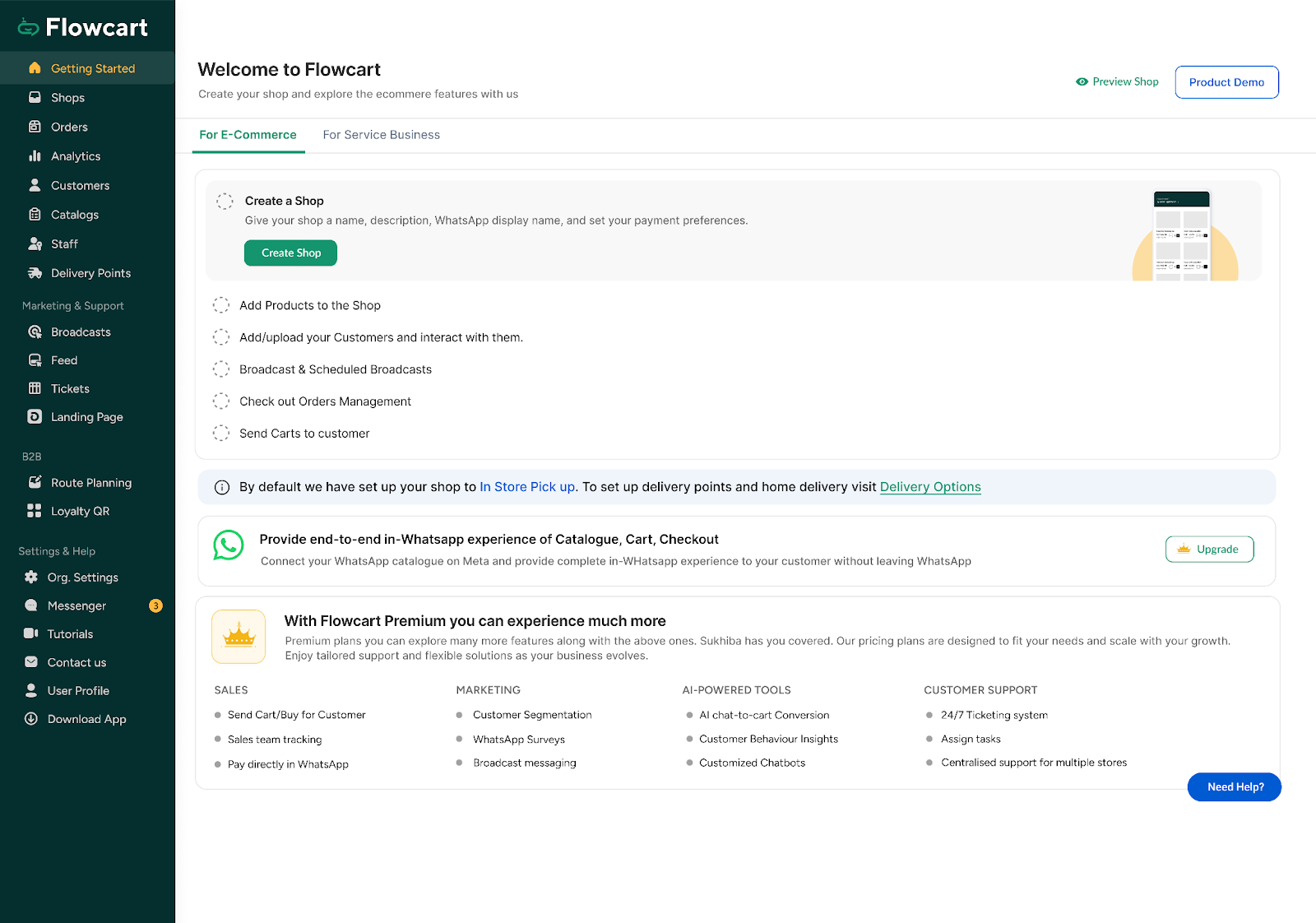
Connect your ecommerce business to Flowcart and enjoy the benefits of WhatsApp marketing
Flowcart turns WhatsApp into a complete revenue channel by combining automation, CRM capabilities, AI-driven flows, and in-chat checkout. Instead of stitching together tools, businesses manage lead capture, product discovery, order processing, payments, and retention within a single operating layer. Below is a streamlined walkthrough of how teams implement the most common WhatsApp workflows using Flowcart.
1. Connect Your Store, CRM, or ERP
Flowcart works as the bridge between WhatsApp and your business systems.
In the integrations panel, connect CRMs such as Shopify, WooCommerce, Zoho, Salesforce, or ERPNext, then sync product catalogs, inventory levels, order data, and customer profiles.
Once connected, Flowcart keeps everything up to date in real time, enabling in-chat browsing and checkout without manual data entry.
2. Set Up Message Templates for Marketing & Operations
WhatsApp requires approved templates for anything sent outside the 24-hour reply window. Create your core set on day one:
- Transactional: Order confirmations, shipping updates, delivery notifications, OTPs
- Marketing: Cart recovery nudges, back-in-stock alerts, promotions, browse follow-ups
Submit 5–10 templates through Flowcart’s template dashboard. Meta typically approves them in 24–72 hours, and these templates become the backbone of your automation workflows.
3. Build Your Conversational Flows
Flowcart’s drag-and-drop builder lets you design guided shopping and support flows with no coding. Common setups include:
- Product discovery: Quizzes that collect preferences and return tailored items
- Abandoned carts: Timed reminders with dynamic product previews
- Bookings and appointments: Real-time slot selection and auto-reminders
- Lead qualification: AI questions that score and route leads to sales teams
These flows handle the heavy lifting so agents only step in when needed.
4. Enable In-Chat Payments and Checkout
Flowcart supports regional payment methods across emerging markets. Customers complete purchases within the same chat thread, without redirects. COD workflows can also be enabled for markets where cash remains common.
5. Segment Customers and Launch Retention Journeys
Flowcart’s CRM automatically enriches each contact with purchase history, engagement behavior, order frequency, and product interests. Build segments such as first-time buyers, cart abandoners, high-value customers, and more.
Then automate post-purchase journeys, review requests, reorder reminders, and win-back campaigns. Businesses using these workflows often report repeat purchase rates 2–3 times higher.
6. Track Revenue and Operational Performance
Flowcart’s analytics dashboard shows how WhatsApp contributes to revenue and day-to-day performance. You’ll see metrics like:
- Conversion rate per flow
- Cart recovery rate
- Revenue by segment
- Time-to-first-response
- Percentage of conversations handled by automation
- Customer lifetime value from WhatsApp
This visibility helps teams fine-tune automation flows and scale what works.
7. Maintain a Healthy WhatsApp Quality Rating
WhatsApp assigns each business a quality score based on customer feedback and message performance. Flowcart monitors your rating in real time and helps you maintain green status by flagging underperforming templates, identifying high-block keywords, suggesting list hygiene improvements, and pacing broadcast sends.
Healthy ratings ensure your campaigns continue reaching customers without interruption.
8. Test, Launch & Scale Safely
Before you go live, Flowcart recommends a short testing phase:
- Test template rendering
- Simulate full buying journeys
- Check CRM and ERP syncs
- Verify payment flows
- Run a pilot with 200–500 contacts
Once validated, you can confidently scale to your full audience with the assurance that every workflow is optimized.
Put simply, Flowcart gives teams a complete system for managing sales, support, and retention inside the channel their customers already prefer. With automated flows, in-chat checkout, real-time insights, and a unified CRM, businesses move from scattered conversations to predictable revenue journeys. So, if you’re exploring WhatsApp as a core growth channel or want to build a cleaner, scalable version of your current setup, you can see how it works in practice by scheduling a demo.
FAQs
What types of businesses can actually use WhatsApp Business effectively?
Any business that relies on customer conversations can use WhatsApp Business meaningfully. It works for both small teams and enterprise operations. If your customers already message you, WhatsApp becomes a natural extension of how you sell and support.
What workflows or processes can I automate using WhatsApp Business?
Teams automate lead capture, product discovery, order processing, appointment scheduling, support FAQs, delivery updates, and post-purchase feedback. Flows and templates handle routine steps so teams can focus on high-value tasks. The result is smoother operations with far less manual work.
Will WhatsApp Business help me improve customer communication and retention?
Yes, WhatsApp keeps conversations fast, direct, and easy to continue. Customers get updates, recommendations, and support without switching channels, which builds trust and encourages repeat purchases. Brands consistently report higher engagement and stronger loyalty when WhatsApp becomes their primary touchpoint.
How much will WhatsApp Business cost?
Costs vary depending on whether you use the free WhatsApp Business app or the WhatsApp Business API. The API uses Meta's conversation-based pricing, and businesses typically pay per conversation category. Most companies find the cost offset by faster responses, higher conversions, and reduced support load.
Will WhatsApp Business actually help you make more sales or save costs?
Businesses see higher conversion rates because customers complete purchases within a familiar chat flow. Automation reduces support volume, and broadcasts drive traffic to new products without heavy ad spend. For many teams, WhatsApp becomes both a revenue channel and a cost-saving operational tool.
How complicated is it to set up and integrate WhatsApp Business?
Getting started with the basic Business app is quick, but the API requires a provider for setup. Modern platforms simplify the process with pre-built flows, templates, and dashboards. Once connected, most workflows can be managed without technical expertise.

.png)





%201.webp)




.png)